Add a column that shows the last date in a Scheduled Transaction series (Q Mac)

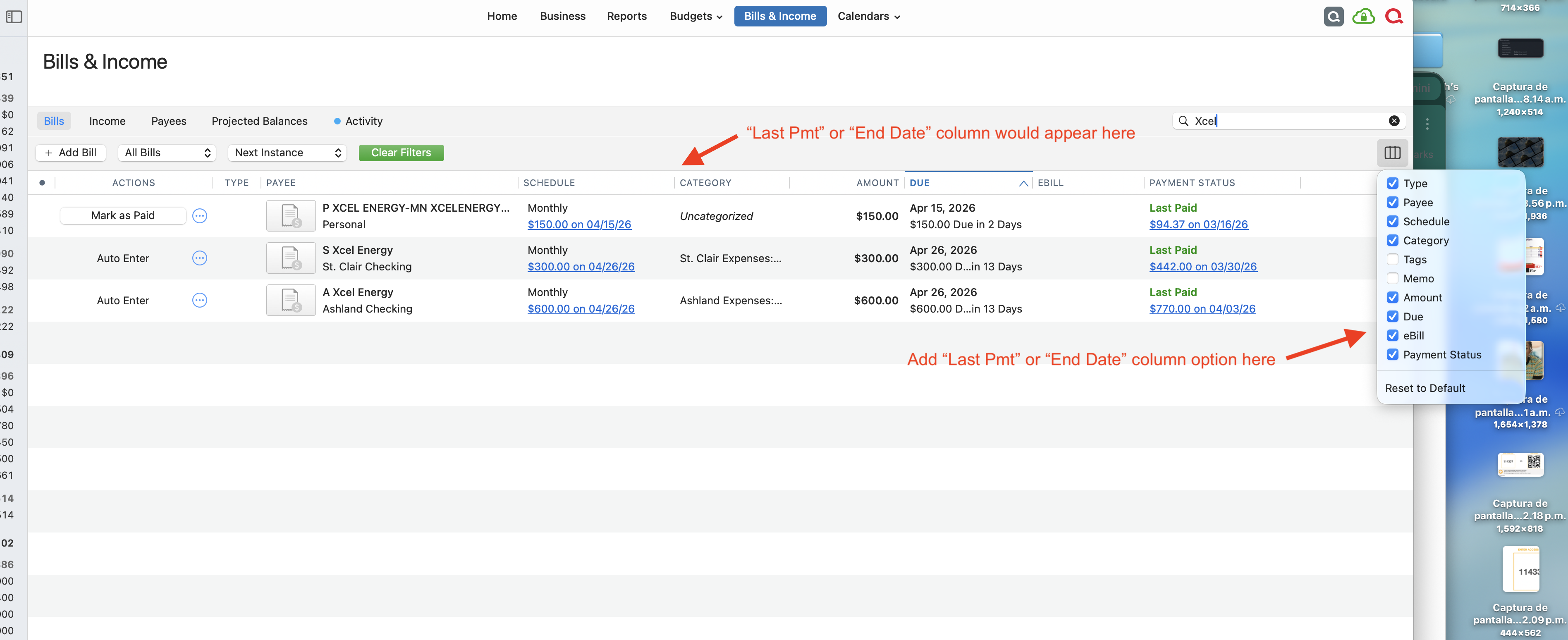
I use Quicken to forecast our retirement. For us, this happens when all mortgages are paid off on our income properties. This date occasionally gets pushed back as time goes on and unanticipated expenses arise, requiring that I push back our payoff date for every transaction that is affected by this. Currently, under the "Bills and Income" tab, both Bills and Income screens list the scheduled transactions without the option of displaying a column showing when the last scheduled transaction in the series
will occur. This requires that I cycle through every transaction individually with 3-4 mouse strokes to get to the scheduling screen of each individual transaction. How easy it would be if I could activate a column (seems like it would be an easy addition to the current checkbox list of column headings) that would show me the last payment/income date!
Comments
-
Hello @richleyh55082,
Thank you for coming to the Community to share your feedback. On the Bills tab, the Payment Status column seems to display the information you are asking for.

If that doesn't meet your needs, would you please provide more information on exactly what you would like to see?
I look forward to your response!
Quicken Kristina
Make sure to sign up for the email digest to see a round up of your top posts.
0
