Track spot price of gold & silver precious metals automatically in QMac
Comments
-
Another request, please. Last I saw it was in the "to be implemented" list, but, golly, that was a loooong time ago…
1 -
Mid April '26… Tick Tock, Tick Tock….
0 -
I just downloaded and installed 9.0.0 for Mac, which says it now supports commodity prices, but there are no instructions for how to do it. If anyone figures it out (or figures out that it's still just not working) let us know!
0 -
See my reply to the other thread:
0 -
Well, the latest update says we can now download commodities and crypto prices…but no particulars on how to do so [Removed - Language]?
[Edited - Readability]
0 -
I didn’t see any announcements but that would be great!
0 -
Hello @BillBelanger & @Gman34798,
The release notes say that support for Commodity and Cryptocurrency securities are now supported. However, no additional details are provided.
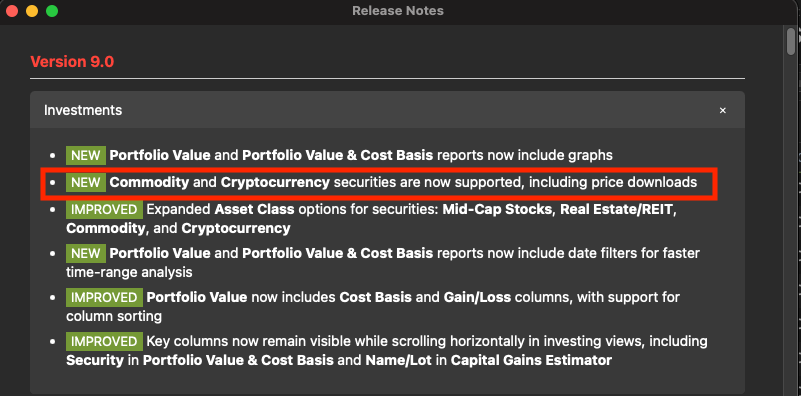
I reached out internally to my team for more information.
Thank you!
Quicken Kristina
Make sure to sign up for the email digest to see a round up of your top posts.
0 -
Hello again,
I heard back from my team. To add a commodity or cryptocurrency security, you need to make sure to select the correct type by clicking the "Type" dropdown.
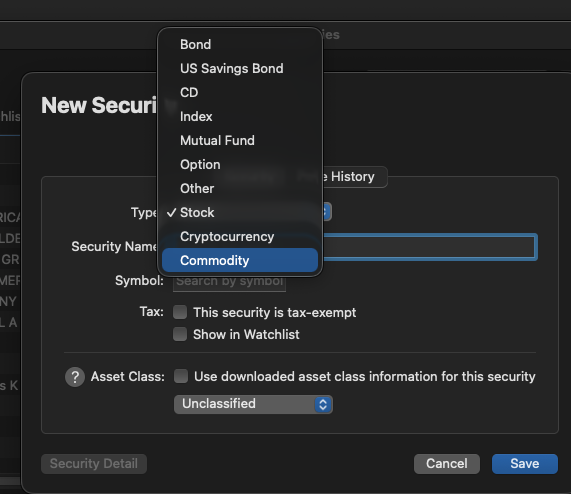
Once the correct type is selected, you should be able to add the security.
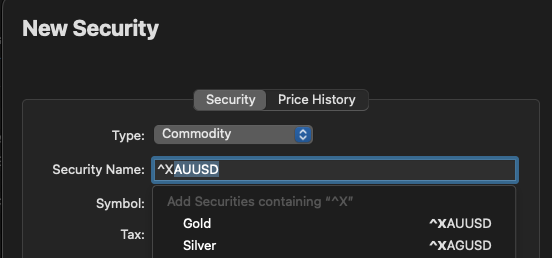
I hope this helps!
Quicken Kristina
Make sure to sign up for the email digest to see a round up of your top posts.
1 -
How to convert a oz of gold to a share when using this symbol? Same with Silver.
1 -
Worked great for Gold using ^XAUUSD. Changed existing type from Other to Commodity, changed symbol to ^XAUUSD, and saved. Then went back to edit Gold security and clicked on tab to rebuild pricing history. At next pop up, unchecked both boxes basically wanting to preserve previous manual entries and not portfolio view of gold looks great. Tried doing the same for my Palladium using ^XPDUSD and when I tried to rebuild history it said security not found. Does anyone have good symbol for Palladium?
0

