Login asks only for password. How to confirm ID?

This discussion was created from comments split from:
Unable to log into Quicken after the program updated
.
Comments
-
When I open quicken classic on my windows desktop, the validation box only asks for my password. How do I confirm or renter my ID? I can open on quicken.com.
0 -
Hello @rickjr@,
Thank you for reaching out! To clarify, are you able to get into the Quicken program on your desktop? If you can, then the steps from our article on changing which ID you use when logging in will help:
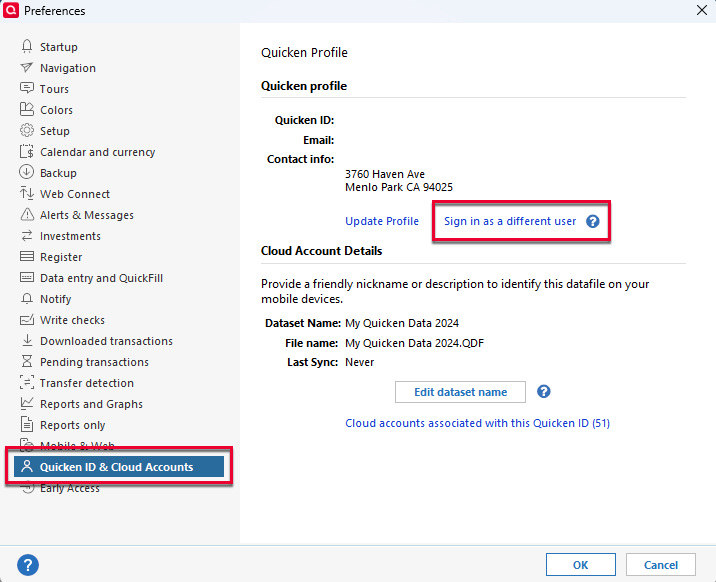
Navigate to Edit>Preferences>Quicken ID & Cloud Accounts. It will display your profile information. You should be able to view the Quicken ID you're currently logged in under. If you need to login using a different Quicken ID, click the blue "Sign in as a different user" link.
A confirmation window will come up. Type "yes", then click the Sign Out button.
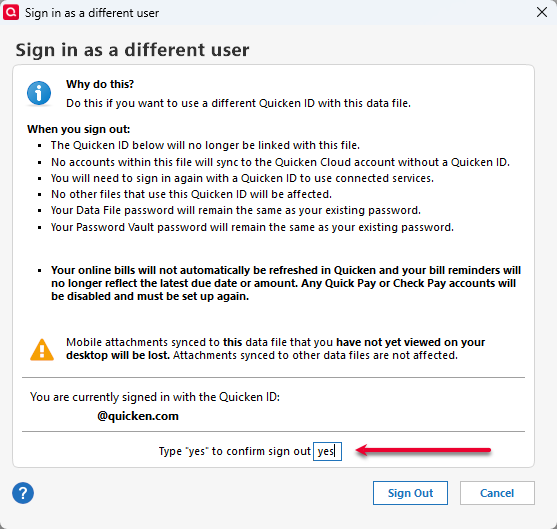
That will bring you to a login screen that will let you put in both the Quicken ID and the password.
I look forward to your response!
Quicken Kristina
Make sure to sign up for the email digest to see a round up of your top posts.
0 -
Hello @rickjr@,
We haven't heard back from you in a while. Do you still need assistance?
Check back and let us know! Thank you.
Quicken Kristina
Make sure to sign up for the email digest to see a round up of your top posts.
0

