User name change

ashirajohnson
Quicken Mac Subscription Member ✭✭
Comments
-
Hi @ashirajohnson,
Thanks for reaching out to the Quicken Community!
To update your name, please follow these steps:
- Click on your profile icon in the upper-right corner.
- Select Account & Privacy Settings.
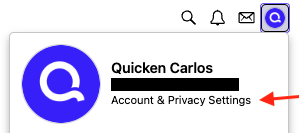
- Click the pencil icon next to your current name.
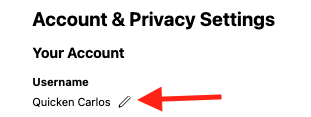
- Enter your new name and click Save.
I hope this helps!
Quicken Carlos
Make sure to sign up for the email digest to see a round up of your top posts.
0 -
@Quicken Carlos Unfortunately, users aren't given permission to change their names:
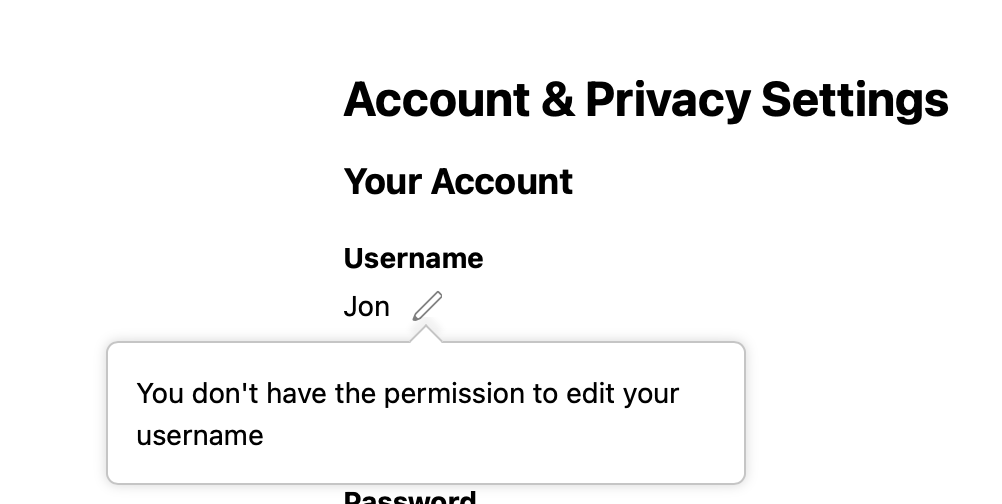
Only moderators & admins have that power.
@ashirajohnson If you post the new name you want, one of the Quicken folks here can change it for you.
0 -
Hello @ashirajohnson,
Please let us know what you'd like to change your username to, and we'll be happy to help!
I look forward to your response!
Quicken Kristina
Make sure to sign up for the email digest to see a round up of your top posts.
0

