Both securities are resolving to the same underlying entry

I have two securities, One is a stock NEE and the other is the preferred NEE-N. One is in my IRA and the other is in my regular Brokage account. Last month I accidently bought NEE in my Brokerage account and after I noticed the mistake I sold it completely the same day.
both securities are resolving to the same underlying entry in Quicken's master Security List. The Security List is shared across ALL accounts, so if NEE and NEE-N are somehow merged into or pointing to the same security record, changing one affects the other everywhere.
How can I fix this. I change one and the other changes in the other account. They both have thier own symbol but seems if still stuck, change one the other changes as well HELP!!!
Comments
-
Just to clarify stock NEE is presently in Brokerage and NEE-N is in the IRA. Both from Fidelity
0 -
Hi @gbr1000,
Thank you for reaching out to the Quicken Community!
Before following any troubleshooting steps, please make sure to create a backup of your Quicken data file.
Based on your description, it appears that both securities (NEE and NEE-N) may be linked to the same underlying security in the Security List. In Quicken for Windows, securities are shared across all accounts, so if two accounts are mapped to the same security, changes to that security will affect both accounts.
I recommend following these steps:
- Go to Tools > Security List
- Locate both NEE and NEE-N
- Click each security and select Edit Details
- Check whether they share the same name or symbol, which would indicate they are linked
If they are linked:
- Update the Ticker Symbol for the incorrect security
- Right-click the security and select Edit, then modify the ticker symbol as needed
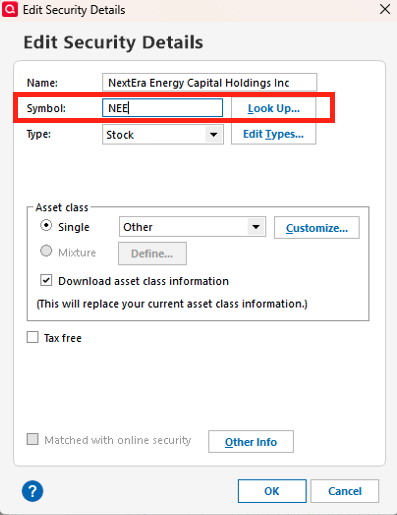
- Right-click the security and select Edit, then modify the ticker symbol as needed
- You will then need to reassign transactions to the correct security
- In the account register, edit affected transactions and change the Security to assign them to the correct ticker (NEE or NEE-N)
If only one security is present:
- You may need to add the missing security:
- Go to Tools > Security List
- Click Add Security (bottom-left corner)
- Search for the missing ticker symbol and select it
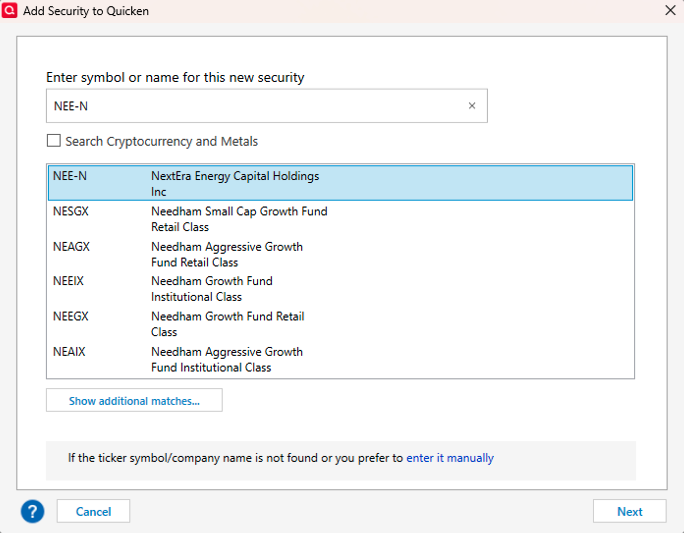
- Click Next and confirm the information is correct, and click Done.
I hope this helps! Let me know how it goes!
Quicken Carlos
Make sure to sign up for the email digest to see a round up of your top posts.
0
