CC-501 Across Multiple Financial Institutions [Edited/Merged Threads]
Answers
-
@MSStateDawg Sorry to hear that it returned, I will go ahead and pass this along!
——If others in the thread could also please let us know if it's resolved or continuing for you, we would greatly appreciate it! Thank you.
-Quicken Anja
Make sure to sign up for the email digest to see a round up of your top posts.0 -
For the sake of preventing misunderstanding, Amex and Fidelity never started working. The other accounts did start working, but not Amex and Fidelity.
Quicken user since 1991
VP, Ops & Tech in the biometric space
0 -
For me, I just tried again and it is working now for Fidelity. I tried transaction download for Fidelity alone and it worked.
Then I tried OSU for all accounts and there were no errors and the update timestamp for each register was updated properly.
Deluxe R66.23, Windows 11 Pro
0 -
Hello again,
For those who are still experiencing this CC-501 errors, we have received the following instructions to try to help resolve this. Please follow the steps below:
- Open Windows Explorer to C:\ProgramData\Quicken\Inet
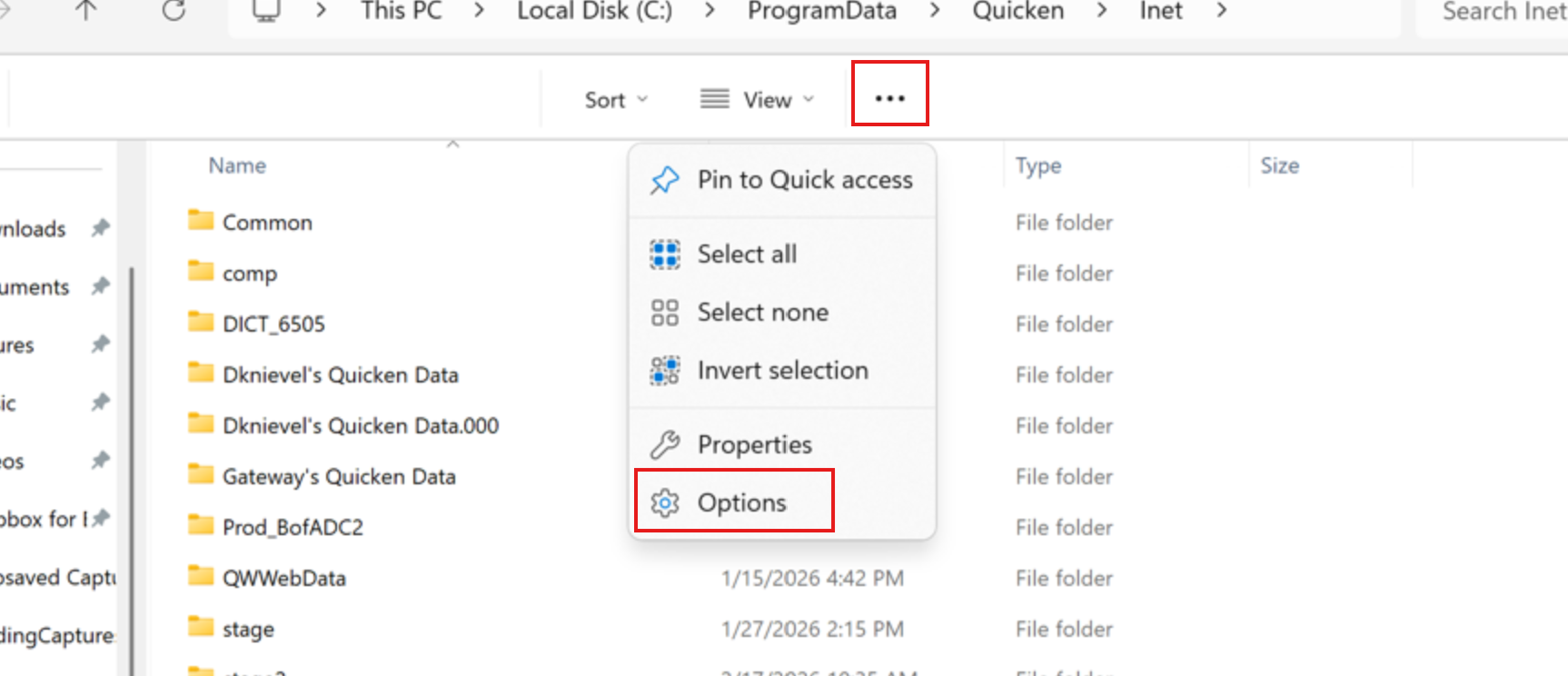
- If you do not see ProgramData, click on the 3 dots at the top
- Select Options
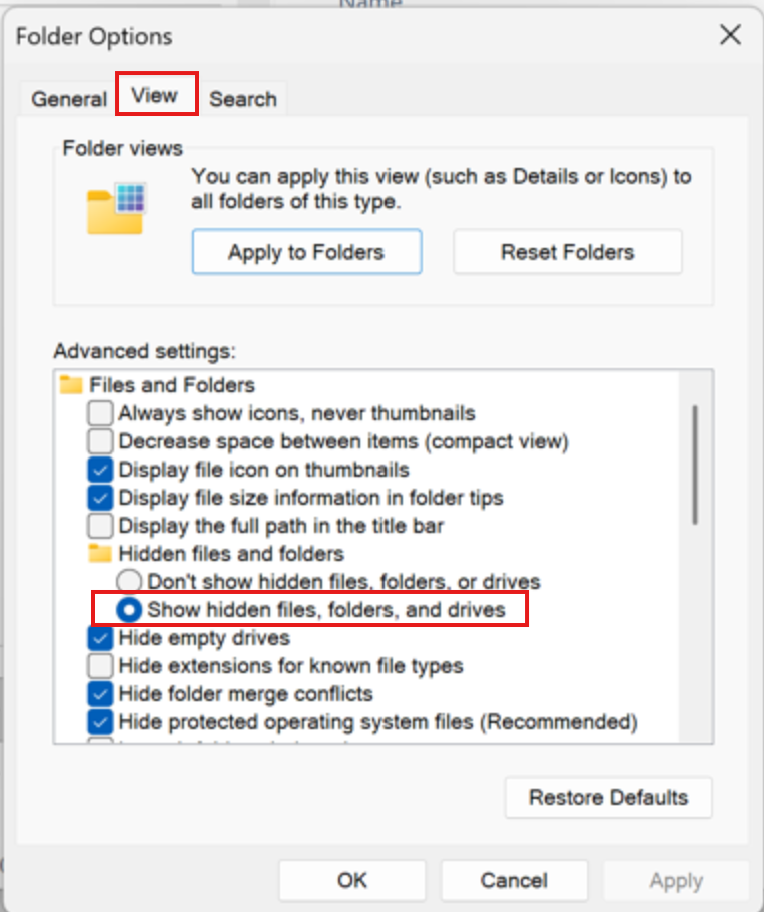
- Click the View tab
- Select Show hidden files, folders, and drives and click OK
- Once in the Inet folder—find your data file name folder and open it.
- Find runtime.dat or runtime and rename it by putting a "1" in front of it.
- Restart Quicken.
- Run One Step Update
Let us know how it goes!
-Quicken Anja
Make sure to sign up for the email digest to see a round up of your top posts.0 - Open Windows Explorer to C:\ProgramData\Quicken\Inet
-
Yeah, still not working.
0 -
FWIW, I did a OSU at 9:07AM Pacific time today, all of my Fidelity accounts (investment, retirement, and NetBenefits 401k) updated properly.
0 -
Ignore this response.
Quicken user since 1991
VP, Ops & Tech in the biometric space
0 -
This has fixed my issue.
Quicken user since 1991
VP, Ops & Tech in the biometric space
1 -
Still CC-501 errors across multiple accounts. Basically all EWC connections are broken.
0 -
Thank you all for the updates!
For those still experiencing the issue, please try the steps outlined in my previous response.
Let us know how it goes! Thank you.
-Quicken Anja
Make sure to sign up for the email digest to see a round up of your top posts.0 -
Quicken Anja
I left mine alone.
I restarted Quicken and then ran the One Step Update, mine worked fine. That was 2:40 PM.
0 -
After renaming runtime.dat, OSU produced no errors.
Ran OSU again a few hours later. All was well EXCEPT Fidelity. I renamed runtime.dat again and there were no further errors after numerous OSU attempts.
Quicken user since 1991
VP, Ops & Tech in the biometric space
0 -
@Tony Luers & @MSStateDawg Thank you both for the updates, we really appreciate it!
Glad to hear things are working for you now.
-Quicken Anja
Make sure to sign up for the email digest to see a round up of your top posts.0 -
@Quicken Anja
I do have a question.
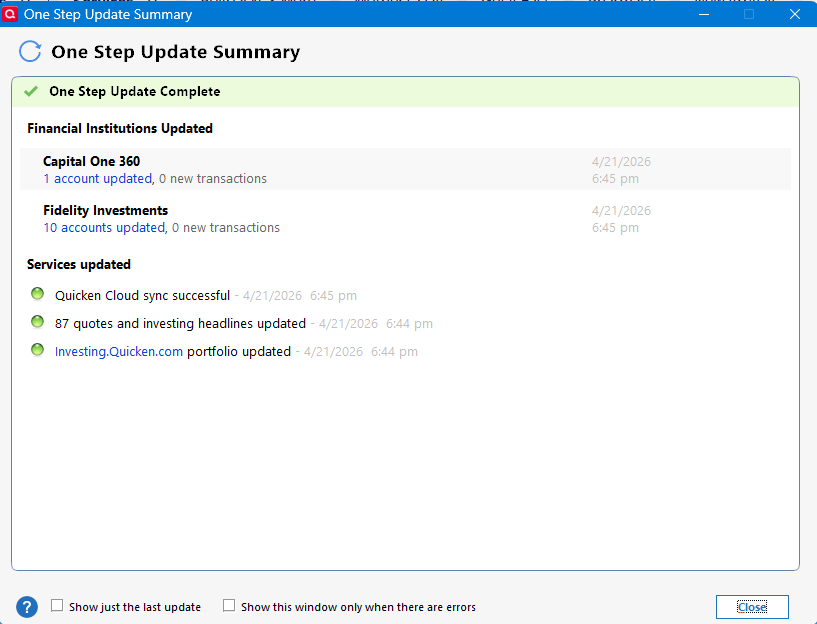
Is the date and time supposed to be so faded that you can barely read it?
I've never seen it that faded.
 0
0


