Service Credit Union requiring code every OSU

Last few days Service Credit Union has been requiring a texted code every time I run One Step Update. I've done an Account Reset a couple of times, but that hasn't cleared it up. No issues at all logging into their web site.
Anyone else?
Quicken Classic Deluxe R66.28
Windows 11 Pro
Comments
-
Hello @Don Bartenstein,
Thank you for letting us know you're encountering this behavior. Unfortunately, it is the financial institution that determines when/if multi-factor authentication is needed. Have there been any recent updates to the financial institution's website that may have prompted this? If there was a change on the financial institution's end, you may be able to contact them to learn how to prevent requests for additional verification.
Have you recently switched browsers or adjusted security settings? Sometimes, that can remove/bypass the cookies the financial institution uses to recognize returning users, which can prompt additional verification.
I hope this helps!
Quicken Kristina
Make sure to sign up for the email digest to see a round up of your top posts.
0 -
So I got in an online chat with SCU yesterday and they say it's because of Two Factor Authorization. Which is odd because I have TFA turned off with this particular institution. So I turn it on and then back off, but the issue persists.
And today the problem started with another bank I do business with (Franklin Savings Bank).0 -
Hi @Don Bartenstein,
Thank you for following up and for outlining the steps you’ve already taken to troubleshoot the issue.
Since you’re now seeing repeated MFA prompts across multiple financial institutions, this may be related to how those banks are enforcing MFA for third-party connections.
To help narrow this down, could you confirm a few things?
- Are you using a VPN or any antivirus/privacy tools that may filter web traffic?
- Are you always on the same network, or do you switch between networks (home, work, hotspot)?
- Is your Quicken data file stored locally, or in a cloud-synced or network location (OneDrive, Dropbox, etc.)? To check, please open Quicken and go to File. At the bottom of the menu, under recent files, the file with the check mark next to it is the one currently open. Please let me know the full file path shown there.
- Have you tried fully deactivating and reactivating Online Services for the affected accounts (not just Account Reset)?
- Does the MFA prompt happen every One Step Update, or only after restarting Quicken?
- Did this start after a recent Quicken update or system change?
Once I have these details, I’ll be in a better position to assist you further.
Looking forward to your response!
Quicken Laura
Make sure to sign up for the email digest to see a round up of your top posts.
0 -
- Are you using a VPN or any antivirus/privacy tools that may filter web traffic? No
- Are you always on the same network, or do you switch between networks (home, work, hotspot)? Always the same network
- Is your Quicken data file stored locally, or in a cloud-synced or network location (OneDrive, Dropbox, etc.)? To check, please open Quicken and go to
File. At the bottom of the menu, under recent files, the file with the check mark next to it is the one currently open. Please let me know the full file path shown there. On OneDrive: C:\Users\donba\OneDrive\Documents\Quicken - Have you tried fully deactivating and reactivating Online Services for the affected accounts (not just Account Reset)? Not yet. Will give that a try
- Does the MFA prompt happen every One Step Update, or only after restarting Quicken? After each restart
- Did this start after a recent Quicken update or system change? Quicken recently updated to R67.7
0 -
Thank you for your response.
While this may not be the root cause, we strongly recommend storing your Quicken data file outside of cloud-synced services. The recommended location is:
C:\Users\username\Documents\QuickenIf possible, please move your file out of OneDrive and save it locally. After doing so, try deactivating and reactivating your accounts using the steps below:
2. Deactivate the affected accounts
- Select the Tools menu and select Account List....
- In the Account List, select the account you want to deactivate, and then click Edit.
- In the Account Details window, click the Online Services tab.
- Click Deactivate next to the service you want to disable.
- Click Yes to the message confirming if you want to disable this service.
- Repeat these steps for each affected account.
- Log in to your bank’s website and revoke Quicken’s third-party access (if applicable).
3. Reactivate and relink the accounts
- Go to Tools> Add account
- Select the bank for the deactivated account(s). If prompted, select the connection method.
- Enter your credentials and click Connect.
- When the list of located accounts appears, choose LINK next to each account you want to reactivate (do not choose Add, as that would create duplicates).

- Click Next then Done on the last prompt.
Please let me know how it goes or if you have any questions.
Quicken Laura
Make sure to sign up for the email digest to see a round up of your top posts.
0 -
I did the Deactivate/Reactivate action for both of the affected accounts. It did the trick for the Franklin Savings Bank account, but Service CU still want's to do TFA.
0 -
Thank you for the follow-up,
I'm glad to hear the issue is corrected for one of the accounts.
To further troubleshoot the account where the issue persists, please follow these steps from our article on FDP-185 (excessive multi-factor authentication prompts):
Cause
Your financial institution has added a new security feature that requires your attention before your account can be updated. This could be a new verification step that needs to be completed on the financial institution's website.
Instructions
Ensure you are on the latest release for your version of Quicken
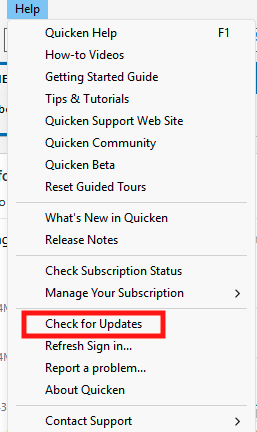
You can check for an update by going to Help > Check for Updates.
Visit your financial institution's website
- Sign in to your financial institution's website.
- Navigate to the page where you view your account information.
- When you encounter the new web page that requires your response, fill out the requested information and dismiss the screen. If you have the option to not display the page or ask you again, select that option. If you do not, the error may continue to occur.
Note: Some financial institution websites may have this new security requirement located in your inbox or message center.
Please let me know how it goes!
Quicken Kristina
Make sure to sign up for the email digest to see a round up of your top posts.
0 -
Hello @Don Bartenstein,
We haven't heard back from you in a while. Do you still need assistance?
Check back and let us know! Thank you.
Quicken Kristina
Make sure to sign up for the email digest to see a round up of your top posts.
0 -
Nothing has changed. According to my account settings on their web site I have TFA turned off, but I am prompted for a code every time I run OSU. I have deactivated and re-added online services a few times. Also did a super validate and that had no effect either.
0 -
Thank you for your reply,
Have you contacted the financial institution's technical support about this issue? Given that the troubleshooting you've done in Quicken hasn't resolved the issue, it may be a good idea to reach out to the financial institution in case it's caused by something on their end.
Please let me know how it goes!
Quicken Kristina
Make sure to sign up for the email digest to see a round up of your top posts.
0

