Commodity Tracking

The latest update for Quicken Mac states that we can now track crypto and commodities finally. However, I cannot get any updates to silver….I have a commodity named "Silver Bars". with a symbol ^XAGUSD, but so far no updates have downloaded….any suggestions?
Best Answer
-
Hello @Gman34798,
Thank you for reaching out! To clarify, was the security you're using added prior to the update to version 9.0? If it was, you may need to re-add it or edit it to get Quicken for Mac to recognize that it's a holding it can track now.
The security type will need to show as a Commodity.
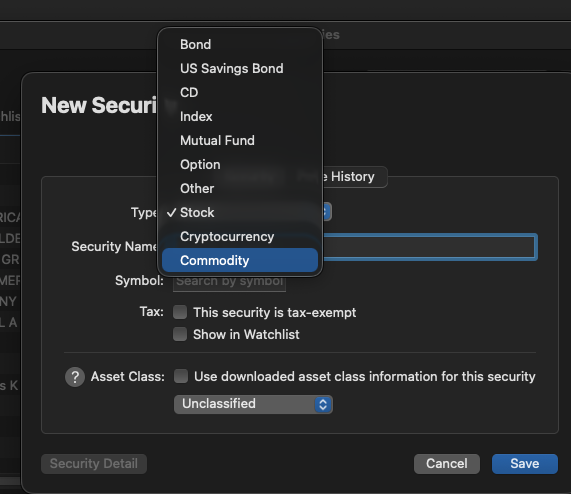
Click where it says "Type" and select Commodity. Then, it should be able to find the security.
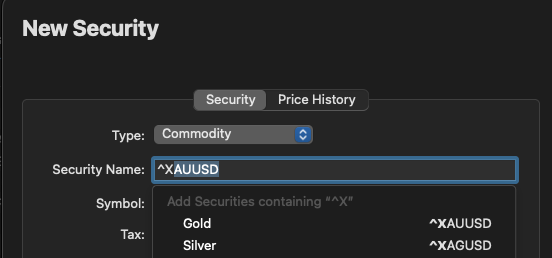
I hope this helps!
Quicken Kristina
Make sure to sign up for the email digest to see a round up of your top posts.
2

Answers
-
In QWin, when I tried to add "silver bars" and also that symbol to my Securities List nothing showed up.
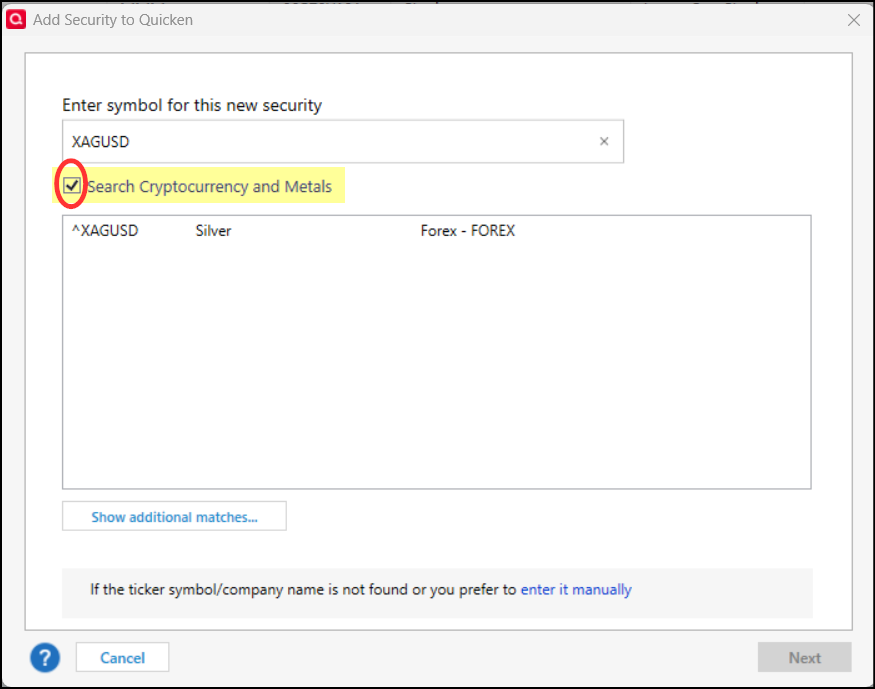
But then I noticed an option to search Cryptocurrency and Metals (see the following picture). I checked that box and typed in "silver bars" and nothing showed up. But when I instead typed in the symbol I was given the option of selecting it for addition the Security List.
The following picture is from QWin, not QMac, but maybe it is a selectable option for QMac, too?
Quicken Classic Premier (US) Subscription: R66.28 on Windows 11 Home
1 -
Hello @Gman34798,
Thank you for reaching out! To clarify, was the security you're using added prior to the update to version 9.0? If it was, you may need to re-add it or edit it to get Quicken for Mac to recognize that it's a holding it can track now.
The security type will need to show as a Commodity.
Click where it says "Type" and select Commodity. Then, it should be able to find the security.
I hope this helps!
Quicken Kristina
Make sure to sign up for the email digest to see a round up of your top posts.
2 -
Thank you Kristina & Boatmaniac,
I got it working! Both your posts pointed me in the right direction!
Regards,
Greg
0 -
Thank you for the follow-up,
I'm glad to hear you got it working!
If you need further assistance, please feel free to reach out!
Quicken Kristina
Make sure to sign up for the email digest to see a round up of your top posts.
0
