PNC and Online Payments

I am using Quicken Classic Premier on Windows 11Pro. For reason I cannot determine, my PNC Bank Direct Connection stopped working about three weeks ago. I have followed instructions to reestablish Direct Connect and enabled online payments, but when I attempt to Send a payment via direct connect, I receive a message: "You don't have an account that is enabled for online payments."
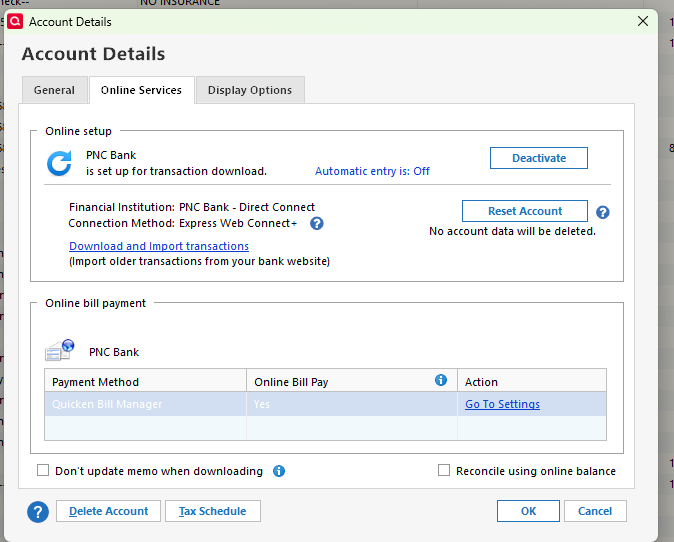
I have gone through the process several times, with the same results. I have pasted a screenshot of the account details below
Answers
-
While PNC continues to offer Direct Connect, for whatever reason, you have currently established Express Web Connect+, which does not support online payments. I suspect that you may have switched during the PNC DC debacle.
You need to Deactivate, then reactivate your account using DC.
 0
0 -
I have attempted to deactivate and reactivate. I have also followed the Quicken Instructions for accounts that were mistakenly migrated to Express Web Connect. I have tried several times, and tried to follow all the steps carefully and I still have Express Web Connect as the connection. I am designating the connection method as “Direct” when following the Quicken Instructions, but I have not been successful
0 -
Several months ago I had the same issue setting up with PNC Bank - Direct Connect but getting an EWC+ connection instead of a DC connection.
What I did that resolved the issue for me (some of this is probably repetitive for you but I recommend just following thru the steps, again, just in case there is some little detail here that is different from what you had done previously):
- Back up the data file.
- Deactivate the account (on that Online Services tab of Account Details).
- Delete all Financial Institution Information above the Contact Name field (on the General tab of Account Details).
- Repeat #2 and #3 for all other PNC accounts.
- Delete the Password Vault (Tools > Password Vault > Delete Vault and all Saved Passwords).
- Go to Tools > Add Account (do NOT use Set Up Now) > type in PNC Bank > select PNC Bank - Direct Connect > click on Advanced Options (not on Next) > Continue > select Direct Connect > Next > select Banking accounts > Next > Continue > enter the DC UserID that PNC originally provided you when you first set up DC in your online account (do NOT enter your SSN unless that is what PNC originally instructed you to use…do NOT use your PNC online account UserID) > enter the Quicken PIN that PNC originally mailed to you (do NOT not use the online account password).> check the box for Save to password vault (you will be prompted to enter a PW for the new PW Vault that Quicken will then generate)> Connect > be sure to Link the downloaded data to the account(s) you already have established in Quicken.
- If you have any other non-PNC accounts that were set up with DC, you will need to set them up with DC and add them to PW Vault, again.
Note:
- If you get prompted to create a new PW for DC downloading: Do not do that. Cancel the process and repeat #6.
- If the process fails for any reason (such as being pushed to the PNC website to log into it or you get an error message or no data is downloaded), immediately cancel the process and repeat steps #2-#6, again.
If it fails, again, repeat #2-#5, again, and replace #6 with the following:
- File > Copy or Backup File > Create a copy or template > Next > give the file copy a unique name…or simply accept the default name provided (it will be the same name as the original file with "Cpy" added to the end of it) > Save Copy > Open copied file > do step #6 above.
- This copied file will be a truly unique data file with a unique name, a unique file ID, a unique Cloud Account, and a unique runtime.dat file.
- This process will deactivate all EWC and EWC+ connections so those will need to be set up, again…but do that only if and after your PNC DC connection is working.
- If you use QMobile or QWeb, you will need to set them up from scratch, again.
In the Dec-Feb window I had several issues with my PNC DC connections. Sometimes steps #1-#6 resolved the issue for me but not always. In those cases making the Copy file resolved the issue for me.
Others have reported similar results but others needed to call PNC and ask to be connected to their Tier 3 Tech Support (who might need to take some steps on their end to reset your DC authorization). You might need to do this as well if what is posted above does not work for you.
Quicken Classic Premier (US) Subscription: R66.28 on Windows 11 Home
0

