Quicken is creating duplicate transactions on my matching downloads
Comments
-
It's been two weeks from when the issue has been first reported. Any progress?
0 -
Hi @Francois,
Thank you for following up on this. I’ve just reviewed the ticket (CTP-16752).
Unfortunately, there are no new updates available at this time. Our support team is still actively working on the issue.
Thank you for your understanding.Quicken Carlos
Make sure to sign up for the email digest to see a round up of your top posts.
0 -
I am experiencing the same behavior as described above. I will submit log files if necessary,
0 -
Hi @DennisDe,
Thank you for joining this thread and letting us know you’re experiencing the same issue.
I recommend submitting your logs so they can be added to the investigation ticket.
To do this, go to Help > Report a Problem.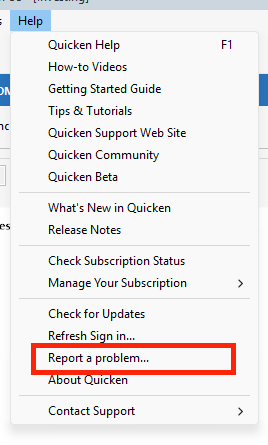
Please let me know once you’ve submitted them so I can include them in the ticket.
I look forward to your reply!Quicken Carlos
Make sure to sign up for the email digest to see a round up of your top posts.
0 -
Related to this same problem. If there is a transaction in the download that I choose to delete because it is creating a duplicate, it does not delete. It still goes into the account transaction and is a duplicate.
0 -
Thank you for sharing the details about the downloaded transactions. Were you able to delete the duplicate entry from the account register once it was entered?
Quicken Laura
Make sure to sign up for the email digest to see a round up of your top posts.
0 -
Just an observation. Until this situation is cleared up by Quicken, I would tend to delete the transaction that's aldredy in the register and accept the downloaded transaction. That way you maintain the downloaded information like the date cleared, if that's important to you. Or accept the duplicate transaction and void it. The downloaded information will be on the voided transaction.
0 -
My logs were uploaded.
0 -
Hi @DennisDe,
Thank you for sharing your observations and for submitting your log files. I’ve added them to the open case for further review.
Quicken Laura
Make sure to sign up for the email digest to see a round up of your top posts.
0 -
Hello, I am also experiencing the same erroneous duplicated match (as @tompfr) with all checkbook register entries that previously had been auto-entered before the download. This necessitates the manual deletion of said duplicate entry before the correct, original entry is properly matched. The problem seems to be occurring only in my main checkbook register which is the only register that contains auto-entered, future transactions.
0 -
Hello, I am also experiencing this precise same issue as many others have previously posted about. I have also submitted a report with logs and am looking forward to a resolution.
In addition, I have also experienced an instance of a check pay transaction where the original register entry date was changed to the bank cleared date. If I try to change the date back to the original date, it won't let me alter it. I should also say that despite this date change, the check was submitted for processing on the originally entered date.
0 -
Thank you for sharing what you’re experiencing. I’ve submitted your log files for further review.
Regarding the second issue, are you seeing any error message when you try to change the date? If so, please let me know the exact message.
Quicken Laura
Make sure to sign up for the email digest to see a round up of your top posts.
0 -
Another Observation: Once I recognized that there was an issue with duplicate transactions when a download is run, I began VOIDING the duplicate transactions rather than deleting them. The duplication problem possibly started in late February; however, I didn't recognize it until 3/2/26. Since that date, I've VOIDED 33 transactions. I've analyzed the VOIDED transactions and discovered that every duplicated transaction referred back to a recurring Bill Reminder. Every transaction had been entered into the account register in advance using the Bill Reminder record. When the download runs, a new uncategorized transaction mysteriously appears in the register. I don't think it is a coincidence that all my duplicate transactions are Bill Reminder transactions.
[Edited Readability]
0 -
Thanks @DennisDe for sharing more information. I'll pass it along to the proper team.
Quicken Laura
Make sure to sign up for the email digest to see a round up of your top posts.
0 -
yes I can delete it from the transaction register
0 -
Be careful if the duplicate transaction is a transfer to another account. Be sure to void/delete the duplicate and not the original. I have found that the duplicate transaction is a phantom and does not connect to the other side of the transfer.
1 -
Another user experiencing this issue. The point made by DennisDe above is important. If you right click on each of the duplicate transactions and choose "Go to matching transfer" - one will go to the correct account with the other side of the transaction. The other - I believe the newly-created duplicate - will give an error saying the account cannot be found in Quicken.
A second symptom that may be helpful in diagnosing this. I have had, for many years, recurring transfers set up between accounts. After this started happening, I deleted all of them and recreated them. I'm finding that when some of the duplicates appear, they are using the OLD recurring transfer (I can tell from the Memo text) - but they are nowhere to be found in the Bills&Income/Income&Transfers or Manage Manual Bills and Income lists.0 -
This has been an issue for a couple of months now - and it's a serious problem messing up transfers to other accounts. When is it going to be resolved? I have the exact same issue with two weekly recurring transactions, one of which is a transfer to my savings account. Every single week I have to go clean up this mess. It is not unreasonable to ask for an update as to when this issue will be corrected, especially since we continue to pay subscription fees for this product. Can we please get that update?
0 -
I am having the same problem and have been for sometime now and I agree. To say we've been patient with this issue is understatement. The amount of extra work required on the customers' behalf to maintain accurate transactional records is beginning to outweigh the benefit of the software. I have uploaded my logs. Please notify us of any progress/plans regarding this issue. Thank you.
0 -
If Quicken was maintained
Agreed. [Removed-Disruptive]. Maybe they should use Claude Code to sort this out. When I get my next survey I'll know how to respond.
0 -
Good Morning…it's been over a week since anyone from quicken has posted regarding the progress in correcting this problem. Please update us on what's being done and ensure us that someone/persons are working on this issue. As someone who downloads hundreds of matching transactions per week, you can imagine the amount of time this is causing in regards to correcting the input errors being generated by this programing problem. Thank You.
0 -
Hi All,
Thank you for taking the time to update this thread with your comments and for your continued patience.We understand the frustration this issue may be causing. I’ve reviewed Ticket CTP-16752, and it is still actively being worked on by our Support Team.
At this time, there are no new updates, but please know this is still in progress and remains a priority. We will share updates in this thread as soon as more information becomes available.
Thank you again for your patience and understanding.
[CTP-16752]Quicken Carlos
Make sure to sign up for the email digest to see a round up of your top posts.
0 -
Thank you Carlos. Yes we are all very irritated and frustrated with this issue, but WE DO appreciate you letting us know that it is still actively being worked on. Please continue to give us frequent updates.
0 -
I, too have started seeing this behavior on my credit union checking account. I agree that the uncategorized duplicate transaction should not be left in the register. I usually just mark my manual (categorized) transaction as Cleared, sometimes I change the date to agree with the downloaded transaction's date, then delete the duplicate. But, this must be fixed, as it is an unwelcome new behavior.
0 -
Hi @Paula2,
Thank you for letting us know that you’re experiencing this issue. Our Support Team is actively working toward a resolution, and I’ve added your information to the investigation ticket.
For reference, the internal ticket number is: CTP-16752
While we do not yet have an estimated timeframe for a fix, we will share any new information or updates in the Community as soon as they become available.
Thank you for your patience and understanding!
Quicken Carlos
Make sure to sign up for the email digest to see a round up of your top posts.
0 -
I've submitted log files and screenshots from today as well - issue continues. How can we get the priority escalated since this is an active bug, not a feature request?
0 -
In addition Carlos, as I'm sure we're all dealing with hundreds of transactions per week and this has been a huge inconvenience including hours of work on our end correcting this issue manually, I don't think it unreasonable for everyone dealing with internal ticket number CTP-16752 [Removed-Disruptive].
0 -
Hi All,
This issue is currently being treated as a high priority. We understand the frustration and appreciate your patience. Hopefully, we will have more updates available to share with you soon.
@berthagator Thank you for uploading the logs. I have added the information to the ticket.
[CTP-16752]
Quicken Carlos
Make sure to sign up for the email digest to see a round up of your top posts.
5 -
I'm having the same problem with auto matching transactions creating double transaction although accepted as auto matched. Just started about Christmas 2025 but continuing unto today. just uninstalled and reinstalled quicken to see if it helps. as stated worked well til about Christmas 2025 so some update since then caused it.
0 -
Hi @Sammy54,
Thanks for joining this thread and for sending the report. I have added the information to the ticket CTP-16752.
Quicken Carlos
Make sure to sign up for the email digest to see a round up of your top posts.
0



