Business Invoices Not Connecting to Data (again)

Previous occurrence:
I attempted to make an invoice today and found things not populating. In my troubleshooting, I did a repair and a restore from a backup a month ago where things were working fine. I then searched here only to find my own post about a year ago. Following those instructions for a super validate again did not do anything but also an uninstall/reinstall did not do it either.
This is static information in Quicken itself, not reliant on external connections, and a MAJOR component to the Business edition, why does this keep breaking?
Comments
-
Hi @ScottT18,
Thank you for providing a detailed description. I’m sorry to hear that you’re experiencing the same issue with invoices again. I’d appreciate it if you could provide a bit more information to help troubleshoot:
- Where is your Quicken data file located? To check, please open Quicken and go to File. At the bottom of the menu, under recent files, the file with the check mark next to it is the one currently open. Please let me know the full file path shown there.
- Is your file being backed up or synced by any third-party services like Carbonite, OneDrive, or Backblaze?
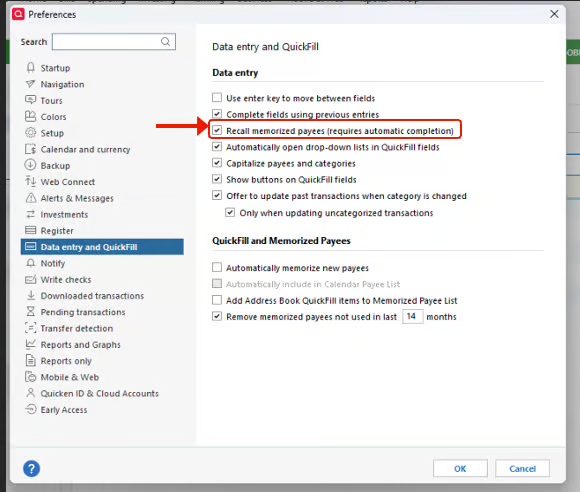
- Is the Recall memorized payees option enabled in your settings?
- Are all templates affected, or only older ones?
- Does creating a new template in the same file behave correctly?
Steps to check the Recall memorized payees option:
- Go to Edit → Preferences.
- Select Data Entry & QuickFill.
- Make sure Complete fields using previous entries and Complete memorized payees are checked.
- Attempt to create a new invoice to test if the customer info autofills correctly.
I look forward to your response!
Quicken Laura
Make sure to sign up for the email digest to see a round up of your top posts.
0 -
The Recall Memorized Payee was unchecked and enabling that resolved it. I have not gone into my preferences in, I'm not sure, a significant amount of time. Is there some other place or workflow scenario where this option may have been disabled outside of preferences? Potentially added in an update and that can be selected when tabbing to different fields in transactions etc?
0 -
Hi @ScottT18,
That’s great news. I’m glad to hear the issue has been resolved!
There isn’t another location where the Recall Memorized Payees option can be enabled or disabled. While it’s uncommon, it’s possible that a recent update may have affected your preferences.
If you have any further questions, please don’t hesitate to reach out!
Quicken Laura
Make sure to sign up for the email digest to see a round up of your top posts.
1
