Desktop program not logging in

Last night I tried doing a One-Step Update on my Windows 11 PC using the latest version of Classic Business and Personal. It gave an error saying my subscription was expired (it is not, it expires in June 2026). I tried refreshing my sign-in, but when I tried to log-in again it gave me a generic error saying either the servers were down or my Internet was bad.
I waited about 12 hours and tried logging in again using the desktop program. Same generic error as before. I contacted support and spent an hour on the phone attempting all their troubleshooting steps. I do not have a VPN, no 3rd party antivirus. I’ve tried uninstalling and reinstalling. My internet connection is perfect. Windows is up to date. Their last ditch effort - installing EdgeView2, failed because it’s been installed all along. The program is locked down and the only options it’s giving me is to create a new file or open an existing one. Both ask me to log in, but that fails.
I am able to log in to Quicken Classic Business and Personal via my web browser just fine, the desktop app is another story. I believe it’s some type of issue with the desktop program attempting to authenticate with the server, not my computer. The desktop program worked perfectly fine 8 days ago, and nothing has changed on the computer between then and now.
I need someone to help me look beyond the basic user level solutions.
Answers
-
Hi @Oregonrunner4,
I’m really sorry you’ve had to go through all of that, especially after already spending so much time with support. I can understand how frustrating it is when everything should be working and the app just won’t let you in.
Based on what you’ve described, you’ve already ruled out the usual causes (subscription, connectivity, reinstall, etc.). The fact that you can sign in through the web but not the desktop app points pretty strongly to a local authentication issue within the Quicken application environment, rather than anything wrong with your account.
To help us better understand the situation, could you please provide a screenshot of the error message you described receiving? If needed, please refer to this Community FAQ for instructions on how to attach a screenshot. Alternatively, you can also drag and drop screenshots to your response if you are not given the option to add attachments.
Quicken Laura
Make sure to sign up for the email digest to see a round up of your top posts.
0 -
Here's the error message I get. It comes up after entering my username and password.
About a month or two ago I was getting constant error messages saying that runtime components did not load. I typically got these errors when trying to open the program and it was fixed by an update if I remember correctly. During the many program restarts today I did see that same runtime component error just once. As far as I can tell the program launches normally, it shows my landing page (which is one of my account registers) for about a second, then loads the log in page. I enter the username and password - then end up at the screenshot.EDIT - I've removed the screenshot for security purposes.
0 -
After about 6 hours of troubleshooting I've narrowed it down to an issue with these two recent Windows updates published in mid-April:
2026-04 .NET Framework Security Update (KB5082417)
2026-04 Security Update (KB5083769) (26200.8246)I believe the .NET Security Update to be the main culprit. I'm assuming it changes something that the Quicken runtime environment requires to run for authentication purposes at sign-in. When I rolled back the .NET Framework Security Update it allowed me to log in to Quicken Classic Business and Personal and use my desktop program as if nothing had ever happened.
This also allowed me to export a .QIF of my file. [Removed - Disruptive]
For anyone who may encounter this problem, just know that if the authentication token process fails due to a runtime error like mine did you cannot access a local copy of your file. Quicken is holding you hostage by forcing you to log in to their system to open a file that's on your computer.
1 -
Hi @Oregonrunner4,
Thank you for taking the time to come back and share such a detailed update, and I’m truly sorry for how much time and effort you’ve had to put into troubleshooting this. I completely understand how frustrating it must be, especially when access to your local data is impacted.
I do appreciate the additional context regarding the recent Windows updates, particularly the .NET Framework update (KB5082417). While we don’t have confirmed reports yet linking that specific update to Quicken authentication failures, the behavior you’re describing, especially the runtime component errors and the successful login after rolling the update back, is very valuable information.
That said, I do want to clarify that rolling back critical Windows security updates is generally not recommended as a long-term solution, as it can leave your system vulnerable. Instead, I’d like to escalate this further so our teams can investigate whether there is a compatibility issue with the recent .NET changes and the Quicken runtime/authentication components.
If you’re willing, please submit your log files through Quicken so I can share them with the appropriate team for further investigation:
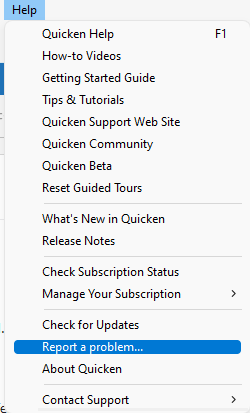
- Click Help
- Select Report a Problem
- Click Send to Quicke
We definitely want to get to the bottom of this, as scenarios where users are blocked from accessing their files are taken very seriously.
Again, I’m sorry for the experience you’ve had here, and I appreciate you sticking with us and sharing your findings. It really does help move things forward.
Quicken Laura
Make sure to sign up for the email digest to see a round up of your top posts.
0
