Bill To Not Populating In Invoicing

I had reported a problem to support where the "Bill To" information was not populating in the "Invoice". I was told this was an ongoing issue reported back in December of 2025, but still, there was no resolution. I followed up again today and was told the same thing.
I deprecated back all the way to 65.15, and the problem persisted, leading me to believe this was not in fact a bug that had been introduced, but perhaps a data or setup problem. There are no settings in the address book other than "Quickfill List" and "Customer List" that you would think would affect customers (both were properly checked).
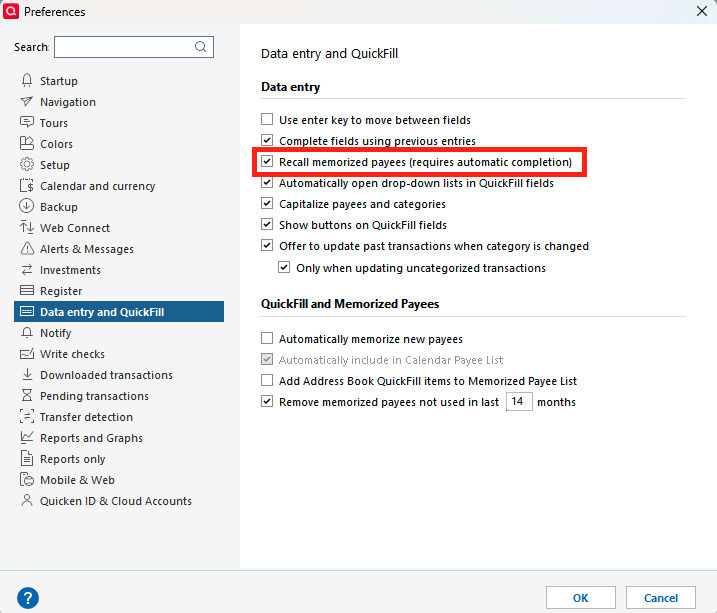
In Version 66.11, I started having a new problem that memorized transactions were not populating in the register even though the drop down of the memorized transactions were displaying. I reviewed the Preferences for "Data Entry and Quickfill" and found that a field "Recall memorized payees" was not checked. I do not know if this is a new field or if one of the updates cleared the field, but checking this field fixed both of the problems.
Nobody in Technical Support was aware of the behavior, and this field was in the preferences. Further, the help section makes no mention of this field affecting "Invoicing" (see the following).
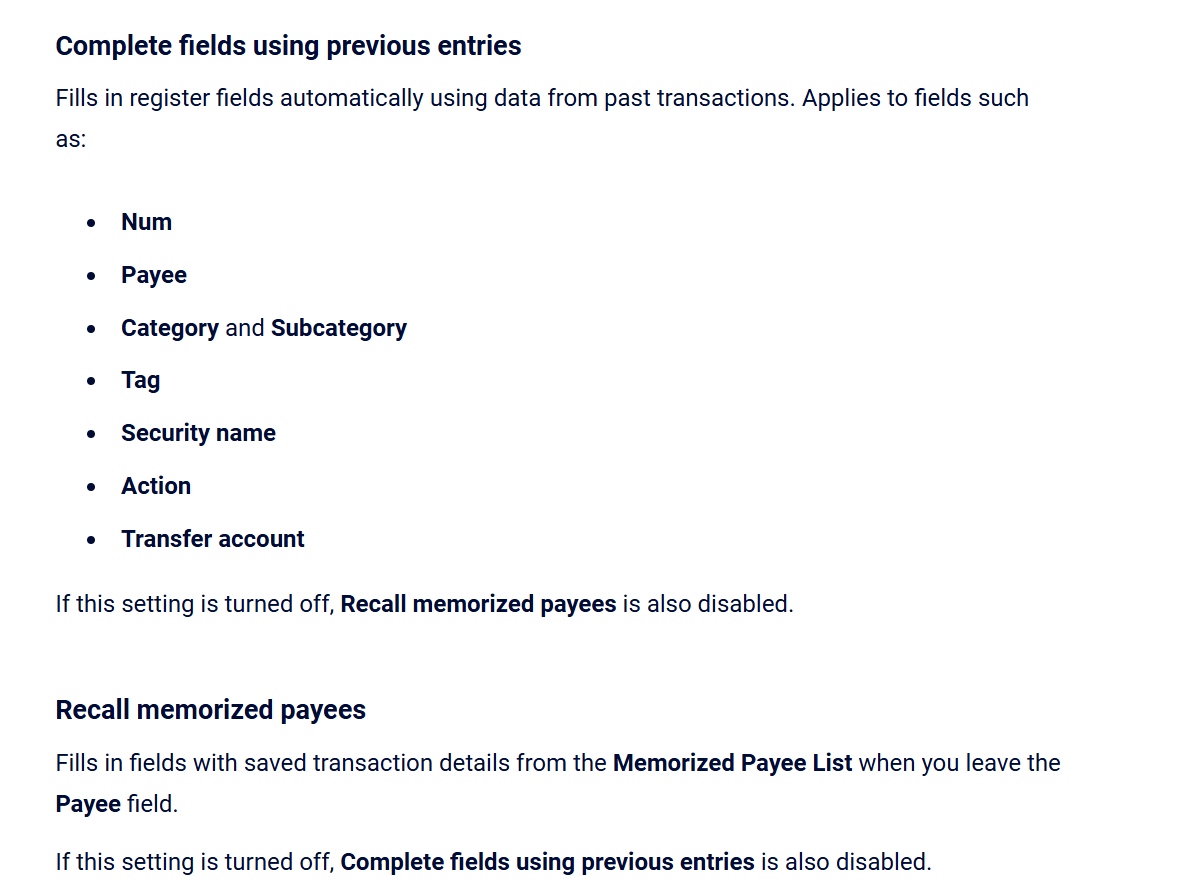
Perhaps if Quicken just devoted a little time in researching the bug, they may have found that this is now a "Feature" and not a bug! Perhaps someone knows when this flag appeared or which version turned it off. Quicken needs to update their documentation and/or correct this if it is a bug.
Thanks, Quicken Support.
[Edited]
Comments
-
Hi @Jon _sacks,
Thank you for reaching out to the Quicken Community and for sharing your feedback with us. We understand how frustrating this situation can be.
I will forward this information to the appropriate team so they can review and update the article you’re referring to.
I hope this helps.
Quicken Carlos
Make sure to sign up for the email digest to see a round up of your top posts.
0 -
I have been fighting this missing feature/bug for over two years now. Every couple months I spend a couple hours fiddling with settings and formatting of invoices and statements but I have NEVER seen the BILL TO or the SHIP TO ever populate with the customer date in the address book. PLEASE FIX THIS.
0 -
This discussion was created from comments split from: Bill To Not Populating In Invoicing.0
-
Hi @Mooring10,
Thanks for joining this thread.
We understand how frustrating this can be. If you haven’t tried this yet, I recommend checking the settings in Data Entry & QuickFill.
To do so:
- Go to Edit > Preferences
- Select Data Entry & QuickFill
- Make sure the “Recall memorized payees” box is checked
- Close Quicken and reopen it
- Then try again.
Let us know how it goes!
Quicken Carlos
Make sure to sign up for the email digest to see a round up of your top posts.
0 -
They need to address why this flag periodically (probably from an update) is turned off and properly document in Quicken the behavior affects Invoicing, not just the registers.
0 -
Hi @Jon_sacks,
Thank you for following up and for providing the feedback. I have forwarded the information to the appropriate team.
They will review it and update the support article as needed.
Thank you!
Quicken Carlos
Make sure to sign up for the email digest to see a round up of your top posts.
0 -
Thank you. This resolved my issue.
0 -
Hi @BrightBird,
I’m glad to hear the steps above worked for you. This will be helpful for other customers who encounter the same issue.As I mentioned in my previous comment, this information has been shared with the appropriate team to update our support article. If you encounter any errors or issues, please don’t hesitate to reach out again.
We’re happy to help!Quicken Carlos
Make sure to sign up for the email digest to see a round up of your top posts.
0

