File corruption after Quicken Update, Sync related?

Shortly after Quicken first went to cloud Sync, I found my data file going back 12-15 years was corrupted. Some custom categories were missing and register entries had been replaced by defaults. Other custom categories were deleted and register entries showed blank spaces where no default was available. File size also changed dramatically. And the corruption propagated after recreating and reassigning categories. I eventually solved this problem by returning to a prior backup. However, a significant amount of data was lost. And, at that time, I turned Sync off. Meant to stay off forever.
Today, my bookkeeper discovered that this data corruption issue has returned. We discovered that, for some reason, Sync was now back on. I suspect this change happened in the background during the most recent update to Version 9.0.1 (Build 900.60628.100).
Has anyone else experienced this?
Answers
-
Hi @RDougG,
I’m sorry to hear your data file was affected by the cloud sync. I’d appreciate a bit more information so I can better assist you.
- Did you disable cloud sync only on the original file, or also on the newly restored file?
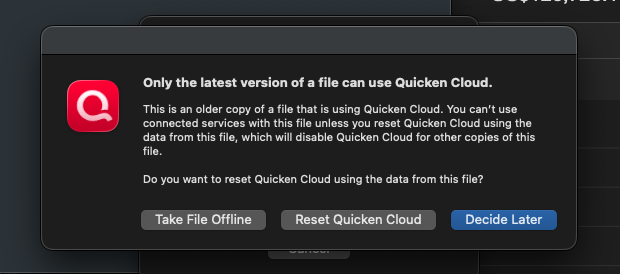
- When restoring the backup, did you see a prompt asking whether to take the file offline, reset the Quicken Cloud, or decide later?
- Where is your Quicken data file currently stored? You can check by opening Quicken, going to File, and selecting Show [file name] in Finder.
- Is your file being backed up or synced using any third-party services such as Carbonite, OneDrive, iCloud, or Backblaze?
I look forward to your response and am happy to help further.
Quicken Laura
Make sure to sign up for the email digest to see a round up of your top posts.
0 -
For the reasons you — and many others, over the years — have described, I do not enable Quicken's Cloud Sync. At all. Ever.
I would find it convenient to be able to access the mobile app or web interface when traveling, or when wanting to answer a question about some long-ago expense — but I am unwilling to risk any unwanted or hidden changes to my 30+ years of carefully curated data. Using the mobile app/web interface is not nearly as important to me as my data integrity, and reading ongoing periodic reports like yours has kept me firmly convinced to forego any benefits from the cloud sync in order to avoid any potential risk. If I ever read an acknowledgement of sync errors from Quicken, and that they had found and fixed the problem(s), I'd be delighted. But I've never seen Quicken publicly address it, and too many people report similar issues, so my solution is to leave Sync turned off.
Sorry, that's no help with your current problem. 😉 I just wanted to empathize and tell you my far-from-ideal way or avoiding it.
If this truly did happen in conjunction with the release of version 9.0 — which may or may not be related — and you're pretty sure the corruption wasn't present as recently as a week ago, then you may want to consider restoring a backup file from last week before you first installed 9.0. Verify that your data is correct in the backup. Then, you can see if the problem recurs after you download transactions. Or you can immediately turn Sync Off and go to Settings > Connected Services to click Reset on the Cloud file, which will wipe out any existing transactions and login credentials from your data stored on their Cloud servers.
Quicken Mac Subscription • Quicken user since 19931

