Options transactions downloads for Fidelity

There is never a dull moment with Quicken and Fidelity. Since yesterday, option transactions are not getting downloaded properly. Instead of a "SPY PUT Sell ….." it is showing a deposit with a description of "You Sold Opening Transaction Pu"
Is it a known issue? Is there any fix? I am running R67.7 Build 27.1.67.7
Thanks
Answers
-
Describe the option. What symbol, in Q, does it have? What shows at Fidelity's website?
And, I suspect that "Pu" is a truncation of Put, and a sell would result in a deposit to your account.
Q user since February, 1990. DOS Version 4
Now running Quicken Windows Subscription, Business & Personal
Retired "Certified Information Systems Auditor" & Bank Audit VP0 -
@NotACPA … I've also observed this problem with selling options short.
In my specific case, upon download, Quicken asked me for information regarding an unknown security (typical for options as older ones expire and new CUSIP ID are issued. In my case, I sold a covered call against shares of XLP. Upon download, Quicken asked me about Symbol XLP260515C86, which I renamed to XLP May 15 2026 86.0 Call. This step has been normal for years, expected.
Starting around April 1, 2026 (approximately), the sale of short options is showing as a simple deposit. Quicken shows these as simple deposits in the downloaded transactions pane. That's also how they get accepted into the register (simple deposit). See attached comparing Fidelity transaction history to how this got accepted into the register (it was later that I discovered it's already a simple deposit in the downloaded transactions pane, even after I've given it my standard naming).
Because these are seen as simple deposits, it triggers a Quicken message about a mismatch in shares reported (see attached). For each one of these, I need to manually update to ShtSell, the security name (which was properly saved into my security list), number of shares and price.
These problems seem specific to Fidelity since the interface changed to EWC+ and whatever mapping is getting done to translate the Fidelity transactions to Quicken transactions. It has worked perfectly for Charles Schwab (previously as TDAmeritrade) using EWC+ for at least 15 years, properly realizing ShtSell and CvrShrt for these types of transactions.
I've reported these using Quicken, Help, Report a Problem.
0 -
This looks like an Intuit issue, rather than a Quicken issue, as Intuit does the interfaces for Q.
Have you reported this, yourself, preferably using either the SUPPORT link at the top of this page or HELP, Report a Problem from within Q?
And, while I'm familiar with ATP, can you also post a graphic of what shows on Fidelity's website since Intuit uses the website info, not ATP, to gather data for download.
Also, thanks for using a graphics format, rather than a PDF that some want to use. GIF and JPG formats are just easier to use on this forum.
Q user since February, 1990. DOS Version 4
Now running Quicken Windows Subscription, Business & Personal
Retired "Certified Information Systems Auditor" & Bank Audit VP0 -
There seems to be reports that Schwab clients are experiencing the same issue. Which further suggests that it's an Intuit issue.
Q user since February, 1990. DOS Version 4
Now running Quicken Windows Subscription, Business & Personal
Retired "Certified Information Systems Auditor" & Bank Audit VP0 -
Here is an example from past week when it was working fine
Action: Sell
Security: PUT (SPY) STATE STREET SPDR MAY 12 26 $680 (100 SHS)
-1 -
I haven't downloaded a Schwab option spread transaction in several weeks (4/16), but that one worked fine for me. Reading this thread, today, I see other have had problems with that interface that hadn't affected me.
Today… I downloaded quite a few Fidelity transactions, carefully taking screenshots to get a comprehensive view. Well, these all worked perfectly for me, including 4 ShtSell and 3 CvrShrt. I've not seen these work correctly for Fidelity since it transitioned to EWC+ last year. This is a promising, not just for correcting the short sell as Deposit, but I'm again seeing downloads properly as ShtSell and CvrShrt with Fidelity transactions.
1 -
Hi All,
Thanks for updating this thread with your posts. Users who are encountering this issue. I recommend sending a report via Help > Report a Problem.
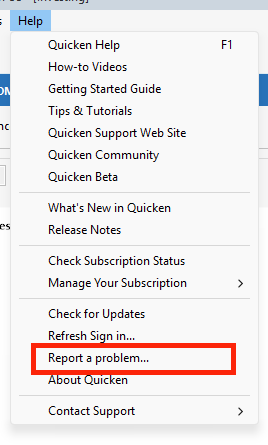
Once you’ve uploaded the logs, please let me know so I can add them to the investigation ticket [CBT-1126].
I look forward to your reply!
[CBT-1126]Quicken Carlos
Make sure to sign up for the email digest to see a round up of your top posts.
0




