R67.7 Repeated 2nd-level sub-categories in custom reports

I would appreciate an explanation why 2nd-level sub-categories when customizing reports are repeated and nested since QWin R67.7? What is the benefit for such behavior?
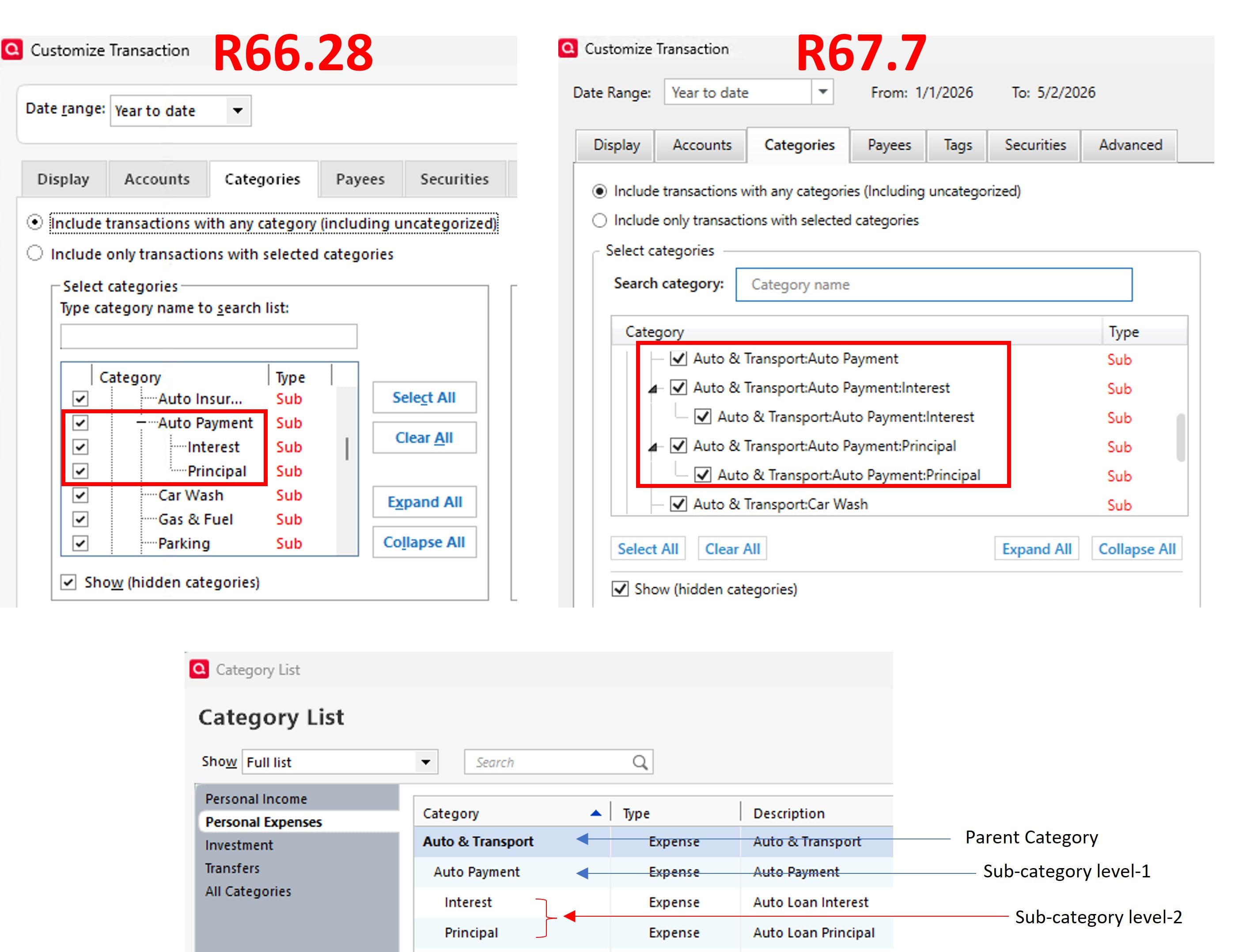
The image below describes it best where you see three in R66.28 vs five in R67.7. You need to have a 2nd-level sub-category to see this. e.g.
Auto & Transport
> Auto Payment
> > Interest
> > Principal
- Q Win Deluxe user since 2010, US Subscription
- I don't use Cloud Sync, Mobile & Web, Bill Pay
Answers
-
One more observation: In the example above, the Auto Payment is collapsible (in the left image) since it the parent of Interest and Principal - the expected behavior. In R67.7 however it is not collapsible (right image), and that does not make sense.
Another issue I discovered was running a saved report after adding a new category where the checkbox to show the new category does not work as well as it did.
It appears that the R67.7 redesign to the reports custom settings section has unfortunately introduced various undesired consequences - such as this other one.
- Q Win Deluxe user since 2010, US Subscription
- I don't use Cloud Sync, Mobile & Web, Bill Pay2 -
I have only 1 category that goes this deep and haven't used it in a few years so I never noticed this behavior. I ran an old saved report (business expenses) back far enough to show some values. Went to modify the categories and saw the same thing you did (well, different categories of course but same effect).
What was weird, if you uncheck the lowest level sub (only the lowest one) and select OK to rerun the report, the subcategory remains. You need to go back and uncheck the next higher level to remove it from the report. Now go back to the category and add it back by checking only the lowest level (next level up remains unchecked). The category is still absent from the report. Now go back and check the higher level, the category returns.
This is very different from the behavior of categories with only 2 levels. I can select the lowest level and have only those selected appear. Then uncheck to exclude them. Definitely a usability/UI issue.
2 -
Agree that this is a usability/UI issue. I am still wondering if this change was by design or they accidentally caused various UI issues when they opened the hood.
It would be great if the moderators could follow up with the teams and let us know if this specific 2nd-level subcategory repeat issue is an intentional UI change that we have to get used to, or an unintentional one that we can look forward to a cleanup in the future.
Besides that, look at the image of the R66.28 again with such a simple and clean UI - all it shows is Interest. And now very cluttered in R67.7 where it shows Auto & Transport: Auto Payment: Interest. Wish they would consider reverting back to the simple UI of the prior release.
I have no plans to update my primary setup to this release.
- Q Win Deluxe user since 2010, US Subscription
- I don't use Cloud Sync, Mobile & Web, Bill Pay1 -
I agree this is a step back in UI design. Note that the "improved" Reports and Graphs Center has been available for over two years, enabled by the Early Access Preferences setting.
There have been several discussions identifying issues with the new design, but most of them were never addressed; users were just advised to switch back to the old version.
I wonder why Quicken goes to the trouble of rolling out "early access" features if they don't listen to the feedback they receive.
QWin Premier subscription1 -
The Early Access Preference setting option is no longer available in R67.7. Now we can't even provide proactive feedback on pending new features, anymore.
Quicken Classic Premier (US) Subscription: R67.7 on Windows 11 Home
0


