latest quicken update (27.1.67.7) causing unexpecting close

Recently did this update. When adding a bond investment quicken accepts the transaction but then closes. Was able to get right back in noting the transaction did record. Not sure yet if this will occur with other investment transactions but suspect it might. Quicken does seem to update all accounts without issue. Transactions in other accounts (checking, savings) so far not closing quicken. Seems unique to investments. Did move data file off OneDrive to local computer as recommended. No other changes done. Please investigate cause. thanks!
Comments
-
Hello @Steven,
Thank you for reporting this and for the detailed information.
Moving the data file off OneDrive was a great first step, so I’m glad you’ve already done that.
Since the update, have you seen this issue happen again when entering investment transactions, or has everything been working normally since then?
If it does occur again, please let us know and include any additional details (for example, whether it happens with specific types of investments or transactions), as that can help narrow things down.
Thank you!
-Quicken Anja
Make sure to sign up for the email digest to see a round up of your top posts.1 -
Glad I spotted this - I've separately reported similar here with R67.7
I have downgraded to R66.28 and my crashes have gone away.
0 -
Thank you for adding to this discussion.
A couple of things I didn't see mentioned in the thread you linked:
- Where is your data file located?
- Is your file being backed up/synced by any third-party services like OneDrive, Dropbox, or Carbonite?
Looking forward to your response!
Quicken Alyssa
Make sure to sign up for the email digest to see a round up of your top posts.
0 -
Datafile is on local disk - c:/users/username/Documents/Quicken/blah.qdf - what I believe is the default location
I don't use any of those 3rd party backup services for my data0 -
Thank you for following up.
Were you able to try the steps @Quicken Laura recommended in the other thread?
I would recommend returning there and trying those steps.
Let us know how it goes!
Quicken Alyssa
Make sure to sign up for the email digest to see a round up of your top posts.
0 -
Hi Anja:
Since reporting this I have not seen any additional issues. Did not buy any bonds recently so when we do, I will note the behavior of the transaction. Interesting the rest of quicken is acting normal as I can tell. I will keep you updated. Thanks for your help!
Steve
1 -
Quicken Alyssa
Make sure to sign up for the email digest to see a round up of your top posts.
0 -
@Quicken Alyssa @Quicken Anja Has it been determined if these reports are edge cases or indicate a problem with the release? I have delayed installing it due to the couple of user posts of closing/crashing. At the time of this writing it is still being offered via Help/Check for Updates thanks
0 -
Thank you for posing this question.
This is currently not a known or widespread issue, so yes, these would be considered edge cases. I don't think you need to avoid updating.
Save a backup, and then perform the update.
Back up in Quicken for Windows
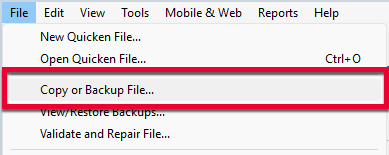
1. Select File > Copy or Backup File...
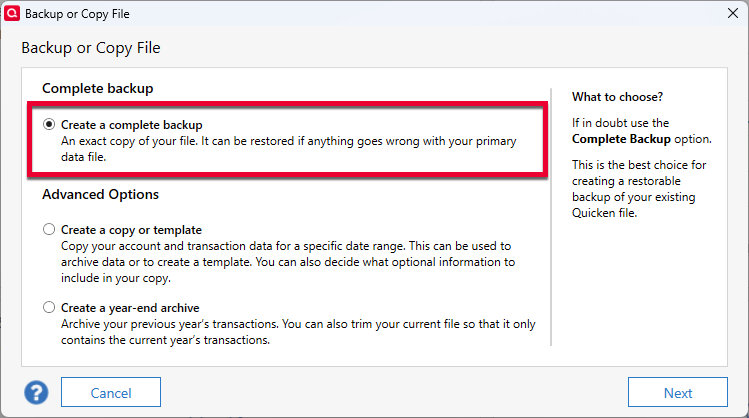
2. Select Create a complete backup and click Next.
3. To make it easier to identify your latest backup, you can put a check next to Add date to backup file name.
4. Quicken will show you the location where your backup will be saved, along with the name of the backup file (this is typically your Quicken file name, followed by .QDF-backup).
- The default save location for backup files is C:\Users\[your name]\Documents\Quicken\BACKUP, and we recommend leaving this unchanged.
- If you need to change this location, click Change... then select a folder to save the backup to. After making your selection, click Save.
5. Click Create Backup.
If you are unhappy for any reason, we can always roll you back to the previous version.
Let us know how it goes!
Quicken Alyssa
Make sure to sign up for the email digest to see a round up of your top posts.
1 -
Hi Alyssa
I added a bond investment to my portfolio earlier and quicken accepted the transaction without closing/crashing this time. As mentioned previously other investment transactions continue to behave normally. The program appears stable. I agree with you there seems to be no reason not to update to the latest version. I have been using quicken since 2009 and experienced its share of glitches and bugs along the way. The program has improved significantly since that point and so have the support. If any issues develop going forward, I will let you know. Thanks for the help, always appreciated!
0

