How do I keep Quicken from auto updating?

There seems to be major problems with R67.7 (after it was installed, Quicken kept shutting down on its own), so I reverted to the prior revision. I have ignored the repeated suggestions to update to R67.7 again, but when I just opened the program it updated itself to R67.7. Fortunately, I have the patch and can revert back to the prior version. My question is, "Is there any way that I can prevent Quicken from updating on its own in the future?" If not, I'll have to keep playing this "I revert, you update" game with the program until the next patch comes out.
Thanks for any assistance.
Answers
-
In Windows 11, click on the Settings gear. Click on the magnifying glass at the top of the Settings window and type UAC to open the User Account Control settings. Set the slider to the second from the top position and click on OK.
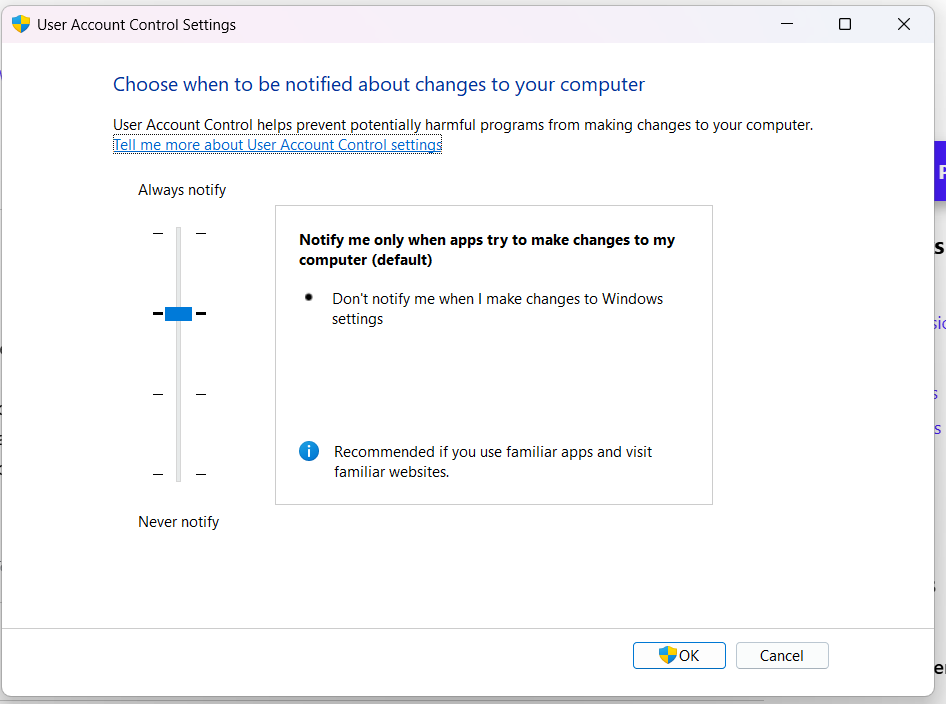
With this setting, you will always be prompted before Quicken makes changes. Select No if you do not want to accept the new version.
QWin Premier subscription0 -
An even more extreme way (my personal method) is to create a outbound Firewall rule that blocks the quickenPatch.exe program from communicating with the Quicken servers to see if there is an update available.
The downside to this approach is that if you try to check for updates from the Quicken Help menu, it will fail. The only way to know if there is an update available is to check the website at this link:
-splasher using Q continuously since 1996
- Subscription Quicken - Win11 and QW2013 - Win11
-Questions? Check out the Quicken Windows FAQ list1

