Asset Allocation Screen to Actual Allocation Drill-down: Simple Investment Accounts Not Selected

Hi all,
I'm a user of Quicken R67.7, and I've noticed the following behavior on the Investing→Allocations screen.
If All Accounts \ All Securities are selected, the Actual and Target pie charts are shown correctly. However, when double clicking the "Actual" chart to see a larger view of the current allocation, it seems that Simple Investing accounts are not selected by default for the chart in the pop-up report.
I can select and enable these accounts to appear in the report, and they appear correctly, but this choice is never retained. I've found that I repeatedly have to re-select the unselected accounts in the pop-up report despite All Accounts\All Securities being selected in the underlying window.
I would expect the pop-up report to honor the All Accounts \ All Securities setting from the underlying screen, regardless of whether they are Simple or Complete. I know it seems like a minor nit, but I'm curious whether others have noticed this or if it perhaps a very small bug.
Thanks,
Brandon
Comments
-
Apologies! I posted this in the wrong topic, and I'm not sure I can move it.
0 -
Hello @Brandon10,
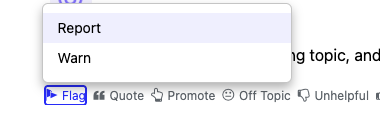
If you need a post moved, you can ask a moderator to move it. You can reply to your post, asking a moderator to move it, or you can click the Flag icon and select Report.
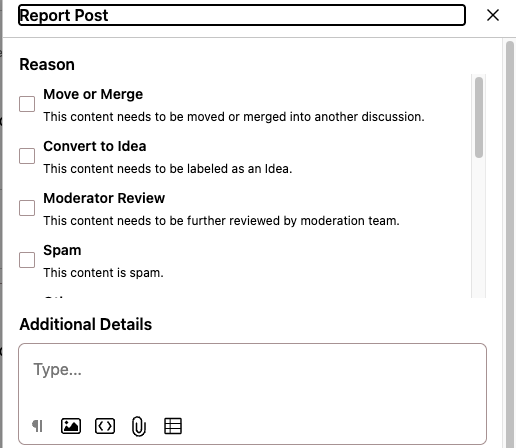
Then, select the most applicable reason to report and fill in the details in the Additional Details field.
I hope this helps!
Quicken Kristina
Make sure to sign up for the email digest to see a round up of your top posts.
0
