Closing Accounts

Comments
-
Hi @crescere,
Thanks for reaching out to the Quicken Community.
There are multiple ways to close an account in Quicken. You can do it from the sidebar, the Display Options tab, or through Manage Hidden Accounts.
Close an account from the sidebar:
- On the account sidebar, Ctrl+Click or Right-Click the account you want to close.
- Select Edit/Delete Account.
- Go to Display Options and choose Close Account.
- Type yes to confirm, then click OK.
Close an account from Manage Hidden Accounts:
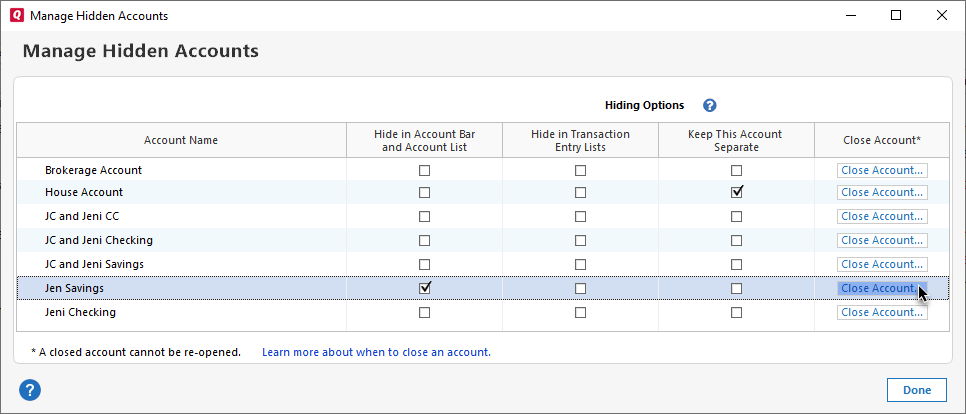
- Go to Tools > Manage Hidden Accounts.
- Select Close Account next to the account you want to close.
- Type yes to confirm, then click OK.
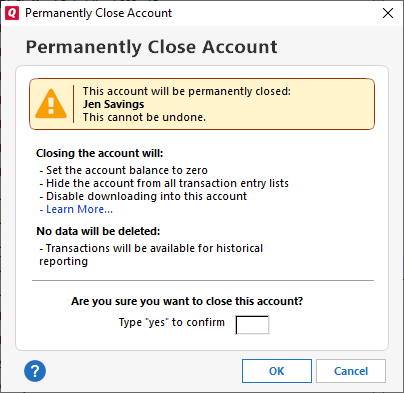
Quicken will automatically:
- Add an adjustment to bring the balance to zero
- Disconnect the account (if it is connected)
- Mark the account as hidden and move it to the Hidden Accounts group
You can also review our support article on how to hide, separate, or close an account.
I hope this helps!
Quicken Carlos
Make sure to sign up for the email digest to see a round up of your top posts.
0 -
You may want to further investigate the entry for Shares Transferred between Accounts. That would be selected to move all (or some) holdings from one account to another. In principle, you would enter that from the older account so that all the assets in that account would get transferred to the new Schwab account leaving the old account empty. At that point, you might close the old account.
For that type of transfer, I recommend:
- Creating the new (Schwab) account first as a manual account
- Transferring the assets, and then
- Set up online connectivity to the new (Schwab) account.
Almost invariably, your first download from the new FI (Schwab) will not have the full detail about your existing holdings. Making the transfer within Quicken first keeps your records more contiguous. Post back if you need more details.
1 -
When I close the account, will I still be able to reference it in the future?
0 -
@crescere , thanks for following up.
Yes, you will still be able to access the data for that account after it has been closed or hidden. The account information is retained in Quicken, so you can view historical transactions, reports, and balances as needed. Closing the account primarily stops it from being actively used for new transactions or syncing, but it does not delete the underlying data.
Quicken Carlos
Make sure to sign up for the email digest to see a round up of your top posts.
0 -
Note that closing an account is irreversible. For that reason I leave old unused accounts empty and not connected for downloading.
QWin Premier subscription6 -
I DO close accounts in Q … but only after I've closed that account in real life. Since both actions are irreversible.
Q user since February, 1990. DOS Version 4
Now running Quicken Windows Subscription, Business & Personal
Retired "Certified Information Systems Auditor" & Bank Audit VP0 -
Thanks to all who answered. That was very helpful.
0 -
Once all the money has been transferred out to new account(s), I rename the old account that has a $0 balance with an "x" or "x-" as the first part of the account name and hide it from the list of accounts I see every day. I don't know the mechanics of doing an official "close account," but I'd rather not do anything that I cannot undo.
0


