AMEX CC-601 Error

It has been about a month since I have been able to download transactions from American Express. Still getting this error message, "We cannot find an account with non-zero balance or with any transaction in the last 12 months." I know this is a known issue but it sure seems to be taking a long time to fix it. Is there any update on when this issue might be resolved and since this is a Quicken issue. [Removed-Disruptive].
Comments
-
Hi @twilson,
Thanks for reaching out to the Quicken Community!
We understand that this issue can be frustrating. This issue with American Express (FDP-101/CC-601) is a known issue and is currently being actively investigated under ticket #11617102.
It has been ongoing and involves multiple parties, including Quicken, the aggregation service provider, and the financial institution, which adds complexity and may affect the resolution timeline.At this time, there is no ETA. I recommend monitoring the Community Alert, as it will be updated when new information becomes available.
Quicken Carlos
Make sure to sign up for the email digest to see a round up of your top posts.
0 -
After moving my data file as you recommended, my one step update completes for my bank accounts and Visa account but doesn't download AMEX transactions. I have followed the instructions to turn off sync and reauthorize the accounts at American Express. It says the three AMEX accounts are reauthroized, but transactions still don't download.
0 -
Hi @Park Price,
Thanks for taking the time to reach out to the Quicken Community!
After checking my internal tools, I found an FDP-101 error, and there is currently an open alert related to it. The issue has been escalated internally, and our teams are actively working toward a resolution.
In the meantime, as a workaround, you can try connecting using American Express Delegate.
Before following the troubleshooting steps below, I recommend creating a backup of your data file.
Once the backup is complete, you can proceed to deactivate and reactivate the accounts.
- Go to Tools > Account List.
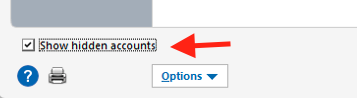
- If applicable, click Show hidden accounts in the lower-left corner.
- In the Account List, select the account you want to deactivate, then click Edit.
- In the Account Details window, select the Online Services tab.
- Click Deactivate next to the service you want to disable.

- Click Yes to confirm.
Please repeat this process for all American Express accounts.
- Go to Tools > Add Account.
- Select American Express Delegate for the deactivated account(s).
- If prompted, select the connection method.
- Enter your credentials and click Connect.
- When the list of located accounts appears, choose Link next to each account you want to reactivate.
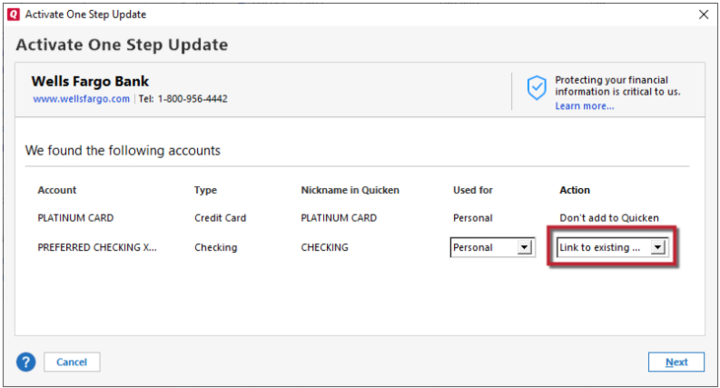
- Click Next, then Done on the final prompt.
I hope this helps! Let me know how it goes.
Quicken Carlos
Make sure to sign up for the email digest to see a round up of your top posts.
0 -
Well, we are at about 6 weeks since this issue was reported and still no ETA for a fix? [Removed-Rant]. I mentioned in my first post about this that it seems to me that a fee rebate might be in order since we pay for a service and we are not getting it. [Removed-Rant] Like you did the first time calling it [Disruptive]. I am not trying to be disruptive, I just think that we are getting very poor service. I worked in the software business for 10 years and am familiar with bugs, bug fixes and hot fixes and there is no reason this fix should take this long [Removed-Disruptive]. IMHO
0 -
Hi @twilson,
We understand how frustrating this ongoing issue has been, and we appreciate your patience while our teams continue working toward a resolution. Since this issue involves multiple parties, the ETA may be impacted.
In the meantime, if you haven’t already tried this workaround, I recommend connecting using American Express Delegate.
You can follow the steps outlined in the previous comment:
Thank you again for your patience, and please let us know how it goes.
Quicken Carlos
Make sure to sign up for the email digest to see a round up of your top posts.
0 -
My American Express accounts stopped syncing with this error:
CC-601 - We cannot find an account with a non-zero balance or with any transaction in the last 12 months. Please check on your FI website and try again.
0 -
Same error here. Just started this week. CC-601 on American Express.
I deactivated the online enrollment, and then reactivated, which did not help.
0 -
Re: Quicken Ticket
#11617102.Same here now: CC-601 on American Express accounts.
"We cannot find an account with non-zero balance or with any transaction in the last 12 months."
Deactivating and reactivating did not help. In fact, it messed up another account, even though I linked it back to its own account in Quicken when reactivating.
0
