Register displays one entry ONLY in out of date order

Windows 10, Quicken Classic Delux Version R67.7
A transaction dated 3/13/2026 is displaying between two entries for 12/31/2025. This is a brand new issue. I have tried clicking on the calendar, rather than manual entry, but no help.
I validated the file without any issues.
"[Fri May 08 01:50:47 2026]
File: "C:\Users\Chrystin\Documents\Quicken\CPPLDP_2020_0101 NEW FILEckdate-202501119"
QDF:
Validating your data.
QEL:
No read errors.
QEL:
All internal consistency checks passed.
[Fri May 08 01:50:55 2026]
Maximum security reference: 4, number of securities: 4.
All security references are within the normal range.
Validation has completed."
No clue what to do to fix this. NB please do not suggest that I have my register date set improperly. Also, the date on the transfer checking file is displaying properly. On the Credit Card file it is displaying improperly.
Comments
-
Hi @chrystinp ,
Thanks for reaching out to the Quicken Community and for sharing the troubleshooting steps you’ve already taken.
Based on your description, it sounds like there may be filters applied in the account register. I recommend checking the register filters to make sure nothing is limiting what is displayed.
To do this:
- Confirm that the register is sorted by Date by clicking the top of the Date column in the account register. A blue arrow should appear next to the Date column to confirm that the register is sorted by date.

- If the register is already sorted by date and the Reset button is available, I recommend selecting it to clear any active filters.
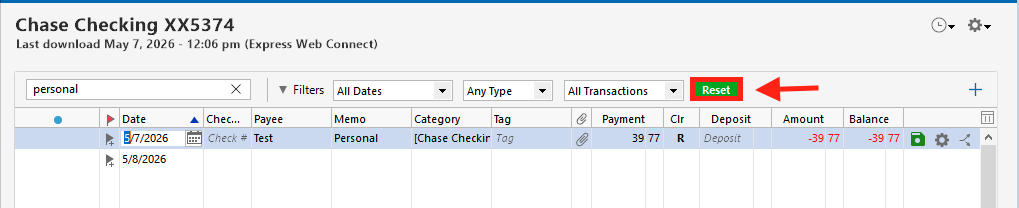
You can also review our support article about sorting the register for additional guidance.
I hope this helps! Please let us know how it goes.Quicken Carlos
Make sure to sign up for the email digest to see a round up of your top posts.
0 - Confirm that the register is sorted by Date by clicking the top of the Date column in the account register. A blue arrow should appear next to the Date column to confirm that the register is sorted by date.
-
In addition to the suggestion from @Quicken Carlos, I'd recommend that you shorten your data file name to something that adheres to the {no more than 8 characters}.QDF format that Q expects.
There are sometimes problems with names where there are spaces in the name to the left of the DOT and/or spaces in that portion of the name.
Q user since February, 1990. DOS Version 4
Now running Quicken Windows Subscription, Business & Personal
Retired "Certified Information Systems Auditor" & Bank Audit VP0 -
Hello, thanks y'all for trying to help. Yes, my files are sorted by date properly. No reset button displaying and search yielded no help for that.
I finally just tried sorting back and forth in the credit card account. It finally took with the dates now ordered properly. Took several times.0 -
Hi @chrystinp,
We’re glad to hear that the steps above worked for you and that everything is now working as expected. Your update may also help other users experiencing the same issue.
If you encounter any additional issues, please do not hesitate to reach back out.
We’re here to help!
Quicken Carlos
Make sure to sign up for the email digest to see a round up of your top posts.
0

