categories

I've noticed in the past few days my categories are not auto populating after I select a transaction with a long time vendor from an OSU download. I've not made any changes to my preferences recently. Windows 11 Enterprise, Q B&P, version R67.7, Build 27.1.67.7
Also noticed when I manually enter a transaction with a long time vendor, the category is not populating even when I select the remembered vendor/category and hit enter…the vendor field gets filled but not the category.
Q user 35+ years…
Comments
-
You may not have made any changes to Preferences, but a Quicken software update a couple of months ago has been accused of changing some Preferences.
Please review this Preferences / Data Entry & Quickfill view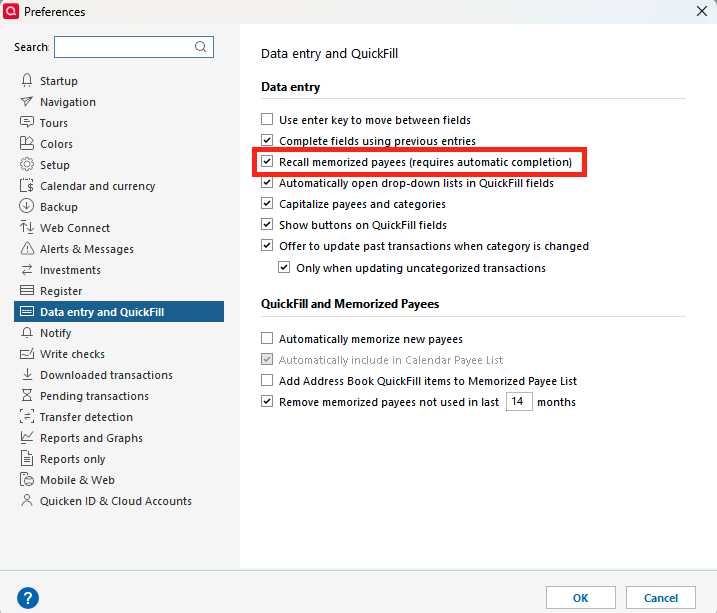
Ensure that both the 2nd and 3rd setting are checkmarked. If not, select them, click OK. Close and restart Quicken.
See if that solves the problem.0 -
3rd one was unchecked. I'm the sole user and I didn't do it.
Thankful to you and the community.
And Q wonders why I don't give them good reviews…
0 -
Hello @John Patriarca,
Thank you for letting us know your preferences changed without your input. Was this the first time it's happened? You mentioned that you noticed it a few days ago; did it start after you upgraded to R67.7?
If you would like to help us investigate the issue with preferences changing after an update without user input, please navigate to Help>Report a Problem and send a problem report with log files attached.
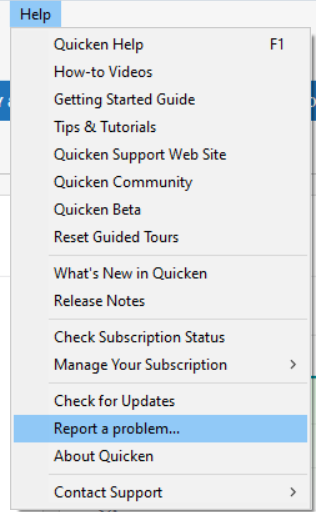
If you send a problem report, please post to let me know.
Thank you!
(CBT-794)
Quicken Kristina
Make sure to sign up for the email digest to see a round up of your top posts.
0

