Lack of options: won't correctly add accounts, or connect to bank properly

I'm in the middle of switching all my daily/admin work from from mac to windows and stuck with massive quicken failures. Been using chat to figure this out for about a week and it's pretty well stumped calling my issues "not a normal setup mistake"
Using QC-Deluxe / Version: R67.7 / Build 27.1.67.7 / latest version for my Thinkpad
-I exported all my accounts from mac to the windows and it all the past transaction data seemed to transfer fine
-began connecting accounts to institutions (eg paypal, credit cards etc) and most worked fine
-My credit union, UFCU, is the only one having trouble. I have a couple savings, a checking and a credit card through them.
-after connecting all accounts online everything seemed to connect fine. The problem is, in the case of UFCU only, no new transactions were actually downloaded, and no indication was given by Quicken there was in error. to the contrary, it said All new transactions were downloaded.
- Yes, all filters were off. there's 100% no new transactions under this account. Other accounts downloaded new data fine.
- I disconnected all the accounts with UFCU and under "edit accounts"; deleting every piece of data in all the fields and tried again fresh
- NOW… when I try to connect the accounts, all 4 of them (savings (x2), CC, checking) only give a pulldown option of "Credit Card" where it says "account type" - this is right after entering bank, and login info screen - the next field on this same page is for whether to start a new account or add to existing account.
- So I let just the credit card from UFCU go through and it did. Only had one new transaction and it downloaded fine.
I'm stuck with what to do next. paying anything for a program that won't download automatically isn't going to fly so, no, not resorting to manually entering transactions.
Hoping there's something I can do under the hood to clear cache or bunged up files?
Comments
-
Hello @ericbettencourt,
Thank you for letting us know you're encountering this issue. When reconnecting the accounts, what process were you using? If you haven't done so already, please try making a backup of your file, then reconnecting the problem accounts by going to Tools>Add Account, and following the prompts. When you get to the Add/Link screen, make sure to carefully link to the existing accounts in your file.
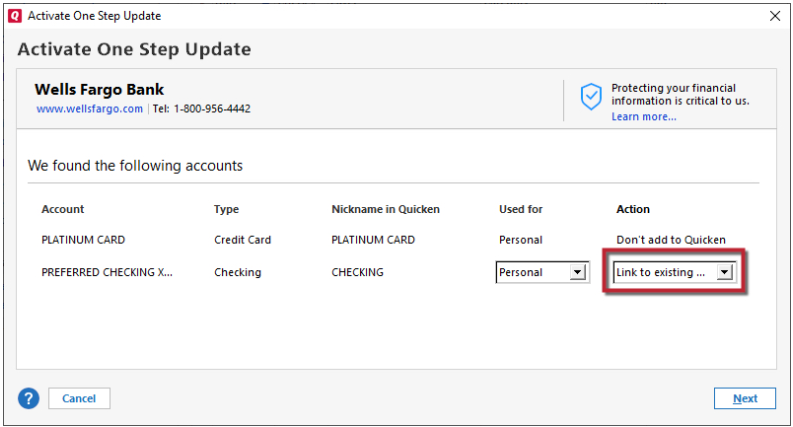
Please let me know how it goes!
Quicken Kristina
Make sure to sign up for the email digest to see a round up of your top posts.
0

Categories
- All Categories
- 1 Categories
- 37 Announcements
- 238 Alerts, Online Banking & Known Product Issues
- 18 Product Alerts
- 276 Welcome to the Community!
- 49 Before you Buy
- 1.4K Product Ideas
- 56.4K Quicken Classic for Windows
- 10.5K Quicken Classic for Mac
- 69 Quicken Mobile
- 54 Quicken on the Web
- 90 Quicken LifeHub