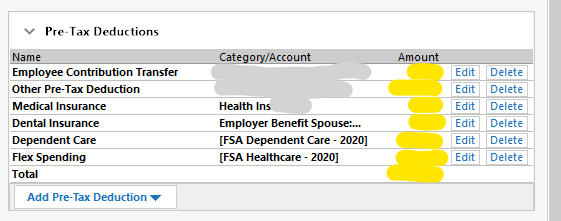
Prior to the most recent update it was possible to edit a paycheck by entering amounts directly into the "Amount" fields (in yellow). Tabbing from field to field would select the amount for quick editing.
The fields are no longer accessible; instead you have to click edit, enter the amount and click 'OK".
I set up a paycheck that has the average amounts in it because my pay and deductions change every pay period. It was easy to just tab through the fields and enter the correct numbers. Now I have 14 fields that require 3 clicks to enter rather than just tabbing through.
Is this supposed to be an improvement? Maybe it's a setting that I messed up?
Quicken Home, Business and Rental Property - Year 2020 - v R2828 - Build 27.1.28.28


