I'm excited to announce the release of v6.3. This is an exciting release with lots of great features many of which customers have been asking us to add for a long time.
Investing Dashboard and Simple Investing
We're adding a new investing dashboard that will show you a high-level view of your holdings, top movers, security, and asset class allocation pie charts. We look at this as a quick way to get the pulse of your investments without having to dive into the nitty-gritty.
We also allow you to track your investments using simple or detailed tracking. Many customers find investments confusing and want to avoid having to deal with cost basis and individual transactions. This is why we created the Simple Investment Tracking mode. Customers will primarily use the dashboard to track their investments but the portfolio view is there if they want it. In this mode, you will not have to deal with the transaction view. If you want to control every detail of your investment portfolio including tracking capital gains for tax purposes, then you should use the Detailed Investment Tracking mode.
Budget Detailed Mortgage Payments
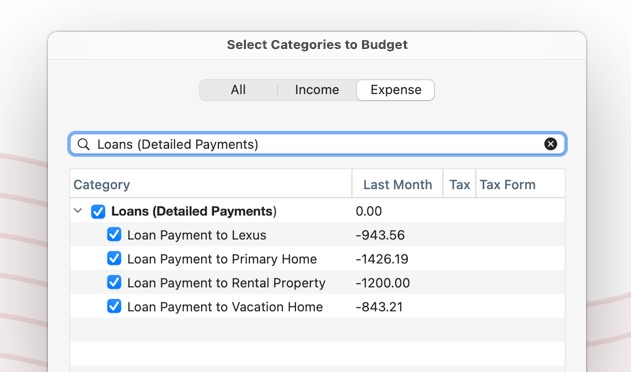
This has been a long-time requested feature and it's taken far too long to add it. To get to this point we first had to get account filtering to work in budgets. Next, we got transfers working, and now we have the detailed loan payment. The way this works is in the category picker, under the Loan (Detailed Payments) section you will now see your mortgage payments so you can add them to the budget.
Account Issue Indicator on the Sidebar
We have also added a new feature where transaction download issues are surfaced and displayed on the account sidebar. Instead of a Blue dot which means everything went well, you will now see an orange dot if there are problems. This will make it easier to spot issues without having to look at the Account Status window.
Also, when you click on that account, you'll see a banner at the top of the screen that will allow you to start the process of trying to fix the issue.
In addition, we've provided an option to turn off the account status window so you can simply rely on the sidebar dots to be notified of an account issue.

Auto-Reconcile
As you’ve seen over the past couple of releases, we’ve been updating the reconcile feature in Quicken. First, we added Reconciliation History. Then we updated the old Reconcile screen to match the new look. Finally, we're adding the ability to auto-reconcile. This is a huge time-saving feature for those of you that use online balance reconciliation. Now, you can let Quicken automatically reconcile all the transactions in an account if the online balance matches your Quicken balance.
Dark Mode
Finally, we've created a new section in Preferences to allow you to get an early look at new upcoming features before they are completely done and officially released. The first feature we're introducing is Dark Mode. Dark Mode is a huge amount of work because every single screen and window in Quicken has to be updated. We've got most of the basic screens looking pretty good so we think the early access Dark Mode is pretty usable but you will find cosmetic issues throughout the product where a screen doesn't quite look right or something is too dark or on a white background and stands out. Anyway, instead of holding up this feature before it's completely done, we've decided to allow those that want to try it out to be able to turn it on and use it. For those of you that use Dark Mode, we hope this early look at the feature makes using Quicken a little more enjoyable for now until we can work out all the kinks and can release it officially.

Thanks,
Quicken Mac Dev Team
UPDATES- 7/29 - Staged release to a small segment of customers. If you want to try it out, select Check for Updates under the Quicken menu to be able to upgrade to v6.3.
- 8/6 - Shipped 6.3.1 that includes fixes for multi-currency issues in Portfolio View and Investment Transaction view when selecting a grouped account item on the sidebar such as Investing, Brokerage, Retirement, or Education. Also fixed issues with Portfolio View settings not getting saved or restored.
- 8/23 - Shipped 6.3.2 that restores the calendar view colors back to the way they looked before and we also made the investment dashboard match the account selection of portfolio and transaction view in the Investing, Brokerage, Retirement, and Education groups. We're still in a limited release but should be able to open this up to everyone shortly.