Vanguard OL-301A error again
Comments
-
I just connected to Vanguard so the issue seems to be resolved.
 0
0 -
Worked for me this morning too.
0 -
The same error msg. happened to me yesterday on Fri., March 28th. I did an update this morning, that is I updated all of my accounts. My Vanguard accounts updated without a hitch. All is well. I have both Quicken and my Windows 11 O/ up to date.
0 -
Hello All,
If you are still encountering issues connecting with Vanguard, please post to this discussion to let us know exactly what issue you're seeing. Additionally, please navigate to Help>Report a Problem and send a problem report with log files attached so that we can further investigate the issue.

Thank you!
Quicken Kristina
Make sure to sign up for the email digest to see a round up of your top posts.
0 -
I continue to get error 16503 when trying to update Vanguard accounts.
 0
0 -
Seems like the problem with Vanguard update is becoming an "on again, off again" problem!
0 -
Hello All,
We do now have an active alert for this issue with Vanguard. You can follow this link to access that alert, where I suggest bookmarking it for all further updates and new information. You will also find instructions on how to download transactions directly from Vanguard and import them into Quicken for a workaround while we investigate a resolution to this issue.
Thank you all!
-Quicken Jasmine
Make sure to sign up for the email digest to see a round-up of your top posts.
0 -
I did not have issues the last couple of days as others, but today I get this:
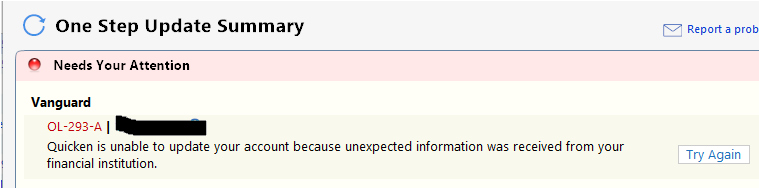 0
0 -
Over the last couple of days, when I try to Connect to Vanguard by selecting within Quicken to Update Transactions, it opens a Web Browser and goes to a Vanguard Website. This is quite out of the ordinary, usually Quicken would connect and download any available transactions. Today I reverted to using a QFX file (created and downloaded from VG), and then imported that using Quicken’s file import.
0 -
Heads up for all….I did not Manually Update any of my vanguard accts….I have 3…during the 295-A issue and when the issue was corrected…I did not have any issues as so many did getting their accts to Update. So if you can just wait…avoid the manual work around
0 -
OL-293-A right now for Vanguard. Seems like it's something different every other day….
0 -
As of this morning, April 5, problems with Vanguard downloads have not been resolved for me. Today's update did not include any of my stocks, only Vanguard mutual fund positions. Also Quicken previously forced a switch from complete tracking to simple.
0 -
@ramatuska Please see the step by step procedure for reconnecting your accounts to Vanguard posted as the 4th item under "Best answers" on Page 1 of this discussion:
If you have not followed this procedure exactly, please try it and let us know if it resolves your problem.
QWin Premier subscription0 -
This was posted by someone else, and a friend shared it with me.
I had the problem and this fixed it for me. The part about "DO NOT USE SET UP NOW", is very important.
- Back up your data file.
- Deactivate the account on the Online Service tab of Account Details.
- Change the tracking method from Simple to Complete on the General tab of Account Details.
- Go to Tools > Add Account (or click on the "+" symbol above the Account Bar List which will open Add Account) to set up downloading with Direct Connect….DO NOT USE SET UP NOW**.**
- During this process you will likely be prompted to decide what to do with the downloaded data. For the accounts that are already connected correctly, make sure to select "Do Not Add". For the account in question that you need fixed, make sure you Link it to the account that is already in Quicken.
https://www.reddit.com/.../are_vanguard_imports_hot.../www.reddit.com
0 -
I am having what may be a new issue now with Vanguard downloads in that neither the deactivate/relink process (which I am quite familiar with after having to do it multiple times) nor the direct Qfx download method is downloading transactions from most of my Vanguard accounts. I have used both methods and both have worked for me in the past. I know I have sell/buy transactions in April and see them in my Vanguard account but they are not downloading to Quicken by either method. I did start a new topic here: [https://community.quicken.com/discussion/7962015/vanguard-transactions-not-downloading-possible-new-issue#latest] since I am not getting any download error messages, just no transactions getting downloaded.
0 -
Thank you for sharing!!
-Quicken Jasmine
Make sure to sign up for the email digest to see a round-up of your top posts.
1 -
New or related issue? For a couple of weeks, Vanguard transactions have not been downloading to my account. I am not receiving any error message now, as I was earlier in the year. I am able to manually push transactions from my Vanguard accounts through the process described above with exporting a QFX file. But would really like the pull function through Quicken to be restored. Suggestions?
Also, I see a few comments from Quicken people about contacting Vanguard, someone there has indicated to someone at Quicken that the issue may be on Vanguard's end. If that is the situation, please provide a Vanguard case or reference number so that we don't have to start with 20 minutes of unnecessary basic troubleshooting that could be avoided by saying "it appears I am also affected the situation in case xxxxx" so that we get to the right level of tech support quickly.
Thanks,
0 -
I have previously posted the following, and it worked for me.
This was posted by someone else, and a friend shared it with me.
I had the problem and this fixed it for me. The part about "DO NOT USE SET UP NOW", is very important.
- Back up your data file.
- Deactivate the account on the Online Service tab of Account Details.
- Change the tracking method from Simple to Complete on the General tab of Account Details.
- Go to Tools > Add Account (or click on the "+" symbol above the Account Bar List which will open Add Account) to set up downloading with Direct Connect….
DO NOT USE SET UP NOW**.** - During this process you will likely be prompted to decide what to do with the downloaded data. For the accounts that are already connected correctly, make sure to select "Do Not Add". For the account in question that you need fixed, make sure you Link it to the account that is already in Quicken.
https://www.reddit.com/.../are_vanguard_imports_hot.../www.reddit.com
0 -
@as_hiker Are the accounts that are not downloading ones that have been connected to Vanguard since before 2009, when they converted to their current in-house brokerage platform? If so, you may need to use Vanguard's old "Pershing" account numbers, which begin with two digits and a letter, like 40V, to reconnect. Please follow the following steps exactly, paying special attention to Step 4.
Some of these steps may not be necessary in every case, but I want to cover as many bases as possible.
- Back up your data file in case something goes wrong.
- Go to Edit > Preferences > Investments and make sure the "Default to Simple investing for new accounts" box is not checked.
- Go to Edit > Preferences > Downloaded transactions and un-check the "Automatically add to investment transaction lists" box if it is not already un-checked. This will give you a chance to review any new transactions to make sure there are no duplicates and the transactions are going to the correct accounts.
- Go to each problem account, click on the gear at the top right and select Edit account details. Make a note of the account name and the Vanguard account number.
For accounts that have been connected since before 2009, when Vanguard converted to their current brokerage platform, you may need to use old account numbers that begin with 2 digits and a V rather than the current 8 digit numbers when re-linking the accounts. If you downloaded transactions using Web Connect (QFX) during the outage, your account numbers may have been changed to the new numbers. If in doubt, open a backup from before the outage, record the correct account numbers, and then return to your working file. You are only using the backup to see what account numbers Quicken was using for Direct Connect before the outage. - Now for each problem account, click on the gear at the top right, select Edit account details, and then the Online Services tab. If it says the account is set up for transaction download, click on Deactivate. Do not click on “Set up now” after deactivating, you must go through the following steps.
- Go to the General tab and now you should be able to select Complete mode. Select that.
- At the top of the Accounts bar, usually on the left side of your screen, where all of your accounts are listed, click on the plus sign. This should open the Add account window. Don't worry, you will not be adding any accounts, you will be linking your current Vanguard accounts in Quicken to the corresponding online accounts.
- Enter Vanguard and you should see the Vanguard logo on the right.
- Below the logo, click on Advanced options. Read the permission screen about Quicken and Intuit and click on Continue.
- Under How should Quicken connect, select Direct Connect. Click on Next.
- Provide your Vanguard username and password, and check the Save to Password Vault if that is how you normally operate. Click on Next.
- You will see a list of all your Vanguard accounts. Any accounts that are already connected will be marked Don't add to Quicken. Accounts that you can connect will have entry boxes. For your existing problem accounts DO NOT SELECT THE DEFAULT OF ADD TO QUICKEN. Instead, select Link to existing account and select the Quicken account to use. Do not guess here. If you don't know which account to select or there are Vanguard accounts that you don't want to track, select Don't add to Quicken and only do the accounts you are sure of. You can pick up at step 7 later and reconnect any other accounts later if necessary.
- Click on Cancel if you are confused at this point and your accounts will not be re-linked. If you are satisfied, click on Done and your accounts should be set.
- Check to make sure any downloaded transactions are going to the correct accounts.
If you have attempted to update while the accounts were in Simple mode, you may see Added or Removed transactions during that time. You will need to delete these. If there are problems, restore the backup file you saved and you will be back to where you started.
QWin Premier subscription0




