EWC+...HATE IT
EWC+ has taken away the time saving electronic Banking that was afforded by DirectConnect. Entry work is duplicated…you must enter Transfers and Bill pays at the banks Online Center and…in Quicken. EWC+ has experienced several multi-days of being down…..
The last several days my EWC+ connection with BofA has downloaded Cleared Transactions that were 6 mos old and already processed… (December 2024). Has anyone else experienced this issue?
Comments
-
Hello @denmarfl,
Thanks for reaching out!
There are a few possible causes of duplicate transactions. First, I suggest attempting the steps below in an attempt to resolve this issue. You can find these steps and more information in this Support Article.
To resolve the issue, we'll first need to determine what's causing these duplicates by looking at the Downloaded ID for these transactions:
Step 1: Add the Downloaded ID column to your register
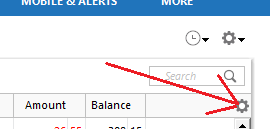
- Click on the Register Columns gear icon at the top right of the account register.
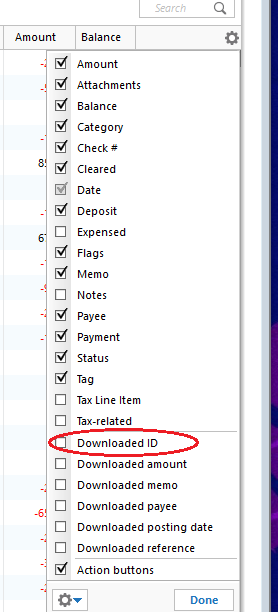
2. Place a checkmark next to Downloaded ID, then click Done. (If you use Two-Line Display, you will need to select Downloaded ID and Downloaded reference)
3. Review the Downloaded ID. This is the unique identifier for each downloaded transaction. It is used by Quicken to determine which transactions have been downloaded and which ones need to be downloaded.
Step 2: Determine which of the following situations is causing duplicate transactions
Mismatched manual and downloaded transactions appear in the account register.
If the duplicate and manual transactions do not have a Downloaded ID, then the downloaded transaction was not properly matched to the manual entry.
Solution: Delete the manual entry.
- Right-click the manual entry.
- Select Delete.
- Confirm by clicking Yes.
Downloaded transaction appears twice, with the same Downloaded ID.
Solution: Set the register for the affected account to Single-line display.
- Press Ctrl + 2 on your keyboard.
- Delete the duplicate transactions.
- Set the register back to Two-line display by pressing Ctrl+2 again.
Downloaded transactions appear twice, with different Downloaded IDs.
If your bank and/or their service provider is making changes to how they present data to Quicken, there is the possibility that they may transmit the same transaction with two different IDs.
Solution: Contact the Online Banking Support for your bank (Tools menu > Online Center > Contact Info) to request they escalate to their OFX team or service provider in order to resolve this issue for all their Quicken customers.Transactions are downloaded through Quicken AND a manual download from your bank's website, resulting in different Downloaded ID numbers and duplicate data.
Solution: Don't mix your methods for getting transactions from your bank. If you want to download from the website, try to stay with that method. If you decide later that you want Quicken to update automatically rather than manually downloading yourself (or vice versa), be aware that you may encounter duplicate transactions on that first download after the change. You will need to manually delete the duplicate transactions.
Deactivating and reactivating your account to change the connection method has caused downloaded transactions to appear again.
This is typically a one-time event; if you have not deactivated and reactivated your account in Quicken, this does not apply to you.
Transfers are appearing twice.
This occurs when a transfer is downloaded for one account then downloads again for the other account and the transfer transactions do not get matched to each other.
If you find that this is not a one-time event
If duplicates continue to download, you may require the assistance from either the Online Banking Support for your bank or from Quicken Support.
To delete multiple duplicate transactions
If you need to delete numerous duplicate transactions, follow the steps below. Please note, multiple transactions can only be deleted simultaneously in the register. This process cannot be completed in the Compare to Register at the bottom of the Quicken window.
- Make a backup of your data file. This ensures that you have a "fall-back" file you can use to get back to where you were when you started.
- Select the affected account to view the register.
- Click the first duplicate transaction to highlight it.
- While holding the Ctrl key on your keyboard, click each of the duplicate transactions in the register.
- Once all the duplicate transactions are selected, right-click on any one of them and select Delete.
I hope this helps!
-Quicken Jasmine
Make sure to sign up for the email digest to see a round-up of your top posts.
0 -
@denmarfl I wholeheartedly agree with you about Direct Connect, it is a far better download method then EWC or EWC+. Whether or not a financial institution supports DC or EWC/EWV+ is the FI's decision, not Quicken.
But it not to say that Intuit, the company that does the DC/EWC/EWC+ interfaces as the data aggregator, has not encouraged the change, but there is a monetary incentive for the FI to drop DC since they have to maintain software on their computers to provide that interface and also pay a fee to Intuit to do so.
So, the group to complain to is the FI since they made the final decision to drop DC. When my FIs dropped it, I switched over to doing manual Web Connect downloads from the FI's website because I don't want my financial data on any more clouds than it already is because of the individual FIs themselves.
-splasher using Q continuously since 1996
- Subscription Quicken - Win11 and QW2013 - Win11
-Questions? Check out the Quicken Windows FAQ list0 -
We haven't heard from you yet. Are you still needing assistance?
Let me know!
-Quicken Jasmine
Make sure to sign up for the email digest to see a round-up of your top posts.
0 -
Just checking in once more before this thread is closed due to no activity!
-Quicken Jasmine
Make sure to sign up for the email digest to see a round-up of your top posts.
0 -
Sure, close it…tks
0 -
Thanks for coming back.
Is your issue resolved?
Let me know!
-Quicken Jasmine
Make sure to sign up for the email digest to see a round-up of your top posts.
0 -
The issue of OLD transactions downloaded has stopped…for now. My issue of disliking EWC+…having used DirectConnect…for 20 years…being forced to use EWC+….is a download in the usefulness of Quicken…and there is nothing that will change it….EWC+ requires duplication of work…Transfer and Payment Must be entered at BofA Online banking…and also manually added in Q Registers…again…duplication of work.
0 -
I hear your frustration, and I do understand. I am happy to hear that the main issue is resolved.
Please don't hesitate to reach out if you need any more assistance!
-Quicken Jasmine
Make sure to sign up for the email digest to see a round-up of your top posts.
0
Categories
- All Categories
- 56 Product Ideas
- 36 Announcements
- 223 Alerts, Online Banking & Known Product Issues
- 22 Product Alerts
- 701 Welcome to the Community!
- 671 Before you Buy
- 1.2K Product Ideas
- 53.7K Quicken Classic for Windows
- 16.3K Quicken Classic for Mac
- 1K Quicken Mobile
- 813 Quicken on the Web
- 111 Quicken LifeHub