Less and Less Faith in Quicken Downloading Transactions

I have had problems with two large banks and transactions being downloaded. I recently had another situation where one transaction was not downloaded but 10 others were. I don't think Quicken is testing because of the sheer number of banks they connect to so it's in our best interests to always check your bank transactions online after you download from them to see if they have all been downloaded.
Comments
-
Did you confirm in the Quicken log files that the transaction did not download? Could it have been matched to an existing cleared or reconciled transaction and thus "disappear"?
-splasher using Q continuously since 1996
- Subscription Quicken - Win11 and QW2013 - Win11
-Questions? Check out the Quicken Windows FAQ list0 -
Which file has that information and where is it located?
0 -
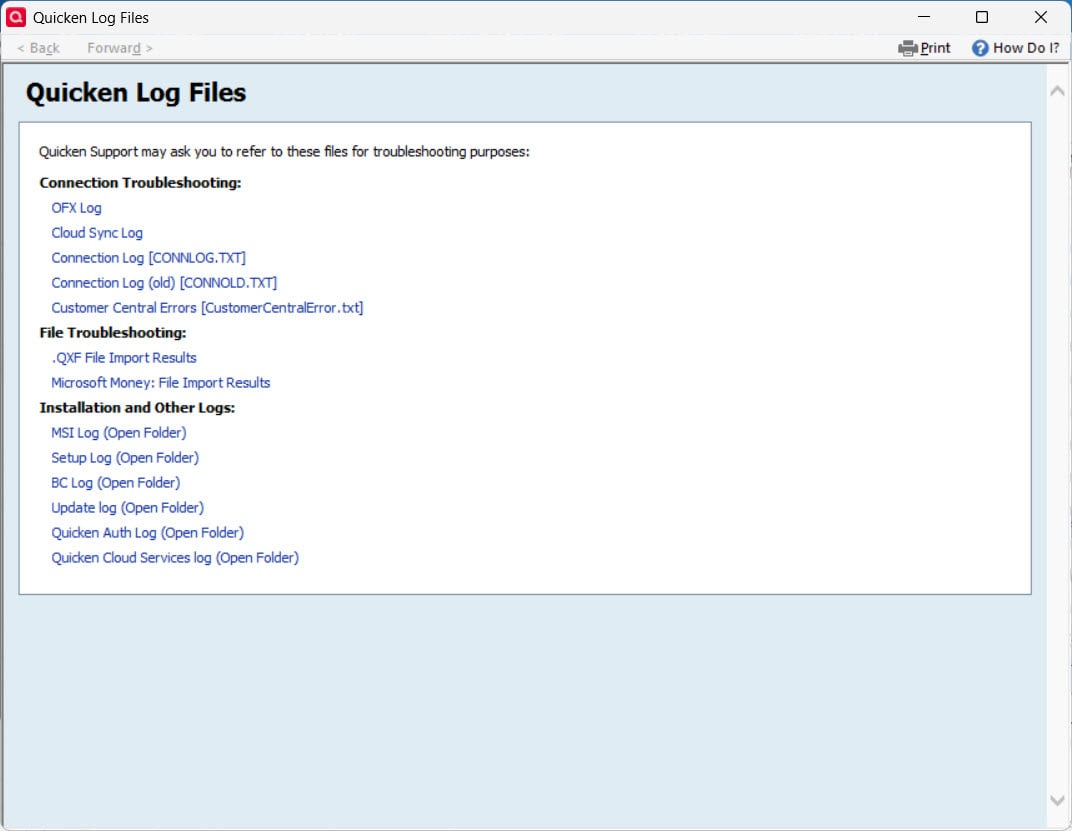
Log files are generated at Help→Contact Support
-splasher using Q continuously since 1996
- Subscription Quicken - Win11 and QW2013 - Win11
-Questions? Check out the Quicken Windows FAQ list0 -
Okay but then how do i view them?
0 -
After generating the log file, do a Save As and then view it in a text editor.
I'd first look for a transaction that you knew was downloaded so that you know what to expect and then look for the transaction that is suspected of not being downloaded. Searching based on the amount is probably the best choice.
-splasher using Q continuously since 1996
- Subscription Quicken - Win11 and QW2013 - Win11
-Questions? Check out the Quicken Windows FAQ list1 -
You want to view the OFX log. Save it to your desktop, and then open it with NotePad or WordPad (NOT MS Word).
The layout is as an HTML file (i.e., a bit funky), but if you do a search for a specific dollar amount that you think is missing, you should be able to readily determine if it was downloaded.
Q user since February, 1990. DOS Version 4
Now running Quicken Windows Subscription, Business & Personal
Retired "Certified Information Systems Auditor" & Bank Audit VP0 -
You want to view the OFX log.
The OFX log is only used for Direct Connect and Web Connect, not for Express Web Connect and Express Web Connect +. These two are in the Cloud Sync log file.
I don't think Quicken is testing because of the sheer number of banks they connect to so it's in our best interests to always check your bank transactions online after you download from them to see if they have all been downloaded.
I doubt that Quicken Inc checks any of them, except when problems are reported (which some might be automated).
Intuit is the one that really does the connecting and downloading, but as of a couple of years or so, Quicken Inc inserted their servers in between, and they have indicated that they can monitor problems through their logs there. But I suspect the "automatic checking" is sort of like the "Report a Problem" where unless there are a lot of errors from a given financial institution it doesn't get flagged. But if a given user can get to the right Quicken Support person or even sometimes the Moderator to check, they can see an individual's connection errors.
it's in our best interests to always check your bank transactions online after you download from them to see if they have all been downloaded.
Can't hurt, but what I do is reconcile to the online balance. It isn't always accurate (for me late at night or sometimes on the weekends), so a "failure to reconcile" might just mean waiting to try it again in the morning, but what never is going to happen is a successful reconcile where there are missing transactions.
The online balance is sent at the same time the transactions and comes directly from the financial institution.
And as note this is with Chase and Citi Cards, and it is because those financial institutions don't always update the online balance to match the transactions they sent. They get it right later but are inconsistent.
Another time that it is out of sync for a day is when my automatic payment for the Chase credit cards goes through. This is purely a Chase/Citi Cards problem. The Chase website even has similar problems, so I know that they are the cause.
1 -
@Chris_QPW @NotACPA How long do those files keep the transactions because I searched for a transaction that was downloaded from the 6/10/2025 and the amount 78.63 is in neither log file?
0 -
How long back I think has do to with the number of transactions. If you have a lot of transactions, you aren't going to get a lot of days history. But also note that there is a pulldown menu at the bottom of the dialog that allows you to select the "Old log" which will go back farther.
We don't have very many transactions, and our current Cloud Sync log goes from 6/3 to 6/15 (older at the top), and the old one starts on 5/30.
0 -
@Paddy Also note Chris's comment about the other possible file, depending upon your download method.
Q user since February, 1990. DOS Version 4
Now running Quicken Windows Subscription, Business & Personal
Retired "Certified Information Systems Auditor" & Bank Audit VP0 -
@Chris_QPW i called quicken and they said all transactions are in ofx. the other file is for web or app but not transactions.
0