This discussion was created from comments split from:
Quicken Classic not recognizing multiple accounts from same bank
.
I'm having this same problem as well. It started a week ago, and I have tried deactivating and reactivating all of the accounts within Quicken. I have deleted and reset my vault, and yet, the problem persists. I waited a week, thinking perhaps Quicken's software team would figure something out, but alas, no. Like others, I cannot, for whatever reason, add more than one set of log-ins and passwords for a single institution. All accounts, despite being associated with two different usernames/passwords for Chase are automatically linked together in Quicken's vault, thus resulting in the error that accounts cannot be found and should be deleted from the One-Step update.
Indeed, alternating log-ins and essentially having to do a two-step update is the only solution.
Please do better, Quicken. You're supposed to make my life easier, not harder, and this has been frustrating [Removed - Language].
Hello @little0leme,
Thank you for letting us know you're seeing this issue. To clarify, since you mentioned you have two sets of login credentials, does connecting under one set of credentials cause all accounts under the other set of credentials to disconnect? If not, then what is the exact behavior you are seeing?
You mentioned that you use the password vault in your Quicken. For the problem accounts, does your password vault show that a password is stored? Do you have any stored passwords in your Password Vault?
I look forward to your response!
I haven't seen a response from you. Do you still require assistance?
Thank you!
Hi Kristina, My apologies for the delay. Thank you for your response. When I update with the one-step update, only those accounts associated with the more recently logged-in username account with the institution get updated. For instance, let's say I have savings and checking at Chase with username Goofy and my spouse has savings and checking at chase with the username Pluto. When I use the one-step update, the checking and savings accounts under Goofy at Chase get updated, and I get an error that says "It appears that one or more accounts at Chase have been deleted…." Those accounts under Goofy show up with a little red null circle on the accounts list. So, when I click on that, I am asked to "add account" and I have to log in with Goofy's credentials to Chase, which connects Goofy's savings and checking… but then I receive errors that Pluto's accounts cannot be found at Chase (obviously, because it's a different username), and I'm told to delete those accounts from Quicken.
The opposite is true if I have more recently connected Pluto's accounts.
The password vault allows only username and password combo for Chase, and it changes depending upon which username has been used more recently.
Does that help clarify the situation?
Thanks for providing more information.
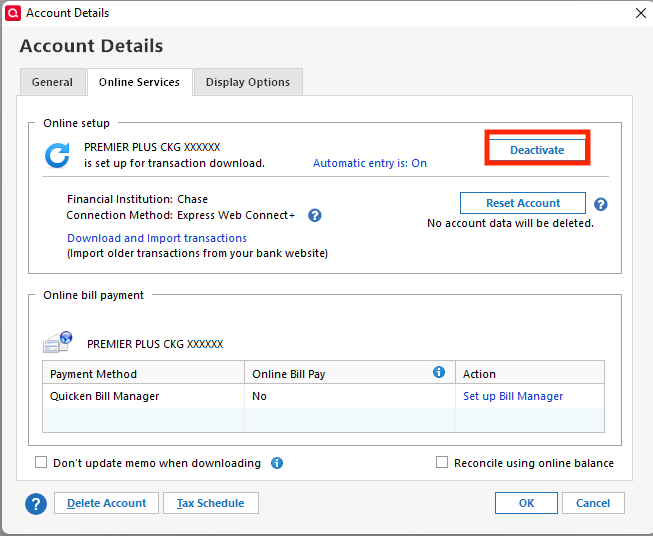
First, I suggest you try to deactivate all accounts for this financial institution, then force Quicken to "discover" all available accounts and see if this will help resolve it. Please, follow the instructions below in order to do so.
Once that is done, see if the issue still continues to persist.
Let us know how it goes!
Hi, Jasmine,
Thanks for your fast response and detailed, step-by-step instructions. This finally worked. I think the key was step no. 4—deleting the Financial Institution in the General tab allowed for the separation of the two usernames within Quicken, and I was then able to reset the logins for the accounts without losing the data within Quicken. I've tried a one-step update, and finally, everything seems to be updating appropriately. THANK YOU for sorting out what has been the most frustrating experience. I appreciate the help, and hopefully others with this problem can find this post and get the resolution they need.
That is fantastic news! Thank you for coming back to update us!
Please don't hesitate to reach back out if this issue returns or if any others arise!