Tax planner does not include correct paycheck info
Answers
-
As others have noted, the latest update R64.19 includes an update to eBill and this transition to a new provider is not going smoothly. Here is the post:
0 -
I updated to R64.19 a couple of days ago. My observations so far:
- FIX: The missing future paychecks data issue appears to have been resolved.
- UPDATE: The new $6000 tax deduction for 65+ folks is now accounted for in Tax Planner
but it does not appear to be calculating the deduction reductions correctly. See @markus1957's post below and myresponsesto his posts for more details. - ISSUE: In 4 data files most of the User Entered, No Projected Amount and Scheduled Bills and Deposits entries were changed to Estimate Based on YTD Daily Average. This was easily corrected but it was a nuisance to go thru each Tax Planner category to make the needed corrections.
- ISSUE?: In one data file a taxable brokerage account was changed to tax deferred (the account type was not changed). In another data file, the taxable brokerage account was not changed to tax deferred. So was this caused by the new version software or by the updating process (similar to how some random Preferences will be changed when doing a version update)?
I haven't dug into R64.19 much more than this but so far it appears that R64.19 is a good update regarding the Tax Planner.
The eBills issues with R64.19 are a different topic and should be addressed in a different thread.
EDIT (8/21/2025): Added some addition comments in italics.)
EDIT (8/25/2025): Added a correction in
small font shaded italics.)Quicken Classic Premier (US) Subscription: R67.7 on Windows 11 Home
0 -
The $6K deduction for 65+ is not being calculated properly for married filing jointly status. The deduction for each spouse is reduced by $0.06 for each dollar of MAGI over $150K. The reduction is only being applied to one spouse's deduction. The other deduction remains at $6K, to $250K where it appears to begin reducing again.
For MFJ status, the planner should be reducing the $6K, 65+ deduction by $0.12 for every dollar over $150K up to $250K where the deduction is depleted. No further reductions should be made until the SALT phaseout at $500K takes effect.
0 -
Thanks for pointing this out. I didn't check for how well the $6K deduction works for MFJ. My wife will not be 65 until next year so while we MFJ only I get the additional $6K deduction. Often I will test out various scenarios but I'm in the middle of a cross country move and I don't have the time to do that kind of thing right now.
I noticed that for the $6K deduction calculations it is applying the deduction as if I were single but also takes into account our MFJ total income. It starts to decrement the amount of the deduction by the $0.06/dollar above $75K up to our total MFJ income so my deduction is something less than $6K. This seems to be the correct process for MFJ when only 1 person is 65+ from what I've read about it. I did a simple calculation of what my deduction should be based upon this and it seems that Quicken calculated it correctly. I'll edit my post above to make this clarification.Further analysis indicates that Tax Planner is not accurately calculating the reduction of the $6K additional 65+ deduction when filing MFJ but only 1 person is 65+. See my reply post below dated today.I also found another issue that occurred when I updated to R64.19 but it only happened in one file: A taxable brokerage account was changed to tax deferred. It did not change the type of account so that is good and was an easy fix but it should not have happened. It's possible it was caused by something unrelated to R64.19 but it is a pretty strong coincidence. Still, I don't know why it did not do the same thing to another taxable brokerage account in a different file.
Edit (8/25/2025): See edits in italics.)
Quicken Classic Premier (US) Subscription: R67.7 on Windows 11 Home
0 -
(Deleted duplicate post.)
Quicken Classic Premier (US) Subscription: R67.7 on Windows 11 Home
0 -
(Deleted duplicate post.)
Quicken Classic Premier (US) Subscription: R67.7 on Windows 11 Home
0 -
@Boatnmaniac said,
ISSUE: In 4 data files most of theUser Entered, No Projected AmountandScheduled Bills and Depositsentries were changed toEstimate Based on YTD Daily Average. This was easily corrected but it was a nuisance to go thru each Tax Planner category to make the needed corrections.
I have seen this issue several times in the past after Quicken version updates. I agree it is annoying. I am now careful to keep track of the Tax Planner's projected refund or tax due and if it changes after an update, I know I must dig in and fix whatever settings were changed.
QWin Premier subscription0 -
The other thing I review after every version update: Check to make sure none of my Preferences have been changed and correct any that were.
This doesn't happen to me much anymore but every once in a while I'll find one or two that were changed.
It is especially concerning when my Automatic Backup preferences are changed because it has happened that I go to restore a backup file and find that there are none or the most recent one is not from the prior session.
Quicken Classic Premier (US) Subscription: R67.7 on Windows 11 Home
1 -
FWIW, I haven't seen an article that described the income thresholds other than by filing status. $75K for Single and $150K for MFJ. If you have seen one, please pass it on if you have the time.
0 -
I just Googled "how is the magi calculated for the additional $6000 senior deduction" and there were quite a few articles that popped up. Most give very basic information (like what you mentioned) but others provide more details.
What does seem to be consistent across the more detailed articles that I've read for when all persons on the tax return are 65+:
- The additional 65+ deduction per 65+ filer can be taken by all people in this age group, whether or not they itemize.
- This is a deduction, not a tax credit, so it only reduces taxable income and is not refundable.
- The $75K Single and $150K MFJ thresholds are based upon a MAGI, not on the AGI. My understanding is that MAGI = AGI + foreign earned income + excluded US Territory income (income from sources in Puerto Rico, Guam, American Samoa, and the Northern Mariana Islands) so the MAGI calculation seems to impact EXPATS more than most other people.
- Excluded from the MAGI: SS income not included in the AGI is not added back in. But the taxable portion of SS income remains in the AGI and, therefore, in the MAGI.
- For each $1 above the single threshold of $75K there is a $0.06 reduction in the amount of the $6K deduction. This results in the deduction being eliminated when the single MAGI hits $150K.
- For each $1 above the MFJ threshold of $150K there is a $0.12 reduction in the amount of the $12K deduction. This results in the deduction being eliminated when the MFJ MAGI hits $250K.
For people in my situation where we are MFJ but only 1 of us is 65+.: I just haven't found that much when I Googled for "how is the $6000 additional senior deduction calculated for married filing jointly when only 1 is 65 yrs old". But AI provided a summary today that seems to make more sense than what I'd seen previously….or maybe I just misunderstood what I'd read previously.:
- MAGI calculations are the same as above.
- For the 65+ person: The $0.06 reduction for every $1.00 above the single MAGI threshold $75K does not apply. Instead, there is a $0.06 reduction for every $1.00 above the MFJ MAGI threshold of $150K. So, the $6K additional deduction is eliminated when the MFJ MAGI hits $250K.
Based upon this it appears that, contrary to what I had posted above, Tax Planner might be calculating my additional 65+ deduction incorrectly by reducing it by $1200 when it should not have reduced it at all.
We'll probably be seeing a lot more clarity on this over the next couple of months.
Quicken Classic Premier (US) Subscription: R67.7 on Windows 11 Home
0 -
I've just noticed that R64.19's Tax Planner is not saving all of my corrections. Some are saved by others (randomly) are not. I've noticed this with 3 new sessions between yesterday and today. This, IMO, is no longer just a nuisance.
Quicken Classic Premier (US) Subscription: R67.7 on Windows 11 Home
0 -
In Tax Planner, under Itemized Deductions, everything I've categorized as a medical expense YTD is being included. Shouldn't you only be able to deduct medical expenses if they exceed 7.5% AGI? Thought it would be smart enough to factor that in.
0 -
Tax planner does that calculation automatically. It shows all of the transactions in the Medical and Dental Expenses data entry section but if you go up to the Deductions level you will see that it distinguishes between the total expenses and the Allowable Medical Deduction.
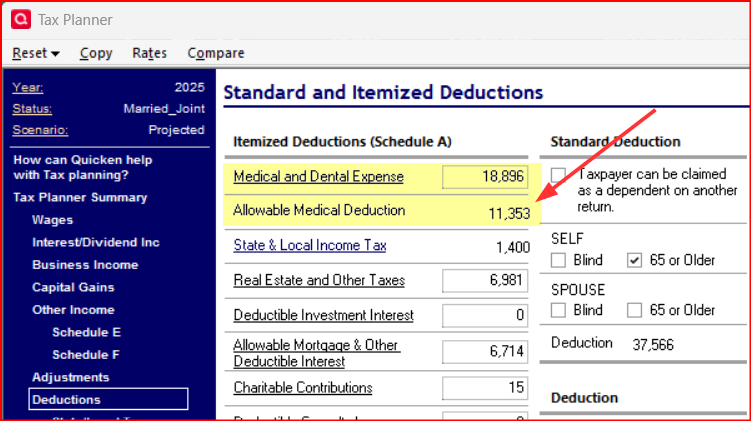
In this regard it works just like every tax software in the market: Enter ALL of the deductions data and the software will then determine how much of that is going to be deductible.
Quicken Classic Premier (US) Subscription: R67.7 on Windows 11 Home
1 -
@Boatnmaniac ah yes right there under my nose. Thanks for pointing out!
0 -
You're welcome. Been there, done that myself…on more occasions than I like to admit! 😁
Quicken Classic Premier (US) Subscription: R67.7 on Windows 11 Home
0



