Hi folks,
After did this change below that is great and was looking for many years ago, now when add or update any bill, I cannot use decimal as "," or the values are rounded to zero. There is any thing to do from my side?
@eloirjr [removed by NotACPA, I misread the above]
Please tell us what specific actions you've taken re: this issue and what the results were. Why didn't the recommendations in that other post work?
Also, re-check that those previous changes are still in place. Sometimes, Q un-sets things.
Also, what Q product are you running and what BUILD of that product? This info is at HELP, About Quicken.
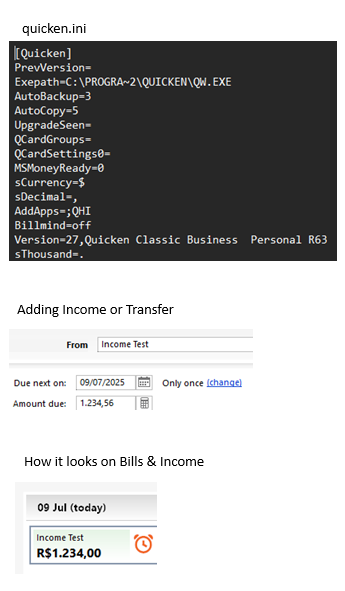
Hi, I did edit the file C:\ProgramData\Quicken\Config\QUICKEN.INI for the two entries, "sDecimal" and "sThousand" → sDecimal from "." to "," and sThousand from "," to ".".
I did it due my regional configuration is portuguese ABNT and wasn´t working "," for decimal entries.
My version is Quicken Classic Business & Personal build 27.1.63.21 running in Win11.
Everything is working as expected when do any new or edit entries on accounts but when go to the Bills & Income to add or edit all values now it shows me rounded to zero ignoring ",".
Do you realize that, in Q, you're not supposed to type in the thousands separator, only the decimal separator, and let Q place the thousands?
Yes, I´m using for cents like this 1234,45 when this value is added on Bills & Income shows me only 1234,00.
All other place in Q the amount shows correct
I'm not seeing the same … but I'm using the period as the decimal separator as I'm in the US. I have several bills or income shown with non-zero values in the cents field.
I also find is curious that in your example, the no thousands-separator is shown.
Have you tried taking a backup and then Validating your Q data file? SuperValidating?
Have you tried contacting Q Support (this is a user-to-user forum) via the link at the top of the page?
Even though I believe the Windows developers are in India, the truth is that they program for the US market and seldom give other markets a second thought. Quicken from the start has never really been a program that has catered to the world market. That is pretty evident in the fact that the decimal/thousand separators are in an INI file that in truth was never meant for the user to change.
To add to this problem the "New GUI" elements are worse than the 40-year-old ones.
Example, I changed the separator and restarted Quicken and you see numbers like this in the Account Bar and other places like the register.
Then you go to the Bill, Income and Transfers Bill Name view, which is the "New GUI":
Even selecting to edit this reminder (older GUI control):
So, maybe this new GUI controls obey the Windows settings???
Nope!
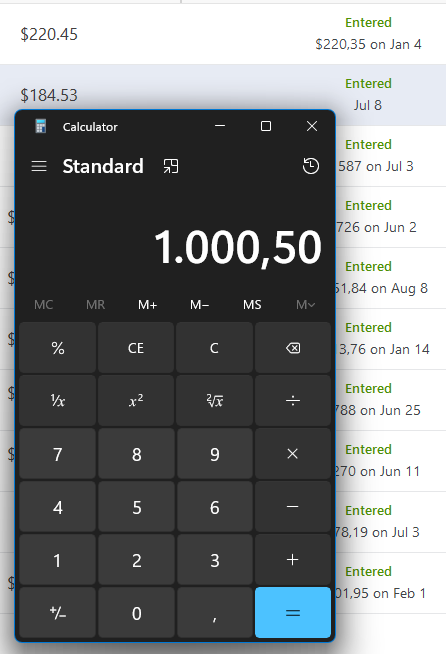
Here I have changed them and as you can see from the Calculator they have been changed, but not in Quicken.
This is a bug, and you should report it to Quicken Inc using: Help → Report a Problem.
I just looked closer at my last screenshot and realized that the "Entered" value did change when I changed the Windows settings, but not the CURRENT BILL amount.
So, it is all very inconsistently implemented.
Here is the screenshot
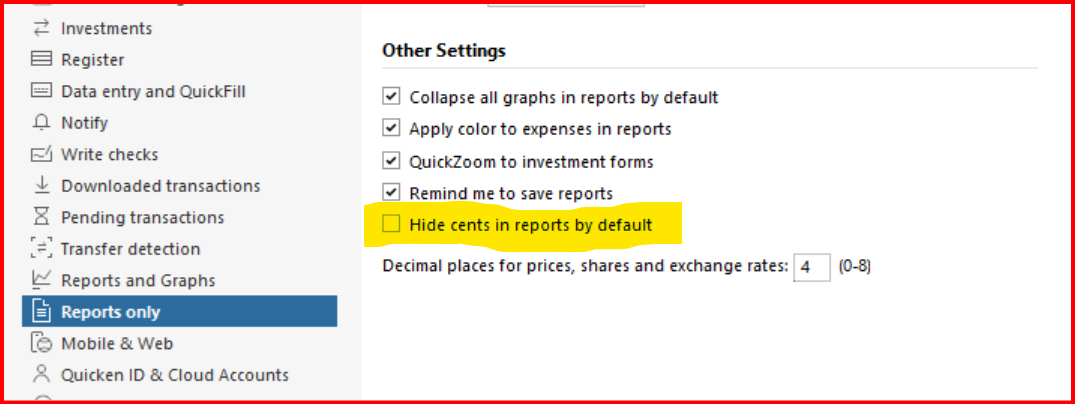
@eloirjr do you have this option checked in Preferences? If so, try unselecting it, click "OK", and see if that makes a difference.
Hi CaliQkn, thanks but this option is already unchecked, sniff
@eloirjr that's too bad, but it was worth a try. I think this is definitely a bug. You should submit a "Report a problem" (Help → Report a problem" and provide the documentation you have, plus a reference to this thread. Your last screen prints clearly show the issue.
Submitting this to Quicken Support doesn't mean that you will get a response or they will automatically create a ticket for the issue. I would recommend submitting the documentation and then contacting them also.
Sure thing will do that and let you know once receive response or not, thanks