Starting over with my register.
Quicken Classic Web 1.30.2 (November 2024)
I’ve read that I can start at any time, even if I've posted entries in my Quicken Classic register. Apparently, I can start with my last statement. I don't want to start from the beginning of the account. How do I do proceed? I appreciate all of the assistance that I receive.
Answers
-
Hello @NAPAWINO,
Thanks for reaching out!
Thanks for reaching out! I’d love to help you get set up exactly the way you want. Just to make sure I’m pointing you in the right direction:
- Are you looking to keep any of the transactions currently in your register, or would you prefer to clear everything and start clean?
- Which account type are you working with (e.g., checking, savings, credit card)?
- Do you want to manually enter transactions going forward, or are you planning to connect to your bank for downloads?
- Do you already have a specific statement in mind that you want to start from—like your most recent one?
- Lastly, are you using a brand-new Quicken file, or is this all in an existing file with other accounts?
Once I have a bit more detail, I can walk you through the best steps!
-Quicken Jasmine
Make sure to sign up for the email digest to see a round-up of your top posts.
0 -
Quicken Jasmine,
- I would like a clean start. [Quicken hid transactions for me, however I don’t know the steps involved].
- All account types.
- I enter my transactions manually. The bank connection gets me in trouble.
- I would prefer using my most recent statement, if I have to choose.
- Not sure of file question. I updated it a few days ago.
I’m very impressed with your speed and accuracy of your reply.
NapaWino
0 -
Quicken Jasmine
I don’t see any suggestions yet.
NapaWino
0 -
@NAPAWINO I am fairly certain the moderators are based in Arizona so likely @Quicken Jasmine won’t be back on shift until tomorrow.
Quicken user since Q1999. Currently using QW2017.
Questions? Check out the Quicken Windows FAQ list0 -
Ok,
Thank you for the reply.
NapaWin
0 -
Hi @NAPAWINO ,
Thanks for providing these details! Since you're entering transactions manually and would like a clean start using your most recent statement, you’ve got two main options—depending on whether you want to reset just a single account or start fresh across everything.
Option 1: Clean Start for a Single Account
If you want to keep your current Quicken file but just start over for all your accounts, you can create new manual (offline) accounts and begin fresh from your most recent statements:
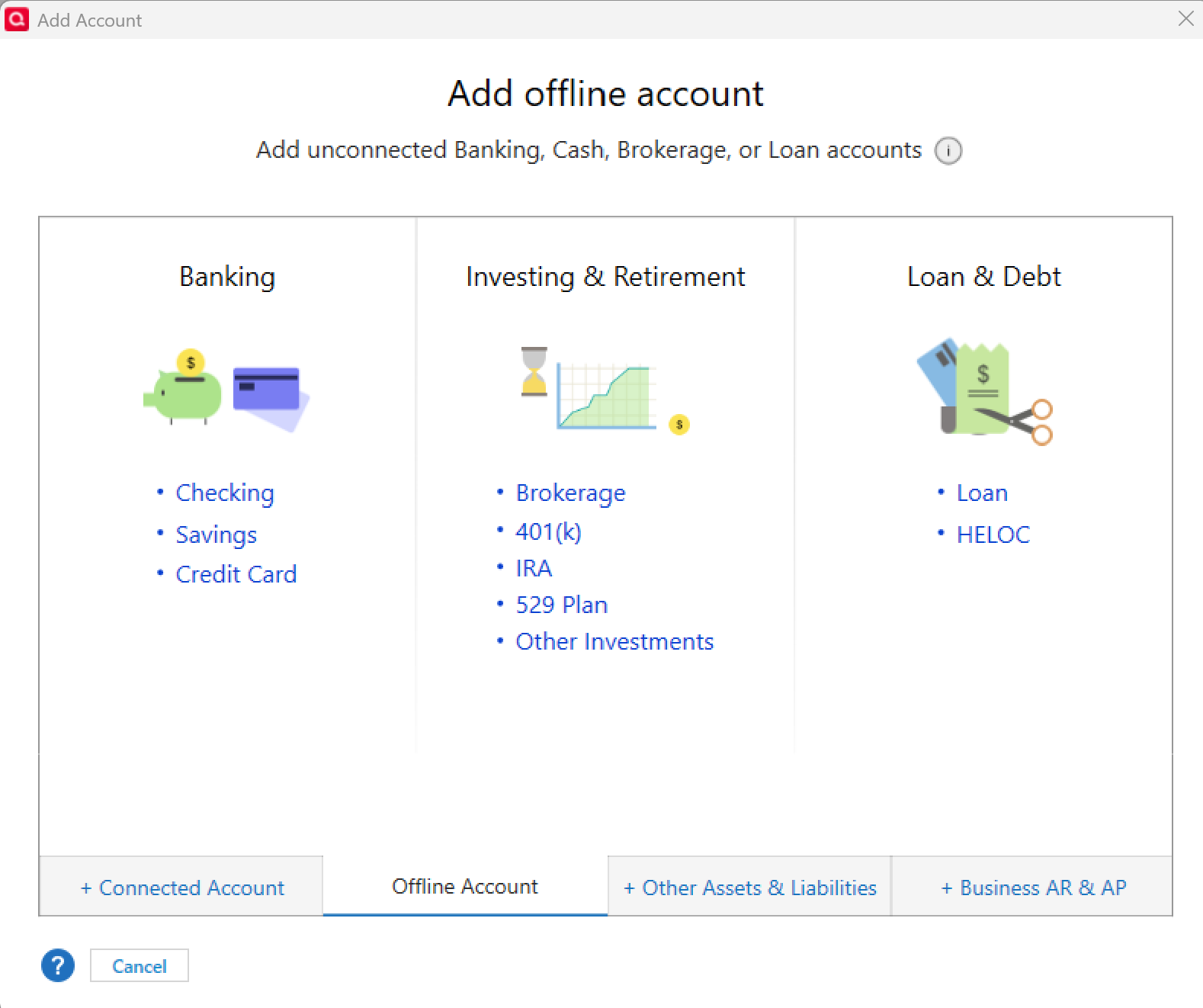
- Go to Tools > Add Account
- Choose Offline Account at the bottom
- Select the account type (checking, savings, credit card, etc.)
- Use the ending balance and date from your most recent statement as your starting point
- Begin entering new transactions from that date forward
You can repeat this for each account you want to start over with.
Option 2: Completely Fresh Start (New Quicken File)
If you'd prefer to wipe the slate entirely and start with a new file, here’s how:
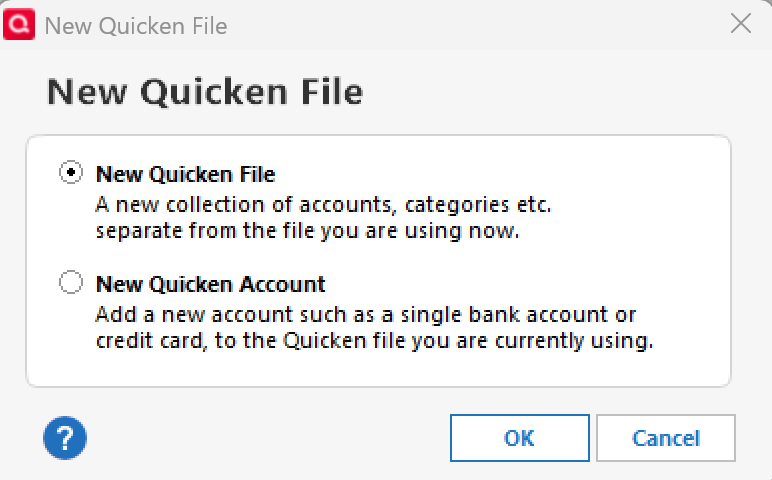
- Go to File > New Quicken File...
- Select New Quicken File again and click OK
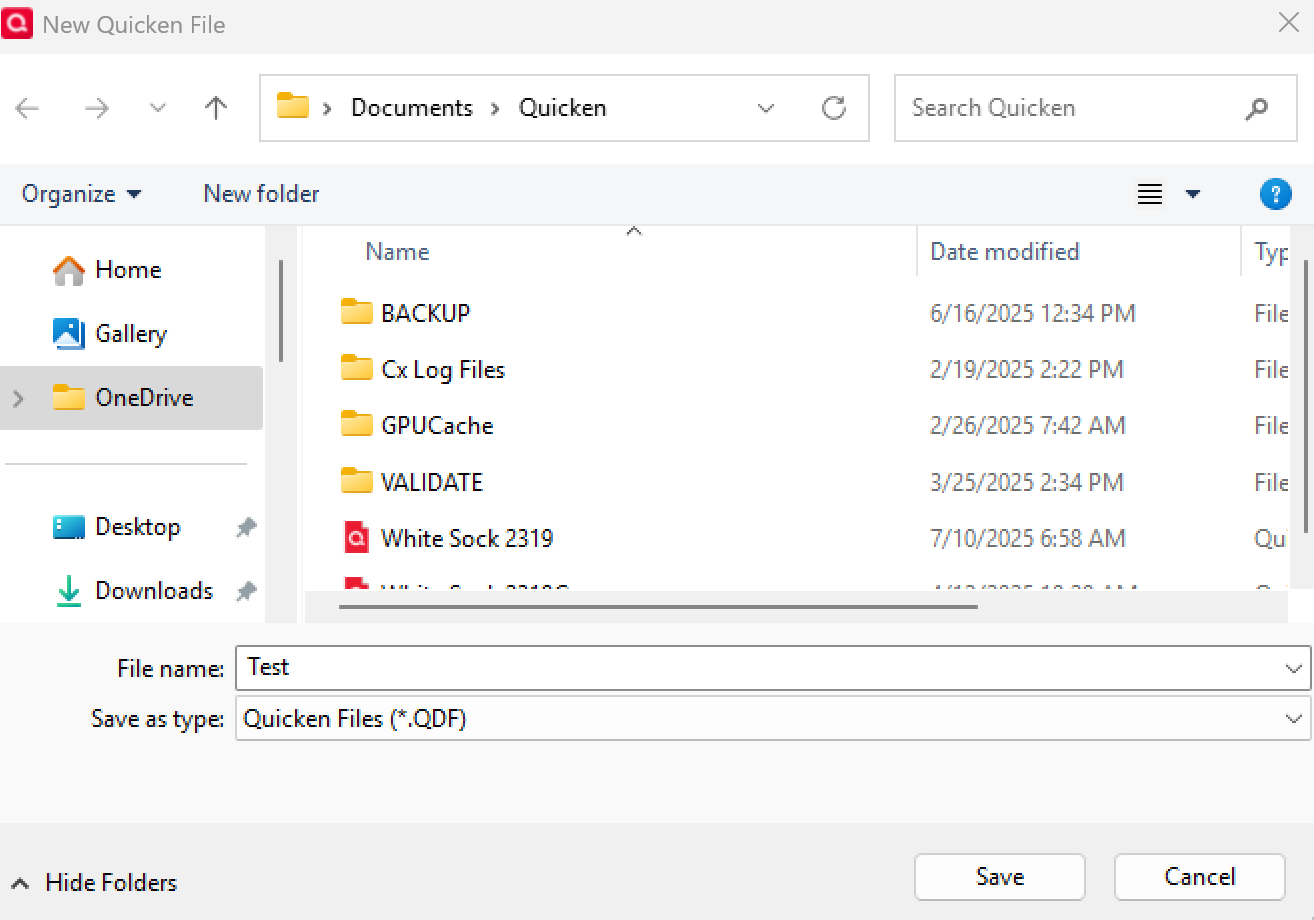
- Name and save the file
- Manually set up new offline accounts using your most recent statements
This will give you a brand-new file with no past data or connections.
Hope this helps!
-Quicken Anja
Make sure to sign up for the email digest to see a round up of your top posts.0 -
Quicken Anja,
I would like to keep transactions currently in your register for reference, i.e not only for refererence but for all of the attachments I have. Question, if I start clean, will I forfiet access to my prior transactions and attachments? I may need for you to step in with advice if your understanding me. How long will I be able to contact you today?
0 -
Thanks for the follow-up—and I totally understand wanting to keep access to your previous transactions and attachments!
If you decide to go with Option 1 (clean start within your existing file), you can absolutely keep your old accounts for reference. You can hide them from your main views, but they’ll still be accessible anytime within the same file—attachments and all.
However, if you choose Option 2 (starting a brand-new Quicken file), that won’t delete your old data, but you won’t see those older accounts or attachments in the new file. You’d need to manually open your old file when you want to view them.
So if having ongoing access to those attachments is important, Option 1 might be the better route for you.
Which option sounds like the best fit for what you want to do? I can give you step-by-step instructions once you decide.
I just wrapped up my shift for today, but I’ll be back online tomorrow and happy to keep helping you then! If you need more immediate assistance in the meantime, feel free to reach out to Quicken Support directly—they’ll be glad to assist.
Thank you!
-Quicken Anja
Make sure to sign up for the email digest to see a round up of your top posts.0 -
It sounds like I would prefer Option#1, a clean start within my existing file along with ongoing access to my attachments. My concern is that it's an offline account of which I don't have any experience. Also will it be a big concern if all the accounts aren't balanced.
NapaWino
0 -
Thanks for the clarification, @NAPAWINO! Since you'd prefer Option #1—a clean start within your existing file while keeping access to your attachments—please follow the steps below to hide the old account(s) so they won’t interfere with your new setup or balances.
Before you begin, I recommend saving a backup of your file, just in case. That way, if you decide you don’t like the outcome, you can easily revert to your original starting point.
To hide the old account(s):
- Go to Tools > Account List
- Click Edit next to the account(s) you want to hide
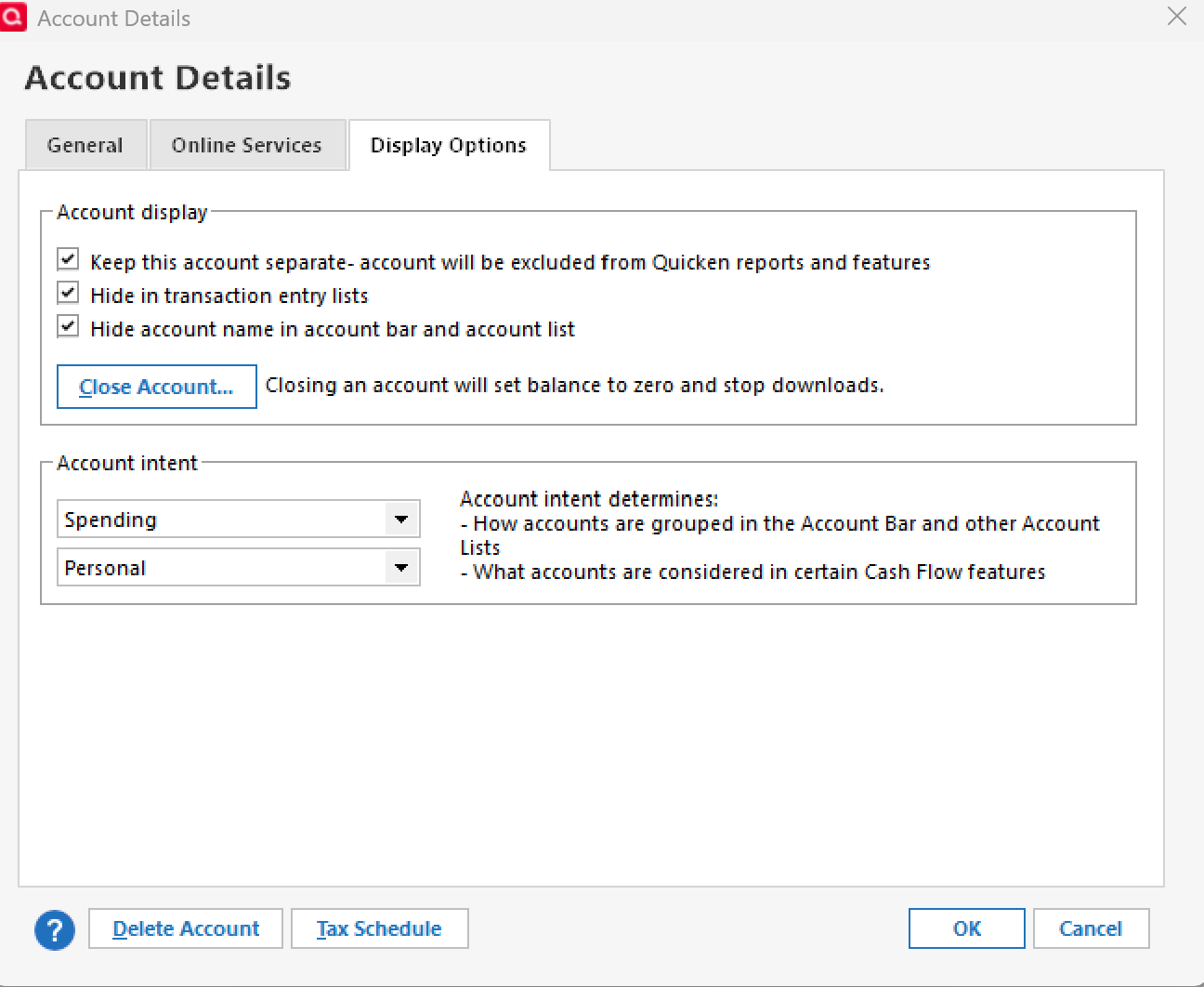
- Go to the Display Options tab
- Check the boxes for:
- Keep this account separate—account will be excluded from Quicken reports and features (this option ensures its balance won’t affect your reports or net worth—especially useful if things aren’t reconciled)
- Hide in transaction entry lists
- Hide this account in account bar and account list
- Click OK to save
Note: You can also choose to Close the account if you want, but that’s optional.
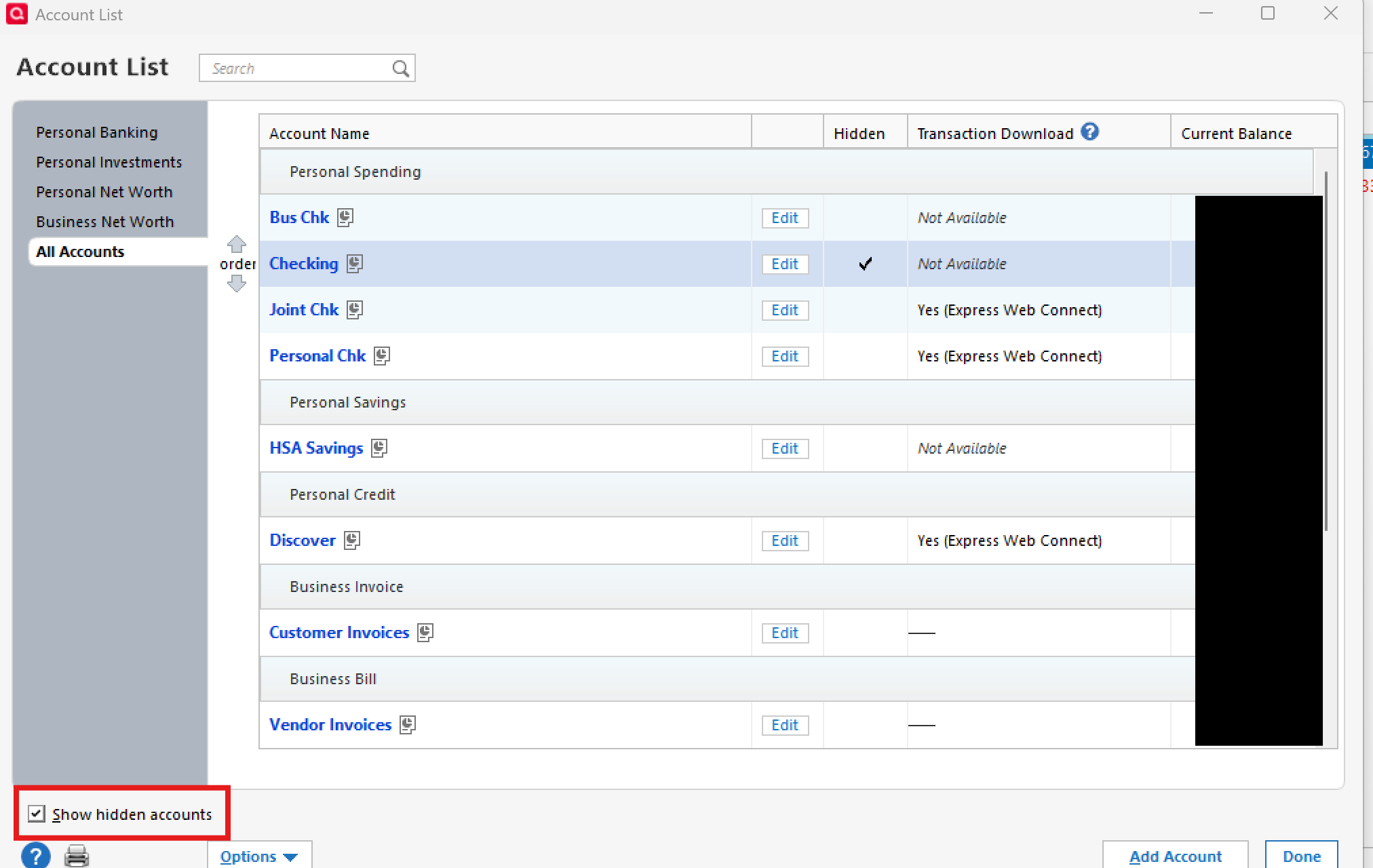
If you ever want to view any of your hidden accounts later on, just go to Tools > Account List and check the box at the bottom left that says Show hidden accounts.
That will reveal them in the list, and you can click on the account name(s) to view their registers.
Once the old account(s) are hidden, proceed with Option #1 from my earlier response to set up your new offline (manual) account and start fresh.
Let me know if you have any additional questions!
-Quicken Anja
Make sure to sign up for the email digest to see a round up of your top posts.0
Categories
- All Categories
- 45 Product Ideas
- 35 Announcements
- 214 Alerts, Online Banking & Known Product Issues
- 21 Product Alerts
- 694 Welcome to the Community!
- 668 Before you Buy
- 1.2K Product Ideas
- 53.4K Quicken Classic for Windows
- 16.3K Quicken Classic for Mac
- 1K Quicken Mobile
- 810 Quicken on the Web
- 110 Quicken LifeHub