Portfolio view: Left click on security name or news icon not working correctly.
I have same issue referenced in title above (In Portfolio view: Left click on security name or news icon not working correctly. — Quicken)
If I restart Quicken the feature works initially but will eventually fail, requiring a restart of Quicken. Is there a better solution than restarting Quicken?
Comments
-
Hello @mfstarnes,
Thanks for reaching out!
I definitely want to get a better sense of what’s going on so we can troubleshoot more effectively.
- When the left-click stops working, does anything happen at all (e.g., does it freeze, highlight, or just do nothing)?
- Are you seeing this behavior in all views of the Portfolio (e.g., by account, by security, by asset class), or just a specific one?
- Have you noticed if this starts happening after performing a specific action—like switching views, updating quotes, or leaving the program open for a long time?
- Do you have any third-party security software or screen readers running that might interfere with UI elements?
Let me know!
-Quicken Jasmine
Make sure to sign up for the email digest to see a round-up of your top posts.
0 -
Thanks for your reply!
- When the left-click stops working, does anything happen at all (e.g., does it freeze, highlight, or just do nothing)?
Instead of security detail view, it opens a browser that indicates Navigation to the webpage was Canceled - Are you seeing this behavior in all views of the Portfolio (e.g., by account, by security, by asset class), or just a specific one?
I primarily use group by Investing Goal, not sure if it happens in the other views - Have you noticed if this starts happening after performing a specific action—like switching views, updating quotes, or leaving the program open for a long time?
My guess it happens after a certain amount of time, but I don't have a precise idea of how long - Do you have any third-party security software or screen readers running that might interfere with UI elements?
Not that I'm aware of. Can you suggest software that might interfere?
0 - When the left-click stops working, does anything happen at all (e.g., does it freeze, highlight, or just do nothing)?
-
Thank you for your reply,
Does this happen only when you hover over the name and left click on the security name in the yellow box that's visible while hovering? Are you able to view the information properly from the Security Detail screen? You mentioned this seems to be related to time; do you know roughly how long it takes before things stop working?
Thank you!
Quicken Kristina
Make sure to sign up for the email digest to see a round up of your top posts.
0 -
The main issue I refer to is when clicking on the security name. If I right click and choose Security Detail, I can view without issue. in fact, this is a suitable (but less desirable) workaround if the reported issue can't be resolved.
Yesterday it failed relatively soon, approximately and hour or so after opening the app. I don't think it usually happens that fast.
Thanks for your help!
1 -
I experimented a little with this and found that if I hover over the security name for a second or so, there is a pop-up that offers two choices: "Quotes and charts (online)" and "Security detail view."
If you click on the first option, perhaps by mistake, it uses my web browser (Chrome) to access the security info on investing.quicken.com. Maybe that is what is failing here.
The second option opens Quicken's Security Detail View. If I click on the security name before the pop-up appears, it goes directly to the Security Detail View.
From the Security Detail View, I can click on News and Analysis, which uses Quicken's internal browser to open the investing.quicken.com page.
QWin Premier subscription1 -
Quicken Kristina, following up to this question: Does this happen only when you hover over the name and left click on the security name in the yellow box that's visible while hovering?
I just confirmed the URLs in the yellow box are broken (same result) when this condition occurs.
Also, today it happened about 4 hours after open, but I'm not sure if it's a time or activity trigger for it to fail.
0 -
Hi Jim, both of those options break for me when this issue occurs. thx
0 -
Hi Jim, both of those options break for me when this issue occurs. thx
Aha. If the yellow box appears and you move the mouse to the left and click on the security name, does the Security Detail view open, or is that broken too?
And when this is failing, if you go to Planning > Tax Center and select Show Tax Planner, is the Tax Planner also broken? That uses Quicken's internal browser, which may be the source of this problem.
QWin Premier subscription0 -
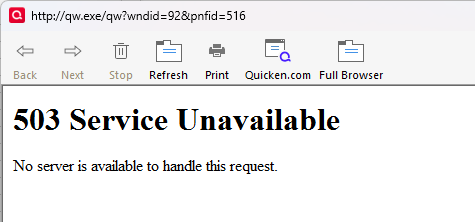
Perhaps a clue? this is what i got on first click in the Tax Planner:
0 -
OK, that means your problem may be with Quicken's internal browser. The procedure below will reset the browser's cache, which will hopefully fix the problem.
You can try exiting Quicken and using Windows Explorer to rename the C:\ProgramData\Quicken\Cache folder. Then restart to see if that fixes the problem. If the folder is missing, Quicken will create a clean one.
The ProgramData folder is normally hidden. To make it visible in Windows Explorer in Windows 11, click on View at the top of the Windows Explorer window and then select Show and Hidden items.
Good luck! Please let us know if you were able to find the correct folder and if renaming it fixed the problem.
QWin Premier subscription0
Categories
- All Categories
- 56 Product Ideas
- 36 Announcements
- 223 Alerts, Online Banking & Known Product Issues
- 22 Product Alerts
- 701 Welcome to the Community!
- 671 Before you Buy
- 1.2K Product Ideas
- 53.7K Quicken Classic for Windows
- 16.3K Quicken Classic for Mac
- 1K Quicken Mobile
- 813 Quicken on the Web
- 111 Quicken LifeHub