Merrill Lynch duplicate CDs and connection fails

This discussion was created from comments split from: Merrill Lynch dividend download adds new security?.
Comments
-
@Quicken Anja - I'm seeing similar behavior in some of my ML accounts that have CDs. In my case, the new connection fails to link up CDs and duplicates every CD. There appears to be no way to edit or delete the transaction as it is classified as a "downloaded" transaction.
I reverted to a backup and have not upgraded to the new connection.
0 -
Hello @rakeshg,
Thanks for the details!
Based on what you’ve described, I suspect what’s happening is that during the new connection setup, the CDs may be getting added as new accounts rather than being linked to your existing ones. That would explain the duplication you're seeing, and potentially why transactions appear undeletable — Quicken is treating them as newly imported from a separate, duplicate source.
To start troubleshooting this, please check to see if any related accounts are hidden, which can sometimes cause confusion during the linking process:
- Go to the Accounts menu and choose Hide and Show Accounts
- Look for any accounts associated with this financial institution that are marked as hidden in Lists, and uncheck them
After that, please follow the steps below to disconnect and reset the connection:
- Open the account register and click the Settings gear in the bottom-right corner
- Go to the Downloads tab
- Click Disconnect Account
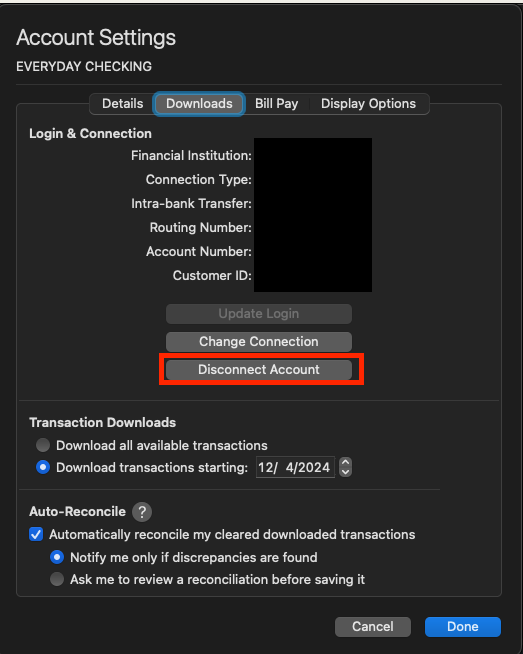
- If more than one account is associated with this financial institution, repeat steps 1–3 for each one
- Quit Quicken
- Open Spotlight and search for Keychain Access

- In Keychain Access, select Login on the left and Passwords at the top
- Use the search bar to locate your financial institution
- Delete any entries named something like "Quicken password for [your financial institution username] at [institution name]"
- Quit Keychain Access and reopen Quicken
- Navigate to Accounts > Add Account...
- Use the search bar to locate your bank and click Continue
- Sign in with your bank login credentials
- When Quicken finds your accounts, use the dropdown menus to carefully link each account to the correct existing account in Quicken — not as new accounts
Let me know how it goes once you’ve run through those steps!
-Quicken Jasmine
Make sure to sign up for the email digest to see a round-up of your top posts.
0 -
@Quicken Jasmine - RE: the CDs may be getting added as new accounts rather than being linked to your existing ones
I have 8 CDs under two ML account. All the CDs were duplicated (the account was fine). Also, it looked like security holdings in other ML accounts updated correctly (I could not see any duplicate entries).
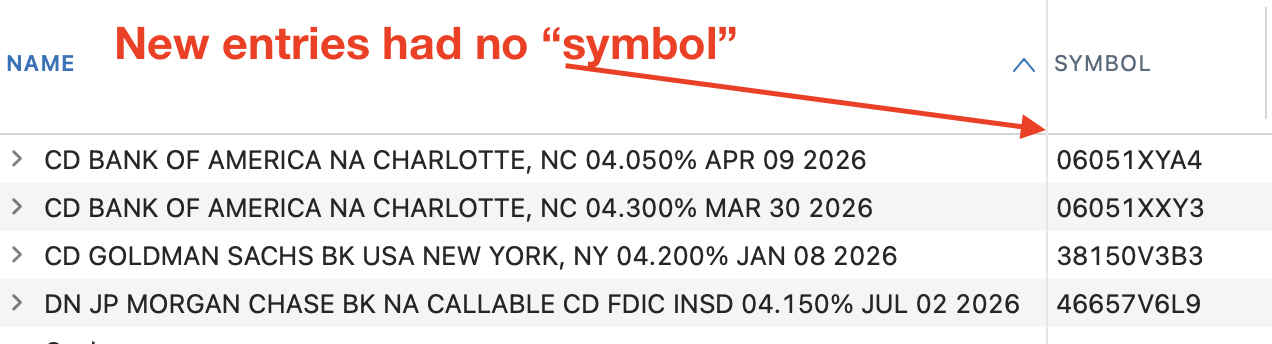
Below is an example of an account where the CDs were duplicated (these 4 CDs are under one account and after switching connections, Quicken showed 8 CDs in this account - 4 were duplicated)
 0
0

