zzz-Fidelity Updates
Comments
-
However, I did just see that there's an R64.30 available and have updated.
Does it fix this issue?
Quicken user since 1991
VP, Ops & Tech in the biometric space
0 -
The cash management account shouldn't need any action taken, it will automatically migrate with the linked account. Did the linked account migrate successfully?
It is not linked to a brokerage account. It is a pure cash account that is used to receive credit card rewards. I can transfer money from this account to my brokerage or IRA if I choose.
Fidelity calls it FDIC cash. Supports debit card and check writing. If it is FDIC, is it not banking?
0 -
After the recent "zzz" conversion, the download of dividend transactions from my Fidelity account is using the "Deposit" transaction instead of "Div" transaction type. The result is Quicken is not tracking which security is the dividend for. For U.S. stocks that I am reinvesting dividend, it is still ok, but for foreign ADRs that Fidelity is incapable of reinvesting the dividend, I am encountering this problem. It is resulting in lots of manual editing of the downloaded "Deposit" transaction to turn it back into a "div" transaction.
This "zzz" change is HUGE STEP BACKWARD in turns of the functionality in Quicken.
Please fix it quickly.
0 -
I too am having a similar issue with the share prices for 5 funds in my Fidelity NetBenefits 401K account not updating since I went through the EWC+ conversion on 9/22. This happens only when I run the OSU early in the morning. I do see the new share prices in the Fidelity app and I do get transactions downloaded into Quicken early in the morning. However, since the 22nd, the share prices would not update until I ran the OSU sometime around noon EST.
I use Quicken Classic Deluxe version R64.30 on Windows 11
0 -
Similarly, my Netbenefit prices used to update in Quicken anytime after 8:30 pm in California. Now it happens sometime overnight. When I did OSU this morning at 6am, the prices updated correctly as yesterday's closing price (and I have to switch date in Investment tab to yesterday to see them). Not a major issue for me, but different than before. Note that in Fidelity web site, prices still update by 8:30pm, but there is a delay for Quicken to pick it up.
0 -
I too am having a similar issue with the share prices for 5 funds in my Fidelity NetBenefits 401K account not updating since I went through the EWC+ conversion on 9/22. This happens only when I run the OSU early in the morning. I do see the new share prices in the Fidelity app and I do get transactions downloaded into Quicken early in the morning. However, since the 22nd, the share prices would not update until I ran the OSU sometime around noon EST.
Update to my post on this issue earlier today:
I normally do an OSU at about 8AM Eastern time. Today I updated at 7:20AM and the prices were not updated. I was also somewhat surprised that I did not receive transactions for any of my EWC+ bank or credit card accounts, even though I had not done an OSU for a few days. Also the OSU seemed faster than it usually is.
I just updated again at 12:35PM Eastern and sure enough, I received updated prices for both of the problem funds. This time instead of an OSU, I clicked on the gear for one of the Fidelity accounts and selected Update transactions. This time, yesterday's closing prices for both funds were downloaded.
Surprisingly, transactions for 5 other EWC+ accounts for 9/20-24 were also downloaded, even though I had only requested the Fidelity transactions. These were bank and credit card accounts, not related in any way to Fidelity.
I guess with EWC+, requesting transactions for one account triggers all of the transactions to be downloaded but there was no fresh EWC+ data as of 7:20 this morning. Or maybe there was a silent EWC+ server outage this morning.
QWin Premier subscription0 -
I wasn't asked until 10 days ago to update my Fidelity connections and it's been a nightmare ever since. Fidelity says its a Quicken problem and Fidelity says that Quicken isn't allowing them to help correct the issues. Daily I have to reactivate my accounts and I still have issues. Just now, Quicken says that all of my Fidelity accounts appear to be closed (which I know is wrong). Quicken just doesn't work for me right now. I've been a Quicken user since the very early days, early 90's, and I've never had this level of problems.
My Fidelity checking account appears as an investment account and cash account now and lost all transactions prior to June 2025. In addition, my 401k account which used to log into netbenefits, now is connected to the other fidelity accounts and I can't see a way to connect it to netbenefits.
What are you doing to correct these issues?
1 -
I'm not getting new transactions from my Fidelity after tax brokerage account.
I had a Buy transaction yesterday, but after over 24H Quicken isn't downloading that transaction, it shows all accounts are updated and 0 transactions.
I tried to reset the connection, it didn't fix the issue.
Does my issue related to this thread that Quicken went with another data aggregator vendor?
Who is the vendor now? Plaid? MX? etc?
Best Regards-1 -
Sorry I misunderstood. In that case, if it's currently zzz Fidelity then it ought to be allowing you to link it to an existing account.
Can anyone else offer any thoughts as to what's happening here?
Barry Graham
Quicken H&B Subscription0 -
Usually this happens when the accounts are already associated with an online financial institution. If you look at the details of the accounts you are trying to migrate, on tab1 of Edit/Details, what financial institution is shown?
Barry Graham
Quicken H&B Subscription0 -
A small change under the hood: For the 1st time in a couple of weeks I'm no longer offered to change connection method with "remind me later" option. Fidelity update via DC went smoothly.
1 -
Ditto!
0 -
This morning's OSU behaved differently from the prior 2 days. After OSU, each Quicken requested how to treat the core position of each Fidelity account. This had already been selected 3 days ago and was working fine. Quicken's behavior has become unpredictable.
Deluxe R66.23, Windows 11 Pro
2 -
That's because the update was designed to do this. I guess they felt it needed to be done for everyone in case it was done incorrectly the first time.
Barry Graham
Quicken H&B Subscription1 -
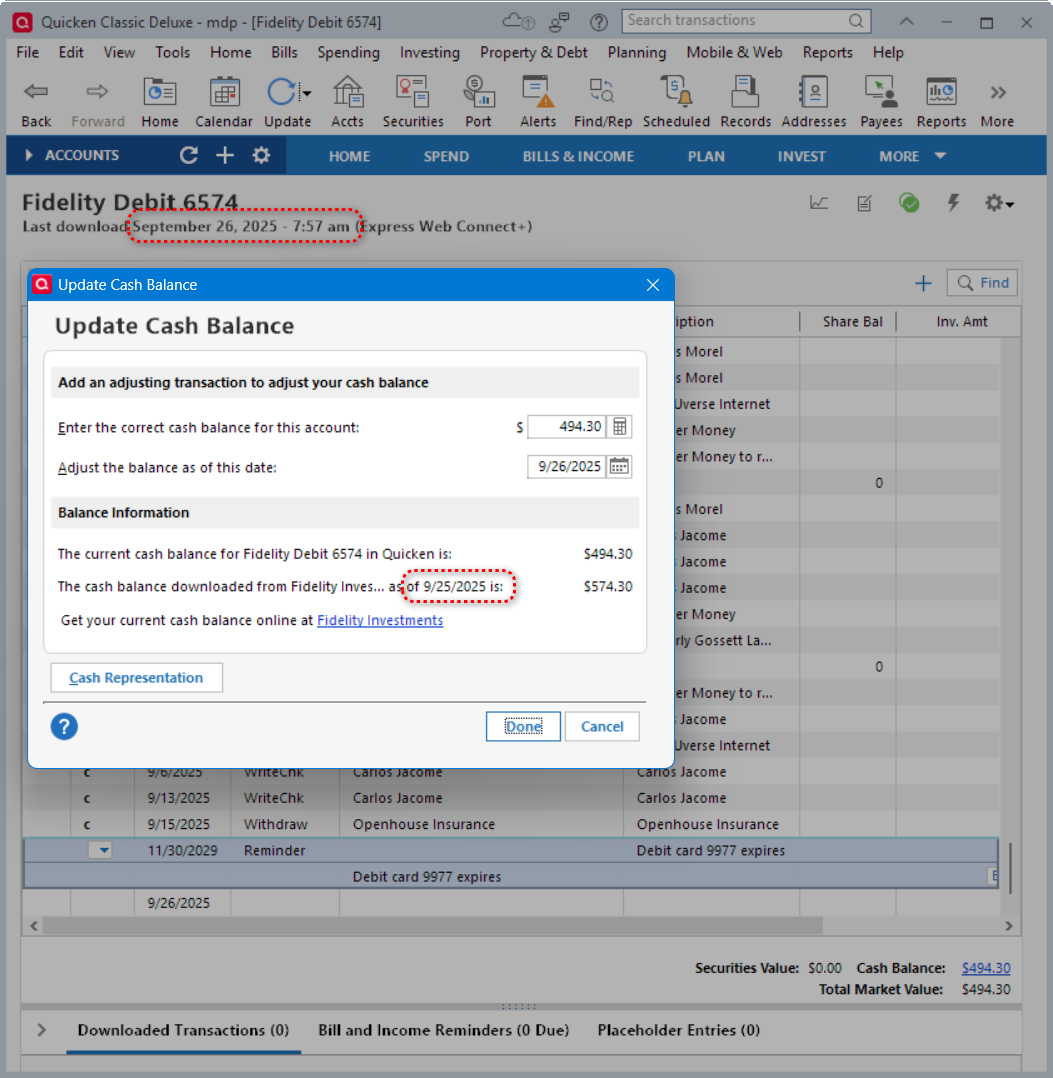
I noticed that for today's download on 9/26/2025, Quicken reports the cash balance for 9/25/2025 for all accounts. It seems that Quicken (or Fidelity) is not reporting the latest cash balance as of the download date. It seems to be a day behind. Is this normal? I tried the DC connection with my alternate datafile and it brought in the correct cash balance as of 9/26/2025.
Deluxe R66.23, Windows 11 Pro
1 -
I'm curious…as I stated in a previous post, I have two data files. One is using the DC download method and the other is using the EWC+ method. Last night I updated both files. The DC file updated everything. My Fidelity 401K account showed new values even before the Fidelity web site did. My EWC+ file wouldn't update yesterday's share prices until this morning. So far everything appears to be okay with both files. I am still able to use the "DC" method as of this morning.
0 -
I too, am able to update DC this morning still.
I'm also being prompted to "update" Quicken to 64.30 - but I am already running 64.30. However, I applied 64.30 via the mondo update. I wonder if another update was issued that isn't showing up in the changelog.I redid the Mondo update and this is working properly now.I also wonder how much financial-intuition specific programing is being added to the core Quicken code, vs. the actual data feeds. If they are having to add FI-specific coding to the application code itself, and lots of different FIs require this, that's going to get very messy, very quickly in the future. Quicken (windows) already runs on some pretty old code where changes in one area cause unintended concequences.
1 -
"I wasn't asked until 10 days ago to update my Fidelity connections and it's been a nightmare ever since. Fidelity says its a Quicken problem and Fidelity says that Quicken isn't allowing them to help correct the issues. Daily I have to reactivate my accounts and I still have issues. Just now, Quicken says that all of my Fidelity accounts appear to be closed (which I know is wrong). Quicken just doesn't work for me right now. I've been a Quicken user since the very early days, early 90's, and I've never had this level of problems.
My Fidelity checking account appears as an investment account and cash account now and lost all transactions prior to June 2025. In addition, my 401k account which used to log into netbenefits, now is connected to the other fidelity accounts and I can't see a way to connect it to netbenefits.
What are you doing to correct these issues?"
It is difficult to advise from distance, yet this is what I would suggest: Deactivate any and all Fidelity accounts, it is important to disconnect all of them, not just the ones that produce the error code. Then, go through the Account Reactivate/Reconnect dialogue, and carefully connect each Fidelity account under the specific Fidelity login you would like to see them under in Quicken. As part of this set up routine, carefully review every account category and account link with your established Fidelity accounts in Quicken. Any minor mistake linking up Fidelity website data with Quicken Fidelity accounts will result in subsequent download and reporting issues.
Hope this suggestion will be of help, best of luck and success!
1 -
Can you please explain the procedure to create 2 separate data files? Do they both contain all of your accounts and past history? Do you run them on separate computers? Thanks in advance.
0 -
Using the Quicken copy process…File > Copy or backup file > Create a copy or template is the safe way to create a safe copy of a data file. Say the new file is datafile-EWC.qdf . This datafile-EWC will need the connections reestablished at which time reauthorization to use the EWC+ connection can be performed.
I didn't change anything of my current DC datafile and selected "Remind me later" for any reauthorization requests.
I did this all on the same computer. I can switch between using the datafile and datafile-EWC and can compare the results for both to check for differences. Of course, this would be easier if two computers could be used. The original computer for datafile and the other for datafile-EWC which would be copied to the other computer that runs the same version of Quicken.
If you no longer have the DC version of the datafile but have a recent backup of the DC version, it may be easier to restore the backup to a different name datafile (datafile-DC?). Run an update and select "Remind me later" for any Fidelity reauthorization requests. Unfortunately, this method may require the manual entry of transactions, depending on how old the backup is.
I know of no way to convert back to DC connection from a datafile that has been updated for ESC+ connection.
Deluxe R66.23, Windows 11 Pro
0 -
@shtevie A safe way to to make a copy of your data file for experimenting is to go to File > Copy or backup file and choose the "Create a copy or template" option. This will make a copy that is not connected for downloading transactions or bills and is completely independent of your main file. Behind the scenes, it has a separate Quicken cloud dataset. Give this file a different name than your working file.
In the copied file, you can connect to your financial institutions and experiment with downloads without interfering with your main file.
QWin Premier subscription0 -
This is assuming the current connection to be copied is DC for Fidelity accounts. Correct?
Can this procedure be used for a datafile using EWC+ connection to go back to a DC connection?
Deluxe R66.23, Windows 11 Pro
0 -
When I created the EWC+ datafile from the DC datafile, I simply copied the datafile.qdf file to another name, maybe datafile-EWC.qdf.
This is an unsafe copy process. The copied EWC+ file shares the same Cloud Account ID and the same runtime.dat file. Cross-talk between the original file and the copied file is not a theoretical risk. It is a real issue, not just a risk, so transaction, category, some preference changes and likely other changes made in one of the files will sometimes also be automatically made in the other. Ultimately the risk is fairly high that there will be data corruption in one or both of the files. The cross-talk and corruption issues gets compounded if/when using Mobile & Web Sync.
I agree with @Jim_Harman: Using the Quicken copy process…File > Copy or backup file > Create a copy or template is the safe way to create a safe copy of a data file.
This is assuming the current connection to be copied is DC for Fidelity accounts. Correct?
This Quicken copy process works with any of the connection methods. All connection methods for all accounts in the copied file will be broken by the copy process and will need to be set up, again.
Can this procedure be used for a datafile using EWC+ connection to go back to a DC connection?
It can if the DC connection method is offered via Add Account or Set Up Now, then it can be used to go from EWC+ to DC. Unfortunately, Fidelity no longer supports a DC connection in Add Account nor Set Up Now so it will not work this way with Fidelity accounts.
There is one option that was posted that some have said allows for going from EWC+ to DC with Fidelity accounts. You might want to try this to see if it works for you.:
Quicken Classic Premier (US) Subscription: R66.28 on Windows 11 Home
1 -
I have 2 different connections to 13 different Fidelity accounts all still on DC. One connection is the normal Fidelity Investments, and the other is a separate connection & login to NetBenefits (due to an inherited 403b requiring a separate account). Thanks to all the useful user commentary in this community (& a little bit of timing luck) I have never attempted an update to EWC+.
As others have commented, Quicken is becoming very unpredictable. Which is a really bad situation for a financial services company. I have been a near daily user for almost 30 years and have never had a lower confidence in the product than I do now. As we near 1000 comments & 30k views in this thread alone, I know others share that concern.
While not in the software realm, I spent my career managing triage to customer facing products and the way-finding solution approach that is being used here is indicative of a company that does not have control over their processes & has no effective verification or validation methodology. Which is mind-boggling for a financial services firm.
I see no comparable viable alternative or I would already be gone as a customer due to lack of confidence. I really want Quicken to succeed as I am swayed by my 30 years of sunk cost, but am concerned the product has entered a slow death spiral. This issue with Fidelity connections will be fully resolved I'm sure, but unless the back-office is improved I'm afraid this will be death by a thousand paper cuts.
Please Quicken, take this opportunity to do a full postmortem on this fiasco and fundamentally change the development practices within your organization. From the outside looking in, things appear unsustainable.
7 -
This is assuming the current connection to be copied is DC for Fidelity. Correct?
Right. If you are currently connected to Fidelity via Direct Connect and make a copy as I described above, the copy will no longer be connected.
To reconnect, go to a Fidelity account, click on the gear at the top right, and select the Online Services tab. Click on Set up now to reconnect. This will lead you through the reauthorization process and set up an EWC+ connection.
Do a One Step Update before making the copy to make sure the transactions are up to date. That way, you will know that any transactions downloaded immediately after the reauthorization are duplicates that can be deleted.
- Have a list of your Fidelity account names, numbers, and account types and the corresponding Quicken accounts handy. You will need this to re-link the accounts to the correct accounts in Quicken
- In the list of accounts, also include the name and ticker symbol of the money market fund Fidelity has been using for the "Core" sweep account, if any. You may also need this later.
- Before starting the reauthorization,
- Back up the file in case something goes wrong and you want to start over or wait until later.
- Go to Edit > Preferences > Downloaded transactions and un-check the "Automatically add to investment transaction lists" box if it is checked. This will give you the opportunity to review any transactions that are downloaded as part of the transition before accepting them.
- After selecting the accounts to authorize and authorizing Fidelity to share your data with Intuit and Quicken, you are presented with a list of the Fidelity accounts and the option to add them to Quicken or link them to existing accounts. The default is Add, but if you have been tracking these accounts in Quicken, you must choose the Link option.
- It is very important to link the Fidelity accounts to the correct accounts in Quicken. The list of accounts does not show the account numbers directly, but you can see the last 4 digits by hovering over the account name. Be sure to choose the correct Quicken account from the list that is displayed when you select Link.
QWin Premier subscription0 -
I went with reset account 3 times already, but no expected Sept 24 transactions are downloaded

And for another Fidelity login, my wife, I got new download with 5 transactions, but Unspecified security are there.

The Quicken got so broken for me in this September.
Best Regards0 -
Thanks for correcting. I updated my earlier post.
Deluxe R66.23, Windows 11 Pro
2 -
N BrianQuicken Windows Subscription Member8:41AMI have 2 different connections to 13 different Fidelity accounts all still on DC. One connection is the normal Fidelity Investments, and the other is a separate connection & login to NetBenefits (due to an inherited 403b requiring a separate account). Thanks to all the useful user commentary in this community (& a little bit of timing luck) I have never attempted an update to EWC+.As others have commented, Quicken is becoming very unpredictable. Which is a really bad situation for a financial services company.Quicken Management, are you listening? My Quicken contains over 20 years of extremely important financial data. As a retired engineer, I totally agree with Brian's detailed comments. Quicken continues to fail miserable and desperately needs competent management immediately.
5 -
OSU under Fidelity EWC+, after some hick ups, actually works quite well now for most folks who have migrated over from Fidelity DC:
On our end, migrated end of July, which required some one-time manual corrections at the time, and have never looked back. Best of luck and success to all!
0 -
Good for you.
It isn't working for me
There are more new related posts with complains.
And just this thread of 32 pages and over 30k views tells otherwise.
Is there any Quicken official announcement about the fix for this issue?Best Regards0






