zzz-Fidelity Updates
Comments
-
I gave up on PenFed with Quicken. It just got too unpredictable. However, it may just be weekend maintenance going on.
Deluxe R66.23, Windows 11 Pro
0 -
[Quicken Premier Ver R64.30} For those who have upgraded their connection to Fidelity and no longer are receiving recent transactions, I found a fix that worked for me. I found a backup file from before I upgraded the connection to EWC+ and loaded it. I then just reconnected using the standard "One Step Update" and all the transactions since the backup were loaded correctly. Prior to this I wasted a lot of time with the Quicken Service Center doing all sorts of things which did not resolve the problem of successful connection, but no new transactions loading.
0 -
I was able to reconnect EWC+ this afternoon (9/27) by deactivating and reactivating my NetBenefit accounts (reauthorization still does not work - only option is "do not add to Quicken"). However, 9/26 fund prices for non-listed funds did not download - I typically do not get these prices until AM the following day but 9/26 prices still have not downloaded today after reconnecting. Will check again tomorrow or Monday, 9/29. :(
1 -
Waited until after 4 PM ET but still Quicken wanted me to reauthorize. So I deactivated & reactivated my accounts.
Bug #1: Yet again half the accounts said Add to Quicken and the other half defaulted to Link to Existing Account. The ones that said Add did actually know the right account to link to, as it had placed a check mark next to it; I just had to tell Quicken to link instead of add.
Bug #2: The only choices for account type were Brokerage or IRA. Where is the 401(k) choice? On 2nd thought, this choice should disappear when you select Link to Existing Account, as the type is already set.
Bug #3: I didn't get the choice to select FDRXX money market shares or cash for my HSA, so I got the dreaded Securities Comparison Mismatch due to previous selection of cash (when the choice had worked).
Bug #4: One of my accounts was flagged, and I answered the New/Existing Security question, but then the transaction with said security was missing (no downloaded transactions were listed), I have a Securites Comparison Mismatch, and the account is still flagged.
Quicken, please fix these bugs!
1 -
My cynical comment: With Quicken, when something goes wrong, it is most likely to happen at month and quarter end. Once again, this is true.
Where are the moderators? Why no update? Fidelity EWC+ isn't working. Tell us what to do so we don't mess up our files.
0 -
Bug #4a: Transactions appeared after I restarted Quicken.
Bug #5: Duplicate transactions were downloaded.
Bug #6: Unidentified security transaction was downloaded.
 1
1 -
Hello @Robert,
Please be aware that the Community forum is primarily user-to-user based with only a handful of us mods. Therefore, responses are not immediate and can take up to 24 to 48 hours. If you prefer immediate assistance, please contact Quicken Support directly. Quicken Support's contact information can be found through this link here. Phone support is available from 5:00 am PT to 5:00 pm PT, Monday through Friday. Chat support is available from 5:00 am PT to 5:00 pm PT, 7 days a week.
Thank you!
Quicken Kristina
Make sure to sign up for the email digest to see a round up of your top posts.
1 -
@EvDob
Please see my post below for what seems to be the new process to deal with your Bug #2
1 -
I just remembered to check some old Fidelity accounts I thought I closed. I found 2 older accounts which were enough longer visible but I DO NOT use them any longer, so I closed them out.
I then unauthorized all Fidelity accounts, rebooted Quicken, and went through the authorization process again. I only authorized one and only clicked on the Fidelity page for my current 6 active account (in past I was clicking the entire list).
I then attempted to connect but did not get the trades from Friday (yesterday) on this account.
Hence, FAILED AGAIN!
Hanging it up tonight…hope someone figures it out. I do not want to delete these accounts, one of these IRA accounts has transactions back to 1993.
0 -
So I went through the de/reactivation procedure for my wife's and then my accounts. My wife's worked, but mine didn't (still getting CC-901 "bank" requesting reauthorization). Could that be because my wife's NetBenefits accounts have transitioned to EWC+ along with her Fidelity Investments accounts, but I've left my NetBenefits accounts on DC?
0 -
I did get my prices for non-listed funds. It's confusing how we all experience different behaviors. Seems like a mark of poor engineering.
0 -
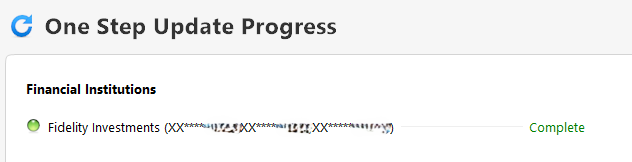
Bug #7: Why is everything green here only to shortly be presented with the CC-901 error?
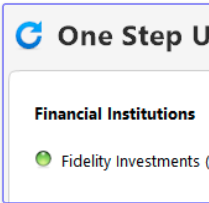
[Edited - Removed personal information]
0 -
Thanks for the edit. Here's a better screenshot:
 0
0 -
Wow, I hadn't checked this thread in awhile. 34 pages and this is STILL not completely resolved.
Is the following still the "official" thread for Quicken updates on this? It hasn't seen any activity since Sep 22.
I really am dumbfounded that we're over two months into this chaos and it's still not completely fixed. And still no official apology or explanation from the executive staff.
Quicken should automatically be extending the subscriptions of every Fidelity user who posted here or reported the bug. And under no circumstances deactivate DC until this is 100% fixed.
0 -
Tried again this morning. The trades I did last Friday still not flowing through.
Has anyone actually reached out to Fidelity for their take on the mess they have created?
0 -
Complaints have been logged to Fidelity on their reddit support site:
Deluxe R66.23, Windows 11 Pro
0 -
I just wanted to say that, so far, I have not been forced to migrate to EWC+. My plan, and recommendation, to those who are still using DC, is to wait until there is no longer an option to postpone. There seems no point in experimenting if you have the option to keep what's working.
Barry Graham
Quicken H&B Subscription5 -
Posted on another thread, which possibly might be useful for Fidelity EWC+ users on the issue of expired/revoked Fidelity authorization tokens:
"Thank you for sharing your experience. The most common thing that can cause the authorization token to be revoked by the financial institution is if, when authorizing accounts on the financial institution website, the account got unselected. If you haven't authorized/reauthorized accounts recently, then the problem is likely related to the CC-901/reauthorization loop issue."
"A straight forward solution to the expired Fidelity authorization tokens for the two Fidelity logins with CC-901 Quicken errors was a simple "Reset Account (no account data will be lost)" execution, which presumably issued new Fidelity authorization tokens to each of the accounts. All three Fidelity connections are now working again without issues, both for transaction and price downloads."
1 -
What kind of trades did you do? What kind of securities and were they Buys or Sells?
Also, were the trades done during open market hours, before the market opened or after the market closed?
I've noticed that Buys, Dividends and Interest transactions seem to be downloaded the morning after they take place. So, if they took place on Friday during normal trading hours they are downloaded as early as Sat morning.
But I've had a few Sell transactions that seemed to download 2-3 days business days after they occurred or after the buyer settled the cash for their buy. So if the Sell were to occur on Friday during normal trading hours they would not download until the following Tues or Wed. It strikes me as being somewhat similar to banks and credit cards where they do not download the transactions until after they have posted which can be 2-3 days after the transaction date. I've only seen this happen 2 or 3 times and, shame on me, I did not write down the details so I'm just going off of memory but I am definitely going to pay more attention in the future.
Quicken Classic Premier (US) Subscription: R66.28 on Windows 11 Home
0 -
I am glad I made a template copy of the DC connected datafile and reconnected the accounts in the copy, in particular EWC+ for Fidelity. I maintain both files by downloading to both to be able to compare and get familiar with the EWC+ the connection and it's problems, if any, and will be ready to switch to EWC+ if and when the DC connection is discontinued. This way I keep what's working and can check out what is coming.
Deluxe R66.23, Windows 11 Pro
1 -
in one account I bought and Money Market ETF. In the second account I traded some stocks.
0 -
There are two different dates in play here:
- The date the data was downloaded: Or the date of the OSU.
- The date of the data that was downloaded: This is the date the data was generated on the financial institution's server.
It is pretty common for the date of the data that was downloaded to be from the day prior to the actual download date. (sometimes 2 days during weekends and holidays). You can see this information in the OSU Summary report where on the right is the date of the actual download. Then on the right beneath the financial institution's name click on the number of accounts that were updated (blue font) which will so the date of the data that was downloaded. This is very common for EWC/EWC+ connected accounts but also it seems to be increasingly common for DC connected accounts.
Also, the last download date at the top of the Account Registers and in Account List is the same as what is shown on the right side of the OSU Summary report….the date of the last download, not the date of the data that was downloaded.
BTW, today (9/28) I checked both my primary file with Fidelity/DC and my test file with Fidelity/EWC+ and they both show 9/27 as the date of the data that was downloaded.
Quicken Classic Premier (US) Subscription: R66.28 on Windows 11 Home
0 -
Do you know if they were fully transacted (i.e., all related cash was fully posted) on Friday? Or is the cash side of the transactions still to be posted?
Quicken Classic Premier (US) Subscription: R66.28 on Windows 11 Home
0 -
all fully posted Friday.
0 -
Well, that being the case, I would have anticipated that those transactions should have then downloaded on Saturday (or today if you did not run OSU on Saturday).
Since they didn't, it's tough to know if this is an EWC+ migration download issue or if Fidelity has a download issue in general. For me, I was able to download transactions with both EWC+ (in test files) and DC (in my primary data file yesterday. New transactions were downloaded OK and the Fidelity accounts in the EWC+ test files and in my primary file are in agreement with each other and with my online account at Fidelity.com. So, it is a bit confusing as to what the cause of the issue is that you are experiencing.
Quicken Classic Premier (US) Subscription: R66.28 on Windows 11 Home
0 -
Look at the online center to see the actual date and time stamp of the data that was downloaded. For me, the dc connection download timestamp is 3am date of the download whereas ewc+ connection is 12am the day before the download. EWC+ connection seem s to be pretty late with providing the latest data compared to the DC connection.
For example, reference:
Deluxe R66.23, Windows 11 Pro
0 -
@leishirsute I suspect that 12am time and previous day's date in the Online Center are not accurate. What I am seeing is that for proprietary Fidelity funds, the closing prices for the previous day are downloaded, matching the prices on Fidelity's website. The downloaded cash balance also shows the previous day's date and matches the balance on Fidelity's website.
QWin Premier subscription0 -
The cash balance for my Fidelity checking account cash balance has been off by a day with EWC+ vs DC connection. I suspect ETF's and non-mutual funds are updated almost immediately from current market data, but cash balance and mutual fund data are delayed due to overnight processing.
Deluxe R66.23, Windows 11 Pro
0 -
Sorry, I'm not disputing that the DC connection is closer to real time. The question is the delay for trades and cash to be updated via EWC+. I think the updates are done overnight, so it is more like up to 24 hours.
Note that for publicly traded stocks and ETFs, Quicken gets semi-real time quotes from its quote provider, independent of DC or EWC+.
QWin Premier subscription0 -
I find it interesting that Quicken Windows has not prompted me to convert to EWC+ since Saturday - maybe Friday - and Quicken Mac does every OSU. Something changed. DC still working perfectly in both.
0