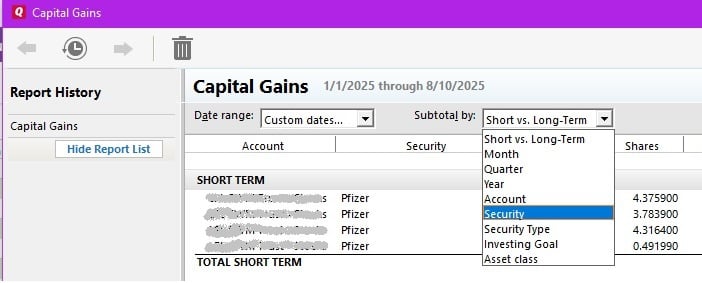
Capital Gains Report -- How to show sub-total by securities only, collapse individual transactions.
In my Capital Gains report, I would like to collapse the individual transactions, and only see the subtotal for security. I have this option in e-Trade, and can easily do it in excel. But have not been able to figure it out in Quicken Classic Deluxe.
Answers
-
@Misra I think you can subtotal the report by security. That will give you the subtotals, but I can't see a way to collapse the detail. The "collapse all" and "expand all" feature seems to be available only for non-investment reports.
1 -
-Quicken Jasmine
Make sure to sign up for the email digest to see a round-up of your top posts.
0 -
It looks like, for Capital Gains Report — the "collapse all" details, and only keep the sub total for each securities is not available.
It will be nice, if Quicken adds this feature in their future update.
0 -
Hello @Misra,
We appreciate you reaching out!
To submit an official request for this feature to be added in the future, what you can do is create an idea post. This way other users who have the same or a similar request can vote on your idea.
Our Development and Product teams frequently use our idea posts in order to improve Quicken and implement new features requested by customers.
I hope this helps!
-Quicken Anja
Make sure to sign up for the email digest to see a round up of your top posts.0 -
@Misra have you tried the different subtotal by options available in the capital gains report?
Quicken user since Q1999. Currently using QW2017.
Questions? Check out the Quicken Windows FAQ list0 -
@mshiggins I think the issue is that investment reports are not collapsible to show sub-totals or totals only.
0 -
So apparently the OP is asking to subtotal by security and sell date?
Quicken user since Q1999. Currently using QW2017.
Questions? Check out the Quicken Windows FAQ list0 -
@mshiggins yes but the OP only wants to see the subtotals, not the security detail and that is not possible for an investment report.
0 -
I have put in an official request for this feature, via
create an idea post. Hope Quicken development team will take quick action. It should be very easy to add this feature.0 -
Here is a link to the idea post:
Quicken user since Q1999. Currently using QW2017.
Questions? Check out the Quicken Windows FAQ list0
Categories
- All Categories
- 56 Product Ideas
- 36 Announcements
- 223 Alerts, Online Banking & Known Product Issues
- 22 Product Alerts
- 701 Welcome to the Community!
- 671 Before you Buy
- 1.2K Product Ideas
- 53.7K Quicken Classic for Windows
- 16.3K Quicken Classic for Mac
- 1K Quicken Mobile
- 813 Quicken on the Web
- 111 Quicken LifeHub