problems with downloading transactions

Tomp.
Tomp. Quicken Windows Subscription Member

windows laptop

quicken classic business and personal

version r63.21 Build 27.1.63.21

problem started around the middle of May. I didn't notice if it was after a recent release.

I was on phone support for over an hour but he was unable to help.

same problem is from every bank I download from. its not an individual bank problem

i originally posted around the middle of may. but the next day my computer broke and its taken over 5 weeks to get a new one from Best Buy geek Squad. thus my delay in contacting you again

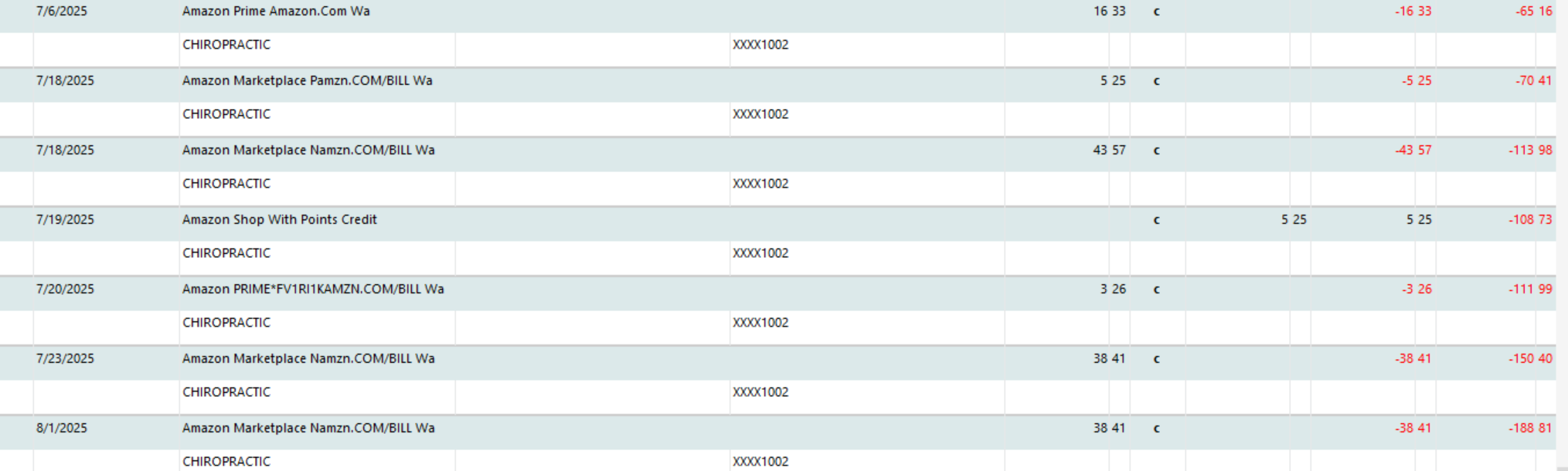
Every time I download transactions it categorizes everything as chiropractic. I tried recategorizing to the correct category and then memorizing the transaction but the next time i downloaded, the same problem occurred.

Can you help?

Thanks

Tom Presson
Untitled Image

Comments

  • Quicken Jasmine
    Quicken Jasmine Quicken Mac Subscription Alumni ✭✭✭✭

    Hello @Tomp.,

    Thanks for reaching out!

    Before we start troubleshooting, I have a few questions to help narrow down what’s going on:

    • Just to confirm, is every single downloaded transaction—regardless of bank, account, or payee—being auto-categorized as chiropractic?
    • When you re-categorize a transaction and memorize it, are you choosing the option to save it with the category for future matches?
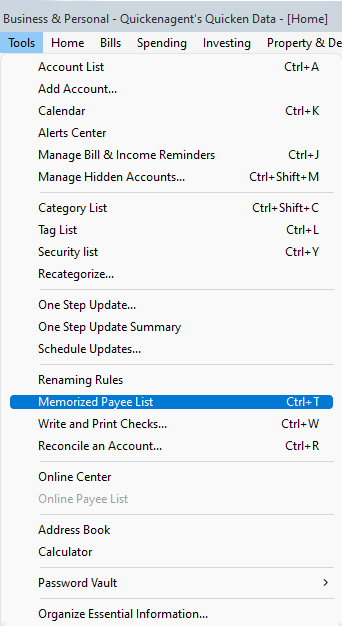
    • If you go to Tools > Memorized Payee List, do you see “chiropractic” applied to a wide number of payees, or possibly listed next to a wildcard entry like *? Screenshot 2025-08-06 at 2.51.55 PM.png
    • Have you checked your renaming rules under Tools > Renaming Rules to see if something there might be funneling all payees into one?
    • Lastly, under Edit > Preferences > Downloaded Transactions, is “Automatically categorize transactions” turned on? Screenshot 2025-08-06 at 2.52.23 PM.png

    Let me know what you find there, and we can go from there.

    -Quicken Jasmine

    Make sure to sign up for the email digest to see a round-up of your top posts.

  • mshiggins
    mshiggins Quicken Windows 2017 SuperUser ✭✭✭✭✭

    Quicken user since Q1999. Currently using QW2017.
    Questions? Check out the Quicken Windows FAQ list

  • Tomp.
    Tomp. Quicken Windows Subscription Member

    thank you Jasmine,

    • Just to confirm, is every single downloaded transaction—regardless of bank, account, or payee—being auto-categorized as chiropractic? answer: yes
    • When you re-categorize a transaction and memorize it, are you choosing the option to save it automatically
    • the option to save it 
    • with the category
    •  for future matches? Answer: Yes
    • If you go to 
    • Tools > Memorized Payee List, do you see “chiropractic” applied to a wide number of payees, or possibly listed next to a wildcard entry like *? Yes.

    I started recategorizing everything in the memorized payee list. Spent about an hour and a half on it and got a ton done. But now all of a sudden when i change the category under a certain payee, it doesn't do it for all of them but i have to do it one at a time.

    Also I have a problem when i try to split categories. For example with Walmart with one purchase i may have 3 split categories such as food, clothing and auto. i could recategorize if i have too but going through all my past Walmart sales in my Walmart app to recategorize them would be extremely time consuming. The Walmart app is not very consumer friendly.

    now i have downloaded twice from all my banks and the categories have been right even though I'm still a ways to go from correcting everything in my memorized payee list.

    thanks

    tom P.

  • Quicken Jasmine
    Quicken Jasmine Quicken Mac Subscription Alumni ✭✭✭✭

    Hello @Tomp.,

    Thanks for clarifying further!

    From what you’ve described, the root cause really does look to be the Memorized Payee List entries that had “chiropractic” applied. When that list contains broad or wildcard payees with the wrong category, Quicken will force all downloads into that category, exactly as you were seeing.

    It’s encouraging that after spending the time to clean up the list, your most recent downloads are now coming in with the correct categories—that shows the changes are taking effect. Sometimes you’ll still need to touch up a few payees one by one (especially ones that had multiple variations saved), but once those are corrected, Quicken should continue to remember them going forward.

    Regarding your Walmart example, you can retroactively apply split categories to past transactions. For future transactions, you can also set up a memorized payee with a split so new downloads automatically use those categories.

    It sounds like you’re on the right track now—it’s just a matter of finishing the cleanup of your Memorized Payee List and applying splits where needed to get everything aligned.

    Please let me know if you need any further assistance!

    -Quicken Jasmine

    Make sure to sign up for the email digest to see a round-up of your top posts.