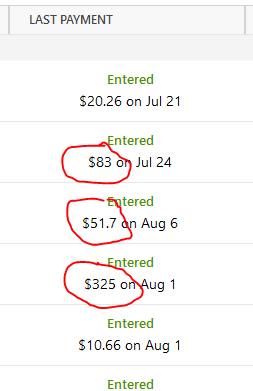
Either round-up to dollars, list dollars and cents to two decimal places (the right answer), but definitely don't just list tens of cents, because nobody in the real world does that. This has annoyed me for years.
@Dave1234 I have noticed the same thing, but I don't think it's a rounding issue. It seems more like a formatting issue. In your example, 51.7 s/b 51.70. I think the formatting just needs to be changed to 2 decimal places.
Hello @Dave1234,
Thanks for reaching out!
I went ahead and changed your post to an Idea so other users who have the same or a similar request can vote on your idea by clicking the up arrow (see below).
Ideas are also reviewed by our Development and Product teams in order to improve Quicken and implement new features requested by customers.
Thank you!
I did not suggest it was a rounding issue.
The code that displays these numbers just needs a ".2%f" to display two digits on the right side of the decimal.
@Quicken Anja we vote now on whether bugs should be fixed? This is a bug. Bugs should be fixed.
@Dave1234 sorry my mistake. I saw "round-up" and my mind went immediately to rounding. I added my vote.
Hello All,
This Idea seems to have stalled, and we would like to gauge the current interest in this request. Please vote if you have not done so already!
This should be changed to always display amounts formatted with two decimal places, e.g., $12.34
I would call this a fix to a display bug … and not a request for a new feature.
I'm taking a SWAG that, in the OP's original post, all of the missing pennies are 0, which is why they aren't displayed.
[EDIT] Just confirmed in my own file … the missing figures are ALL 0 pennies.
[/EDIT]
Vote to fix a bug? Come on.
I'm not a software developer, but this should take like 30 seconds to fix. Someone just needs to change a format string from "%f" to "%f.2" (or whatever works in the platform that Quicken is developed in)
Also in all of the views, please show the year next to the date. Otherwise it gets confusing for annual payments.
Did I already pay this year's bill?