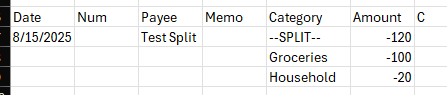
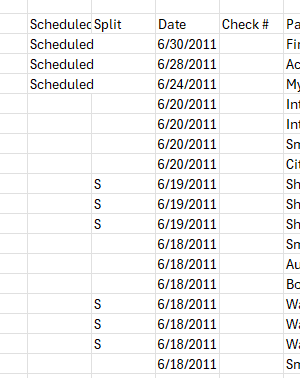
Version: Quicken for Windows Subscription loaded locally on a PC
Release: 63.21
Issue:
I need to import Split Transactions into Quicken using CSV.
Goal:
I am able to get downloaded files from various vendors, like Amazon, Walmart, Grocery store etc. of my detailed transactions. I plan to combine them in Excel, add categories and tags, and import them into Quicken in their respective accounts (Credit cards, Checks, etc.).
I understand that I may have to edit the auto-created Categories, as the Import cannot recognize sub categories (an issue that is not a technical challenge, but rather just Quicken deciding to not implement it) .
Background:
1) I setup an Excel Spreadsheet using the COLUMN list in the following order
- Date *
- Payee *
- FI Payee
- Amount *
- Debit/Credit
- Category
- Account *
- Tag
- Memo
- Chknum
2) I filled out the Date,Payee,Amount required fields
Date - all had same date
Payee - All had same Payee
Amount - All had different amounts
Account - All had same Account
(I created a separate TEST account to not affect my real data
I will use a real account once I see the process work
This way, all I have to do is delete this account and and Tags and Categories
auto-created to get back to the start)
3) I filled out the fields
Memo - items that were purchased
4) Tried to see if Import would group items into a Split Transaction by trying two methods
4a) Put the same unique number in the TAG field
4b) Put the same unique number in the CHECKNUM field
5) Exported the file from Excel as a CSV file
6) Imported the file into Quicken as a CSV file
Results:
In both cases, 4a and 4b, I got multiple SINGLE transactions created.
Question:
Since there is no TRANCACTION ID field, there seems to be no direct way to associate multiple lines in Excel to a single SPLIT transaction.
Can someone help with this? Even If I have to go to some other translation S/W to generate a QIF file, I would do it if it worked. Most of the S/W I saw was quite old and outdated. None directly cane out and said that they can do SPLIT transactions.
Caveat:
Yes, I looked through this forum, but found nothing that really explained how to do this.
Yes, I might have missed something.
[Edited - Readability]