Random transactions getting deleted

CCL
CCL Quicken Mac Other Member ✭✭

Recently (last few months?), Quicken Classic Deluxe for Mac 8.2.1 has started deleting very old (5-10 years) random transactions from my register. It's only at most a few dozen per year, but it throws off my account balance and it's VERY tedious to track down and remedy (luckily I keep my statements for like forever). I get no warning of this - I have to notice that my balance is off in order to know it's happened, and then tediously check the running balance month-by-month against my paper statement to find the deleted transactions. (I know they're getting deleted because I've always kept my balances in sync with what my statements say, for many years).

Alas, I don't see any pattern, per se, except maybe it's only transactions from one particular bank (USAA) (at least that's the only institution I've seen it happen with). It might delete one transaction from, say Nov 2016, and then 6 from July 2018, etc. etc. It might be a credit or debit, it might be from any vendor. Help!


Comments

  • Quicken Kristina
    Quicken Kristina Quicken Windows Subscription Moderator mod

    Hello @CCL,

    Thank you for letting us know you're seeing this issue. To help troubleshoot, please provide more information.

    You mentioned this is happening with one particular financial institution; is this impacting multiple accounts with that financial institution, or just one account?

    Is there any chance that these missing transactions are being incorrectly matched with newly downloaded transactions or reminders?

    When you notice your balances are incorrect, does restoring a recent backup correct the issue, or does the issue happen again? If the issue happens again, are the balances off by the same amount, or by a different amount?

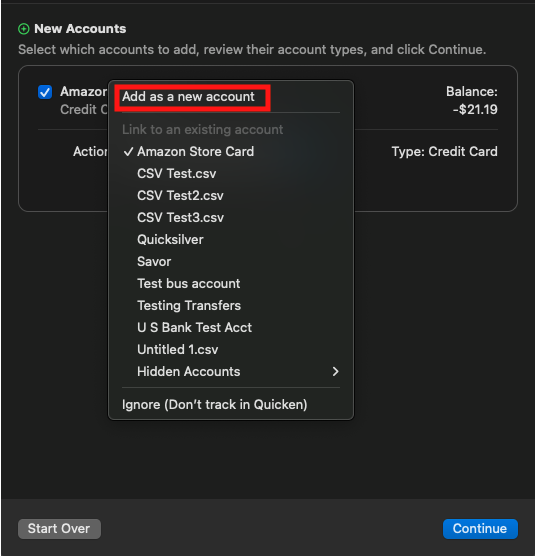
    I suspect that the issue may be a file specific or account specific problem. To troubleshoot this, please backup your Quicken file and deactivate your account(s) with USAA. Navigate to Accounts>Add Account… and follow the prompts to add your USAA account(s) as a new account rather than linking to the existing account.

    Add as New.png

    Some transaction history will download from USAA. To fill in the rest, you can backup your Quicken file, then copy/paste the transactions from the original account(s) into the newly added account(s). Once that is done, monitor the newly added account(s) to see if the issue is resolved.

    I hope this helps!

    Quicken Kristina

    Make sure to sign up for the email digest to see a round up of your top posts.

  • jacobs
    jacobs Quicken Mac Subscription SuperUser, Mac Beta Beta

    @CCL Do you have Quicken Cloud Sync set enabled? (Settings > Mobile, Web & Alerts). If Sync is On there,that could be the source of your problems. While Quicken's cloud syncing generally works, there have been many instances reported where transactions were changed/removed due to some problem with syncing between desktop and cloud files. (For this reason, I do not enable sync, even though I would find it useful on occasion to use the web interface.)

    Quicken Mac Subscription • Quicken user since 1993
  • CCL
    CCL Quicken Mac Other Member ✭✭

    @Quicken Kristina

    Is this impacting multiple accounts with that financial institution, or just one account?

    Yes, multiple accounts.

    Is there any chance that these missing transactions are being incorrectly matched with newly downloaded transactions or reminders?

    No, this does not appear to be what's happening. As I said, I've kept my Quicken ledger up to date and accurate for years. And the dollar amounts for the deleted transactions are not the same as any recent transactions.

    Does restoring a recent backup correct the issue, or does the issue happen again? If the issue happens again, are the balances off by the same amount, or by a different amount?

    I haven't tried this yet - I'll maybe try it next time it happens. Believe it or not, I didn't even know about the backups until now - been using Quicken all these years and never had to make use of backups! :-)

    please backup your Quicken file and deactivate your account(s) with USAA. Navigate to 

    Accounts>Add Account… and follow the prompts to add your USAA account(s) as a new account rather than linking to the existing account.

    Um, I'm a bit wary to do this - won't this lose all of my really old transactions?? Copy-pasting over a decade of transactions is not viable.

    @jacobs

    Thanks for the lead. Alas, I don't have sync turned on, and never have (prefer not to have all of my financial info in one place in the cloud).

    —————

    So far (in the last week), the problem has not showed up again…crossing fingers it stays that way…. if it shows up again I'll try the above.

  • Quicken Kristina
    Quicken Kristina Quicken Windows Subscription Moderator mod

    Thank you for your reply @CCL,

    Deactivating your account and adding it as new (rather than linking to the existing) should not cause you to lose any data. The new account may not be able to automatically download all of your history, but that historical data should still be present in the older account that you deactivated, and if the problem behavior does not happen in the new account, you are able to copy/paste the transaction history that didn't download from the old account into the new one. Prior to moving any transactions, please make sure to backup your file. That way, if anything goes wrong, you can restore your information.

    I hope this helps!

    Quicken Kristina

    Make sure to sign up for the email digest to see a round up of your top posts.

This discussion has been closed.