Quicken since the dawn of time
I've had Quicken since at least 1994 (I just found a report printed out of Quicken dated 1994 in a stack of papers I'm trying to de-hoard). I made the unfortunate decision in early years to start a new data file with each year. I have various storage media containing backups going back decades. I'd like to try to identify my old Quicken data files from as far back as I can, perhaps (someday) integrating them into ONE file (not sure that's possible).
To start - I'd like to search my drives and delete duplicates/backups that are no longer needed.
Have Quicken data files ALWAYS had a .QDF extension? Seems like the extension changed, at some point, and I need to know what to search for.
Quicken Classic Premier (Windows) R64.23 Build 27.1.64.23
Answers
-
According the an AI search, before 2010, the bundle of files that made up Quicken were:
.QDF: The core data file containing the transaction details and account information.
.IDX: An index file used to quickly find and organize the data in the main.QDFfile.
.QEL: The file containing the "quick entry" or memorized transaction list, which stored frequently used payees and categories.
.QPH: The "placeholder" file, used for reconciling transactions and managing uncleared checks.
- In 2010 they were consolidated into the one file in use today.
0 -
There has always been a QDF file associated with Quicken … but a number of years ago the "auxiliary files" that Q also used (.QEL, .IDX, etc, etc) were consolidated into a new-style QDF that's actually a ZIP type file that contains the QDF and all of the auxiliaries.
BUT, consolidating prior Qdf files (old-style or new-style) is VERY difficult and error prone and unless you've got all of the Aux files for the old-style QDF such consolidation probably wouldn't be successful anyway.
For consolidating any new-style QDFs you can search this forum for the laborious method.
Q user since February, 1990. DOS Version 4
Now running Quicken Windows Subscription, Business & Personal
Retired "Certified Information Systems Auditor" & Bank Audit VP0 -
@Tom Young AI is wrong.
QPH file holds the security price history records. That is definite.
I believe the QEL file held information about connections to online financial institutions, by I don’t know the details on that one.
2 -
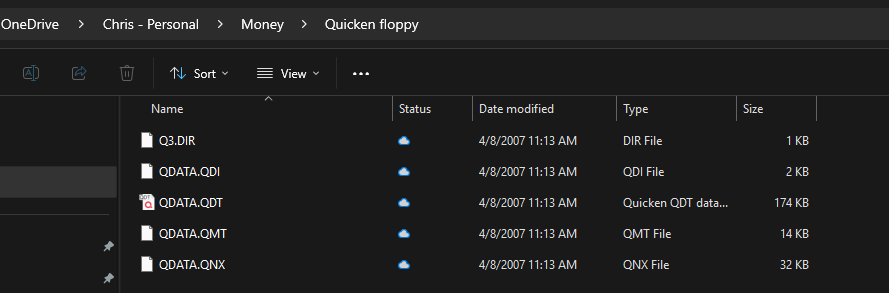
There hasn't always been a .QDF file, I'm not sure exactly when it was first created, but I have my files from what I was using when I first used Quicken starting in 1992. I used Quicken for a year or two, but back then it was purely manual entry, and I gave up. So, call this somewhere between 1992 and 1994 format:
And the auxiliary files have certainly changed over the years. And one thing that always seems to get forgotten in this discussion is the attachments. The attachments are held in a folder that sits alongside of the QDF file (whether that be in a Windows folder before Quicken 2010, or afterwards in the compress QDF that has the old .QDF,… and Attach folder)
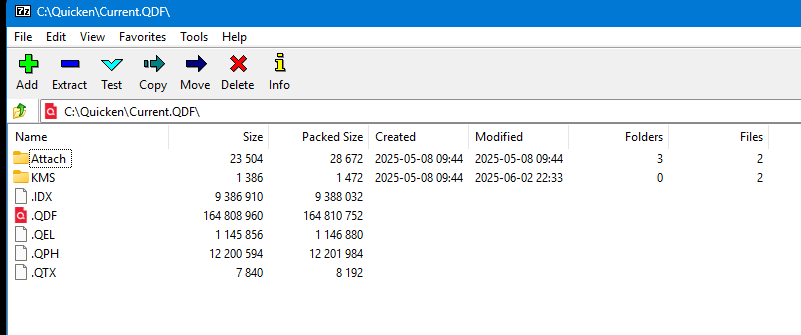
The internals of the modern QDF (compressed files) look like this:
Signature:
This is my website (ImportQIF is free to use):0 -
BTW I would put a rough guess on when the QDF format came out between 2000 and 2004.
There is a very good reason why they have Quicken 2004 in this document about converting old data files.
It is the dividing point between the "old format" and the "new format". It is the last version of Quicken that knows how to convert the older format(s) to the new one.
Signature:
This is my website (ImportQIF is free to use):1 -
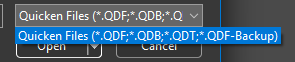
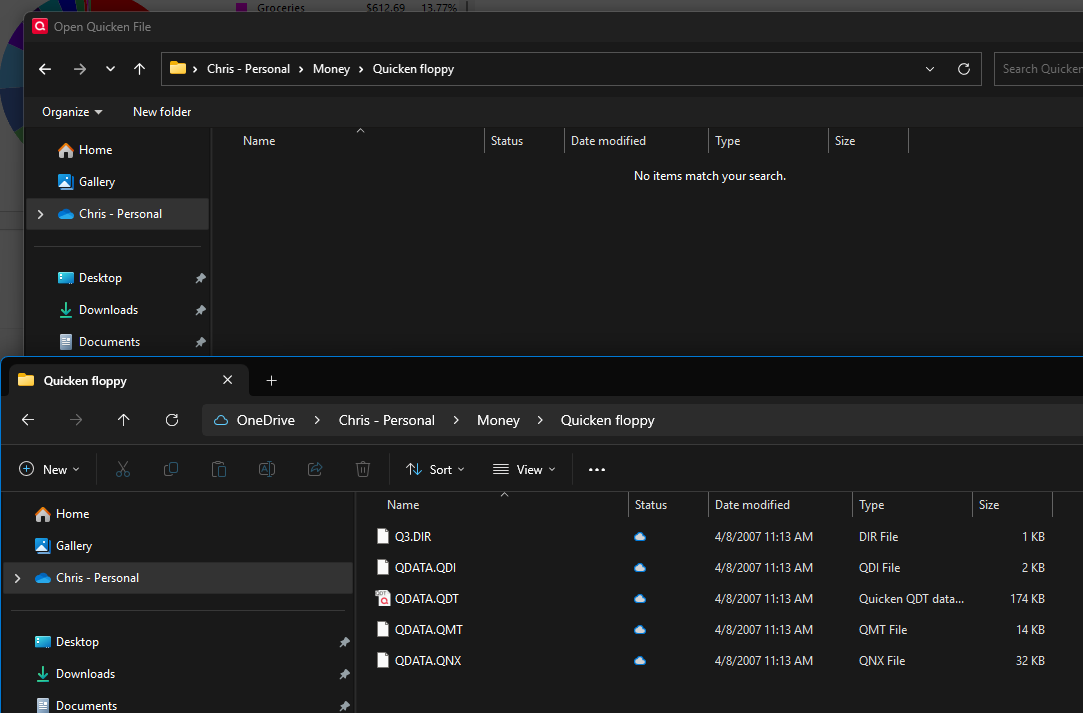
I just notice something interesting. With Quicken Subscription I was sure I couldn't open my old Quicken data file, but I figured I would give it a try and sure enough it comes up blank, but the interesting part is the selection text makes it look like it should be able to find the .QDT file:
One sort as to be a programmer to know what is going on here. In the program when calling to open a file there is both a text to show the user and the actual wild cards to file the files. Clearly, they have updated the actual wild cards not to include .QDT, but missed taking them out in the text that is shown to the user.
I also notice the .QDB file. The .QDF and the QDF-Backup are actually the same format, the -Backup is just a hint to Quicken to treat it as a backup and do a copy/restore instead of opening the data file directly. But back before Quicken 2010 when all the files were put into the compressed files instead telling people to copy all the files that made up a "data file", if the user used the backup feature it put them all in one .QDB file, which can be move to another machine and then restored.
Signature:
This is my website (ImportQIF is free to use):0
Categories
- All Categories
- 56 Product Ideas
- 36 Announcements
- 224 Alerts, Online Banking & Known Product Issues
- 22 Product Alerts
- 702 Welcome to the Community!
- 671 Before you Buy
- 1.2K Product Ideas
- 53.7K Quicken Classic for Windows
- 16.3K Quicken Classic for Mac
- 1K Quicken Mobile
- 812 Quicken on the Web
- 111 Quicken LifeHub