Debt Planning and Projected Balances
I set up a debt plan several weeks ago. When I look at my upcoming bills, the debt plan amounts are reflected for the next month only. As a result, my projected balances of bills/income are useless beyond the 30-day window. Is there a way to get a long-term view of my debt plan reflected in my projected balances of bills and income?
Answers
-
Hi @Steven Miller ,
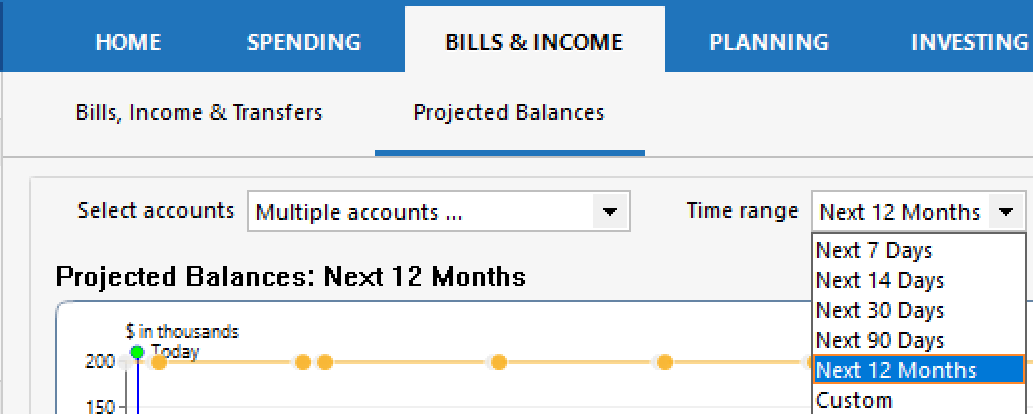
Thanks for reaching out! In the Projected Balances tab within Bills & Income, there’s a Time range filter dropdown that controls how far out your projections are shown.
Could you check if you see that dropdown and let me know:
- What it’s currently set to.
- Whether you’re able to adjust it.
You should have options to extend the view up to 12 months or even enter a custom range. Adjusting this should allow you to see your debt plan reflected in projections beyond the next 30 days.
If you don't see this, please provide a screenshot of what you are seeing. If needed, please refer to this Community FAQ for instructions on how to attach a screenshot. Alternatively, you can also drag and drop screenshots to your response if you are not given the option to add attachments.
Let me know what you see!
-Quicken Anja
Make sure to sign up for the email digest to see a round up of your top posts.0 -
Quicken Anja,
Thanks for the response. I can extend the view of my projected balances for 12 months and longer using the custom range feature. I'm good there. My problem is that the payments established in my debt plan are only reflected for one month in my projected balances regardless of the view selected.
Steven
0 -
Thank you for your reply,
So that we can help troubleshoot, please provide more information about exactly what you're seeing. What kind of account (checking, savings, credit card, loan, etc.) is this happening with? Do you have reminders set up for these monthly payments? Are these reminders linked to an online biller? Please provide a screenshot of what you are seeing (with any personal information redacted). If needed, please refer to this Community FAQ for instructions on how to attach a screenshot. Alternatively, you can also drag and drop screenshots to your response if you are not given the option to add attachments.
Thank you!
Quicken Kristina
Make sure to sign up for the email digest to see a round up of your top posts.
0 -
I thought the debt plan was a stand-alone module and that it did not feed into projected balances. I tested it in my file and while it created a nice-looking plan, it did (not) create any scheduled bill reminders that would report to the Projected Balance graph.
To see the extra debt payoff payments reflected in Projected Balances, you would need to set up a scheduled bill reminder for each account involved or one that represents the sum of the extra payments recommended by the plan. You would need to schedule it as a recurring reminder that ends when the plan projects you will pay the debt off.
0 -
@markus1957 did you mean "… did not create any scheduled bill reminders …"?
If the Debt Reduction plan includes the first monthly payment, you can easily convert that to a monthly Reminder by right clicking in the payment transaction and selecting "Add reminder."
QWin Premier subscription1
Categories
- All Categories
- 56 Product Ideas
- 36 Announcements
- 223 Alerts, Online Banking & Known Product Issues
- 22 Product Alerts
- 701 Welcome to the Community!
- 671 Before you Buy
- 1.2K Product Ideas
- 53.7K Quicken Classic for Windows
- 16.3K Quicken Classic for Mac
- 1K Quicken Mobile
- 813 Quicken on the Web
- 111 Quicken LifeHub