Quicken Bills & Income >> does not link ANY non-bank billers
I have the latest updated version of Quicken Classic Deluxe (Version R64.25 / Build 27.1.64.25) as of Sep 11.
After the Quicken Bill Manager Change in August mentioned in Quicken Support, the following has happened:
— Past reported via the "Help » Report a Problem" that in "Bill and Income reminders" I could see the accounts used for payment had almost all been "mostly scrambled" to different accounts that don't actually pay the bills. I sent in screen shots. I still see "broken" bills pop up and just fix them. Received no feedback from Quicken as to why. I do not recommend "Report a problem" because every time it's been a void I've chucked things into and found my own workarounds. The board = community, visibility, and tracking.
— Currently all my Bank (savings/checking) and Credit Card accounts transferred over and continue to update.
• One exception: Hughes Federal Credit Union recognizes the Checking account, but tries to link the Hughes Savings Account to a completely different bank (USAA). There are no other options. I can't change it.
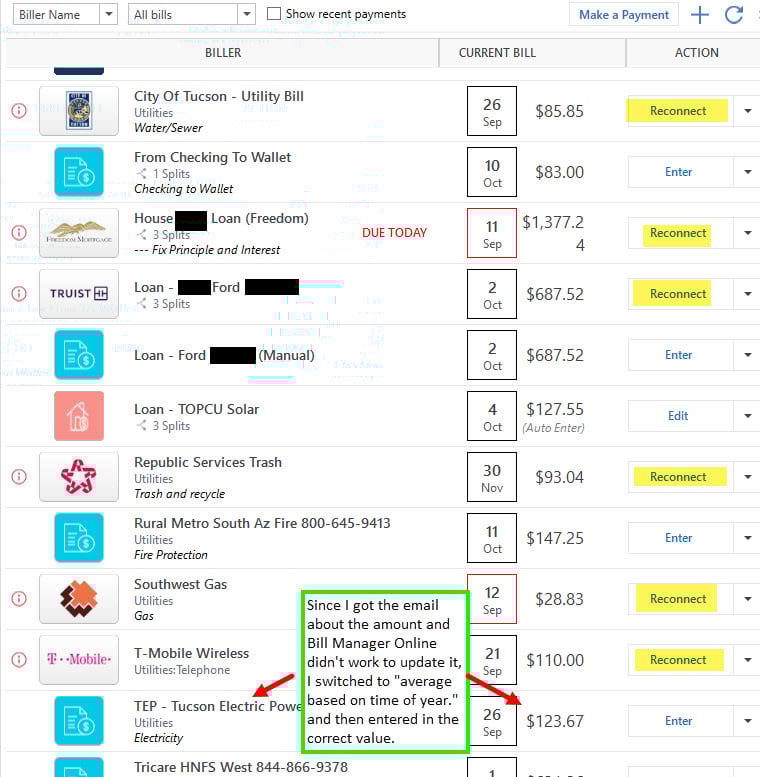
— None, Zero, of my linked "non-bank" bills or loans will update.
- City of Tucson water/sewer -- Can no longer not locate this company
- Freedom Mortgage -- Can no longer not locate this company
- Republic Services Trash -- Can no longer locate this company
- Truist Banking -- 2 Truist banks, 2 Truist online banks. Tried reconnecting to different ones. "Truist Bank" seemed to work, but despite using "reconnect" it insisted on making it a new account. It downloaded exactly 1 day of transactions and none of the loan details, making this effectively useless. One online banking turned into "zzz-Truist Online Banking" the other was "Truist Online Banking-WC". The Banking-WC also worked, also 1 day of transactions, would not link to the account I was trying to sync. Thank you for screwing up years of payments.
- Southwest Gas -- asked for Acct #, says it worked. No other security or login? Says "Pending." Two weeks later, still nothing.
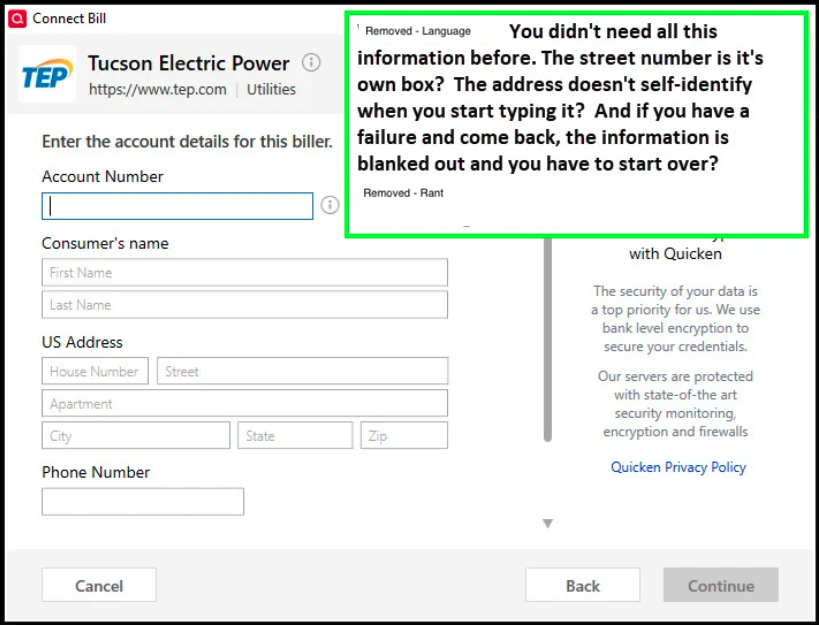
- TMobile - Instead of web page login sync, needed 2 phone numbers, home address, etc. Pending, two weeks later, still nothing.
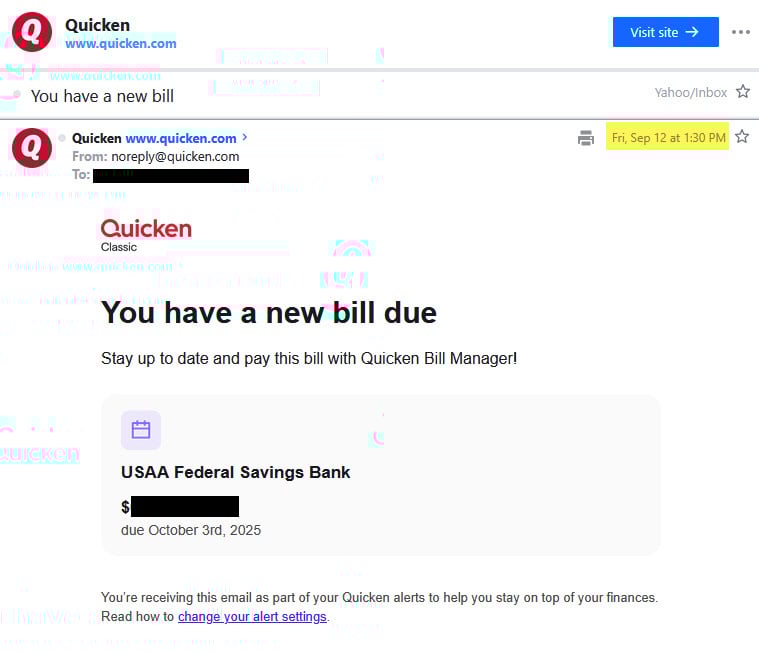
- Tucson Electric - Instead of web page login sync, needed 2 phone numbers, home address, etc. Pending, two weeks later, still nothing. I want to note however: I received a notification by EMAIL that a TEP bill had come in. It would not update the payment due in a few weeks in Quicken, but at least the email let me know "something" had happened.
I gave up on the Hughes Bank linking to USAA account problem, I'll worry about that later as I make limited transactions and will have to update and check balances manually.
But none of my bills or loans will connect? I got an email from Quicken saying I had a new TEP electric bill. But it wouldn't update in Quicken.
Because it's not working in Quicken now, I tried killing and recreating the online TEP account today because —there's definitely a value to update.
I go through the much more laborious screen that if it fails and you go back, it doesn't retain your information—so I have to retype it all if I did make a typo. Great design.
I know about the old “Your request could not be processed right now..." problem as I struggled with it initially, but I did eventually get through. (And the 9/10 update that it's back again)
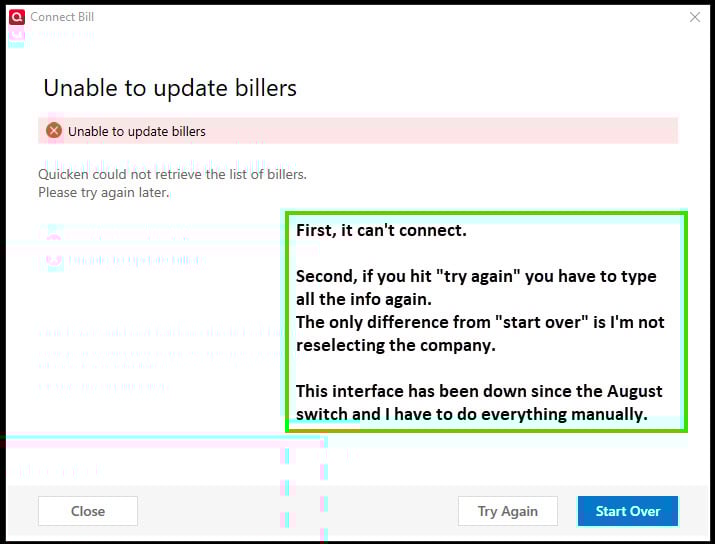
Now after the 9/11 update, Quicken Bills doesn't even say it's going to keep trying to find TEP, (which it shows existed), it just fails and says "unable to update billers."
I've been updating manually the failing accounts for weeks. This can't be just me; is there any help out there? I'll check back and see what's here and call if there's no good answers on the board.
Thank you to anyone who tries to help, and I hope I'm the only one.
Here's the big ugly.
Answers
-
I am experiencing the same problems. How can Quicken put out a notice of improvement without testing?
I wish there was an alternate program that cared.
1 -
Hello @Tom39,
Thank you for letting us know you're seeing these issues. The ones where it can't find the biller are not currently supported by the new service provider. They are working to increase the number of billers they support, so those billers may be supported in the future. For more information, please review this article:
For the feedback on the user interface to reconnect with the various billers being unfriendly to users, I recommend that you create an Idea post. Ideas that get enough votes may be implemented in the future. For information on creating an Idea post, please refer to the post linked below:
For the issue with billers being perpetually stuck in Pending status, I recommend that you contact Quicken Support directly for further assistance, since they have access to tools we can't access on the Community and they're able to escalate the issue as needed. The Quicken Support phone number can be found through this link here. Phone support is available from 5:00 am PT to 5:00 pm PT, Monday through Friday.
I apologize that I could not be of more assistance!
Quicken Kristina
Make sure to sign up for the email digest to see a round up of your top posts.
0 -
Also, make sure you hover your cursor over or tap on the "I" to the right of the account number. Some required the account number, no spaces or dashes (-). One of mine also required my 5 digit zip code appended to the account number.
Having said that, the two I tried to connect, failed. One failed outright (Verizon, indicated "Failed"), the other stayed in "Pending" for a week despite running OSU and checking status several times a day. I finally just deleted them as billers. I did the same as you, set a manual bill with reminder but with zero dollars. When I get close to the payment date, I'll check my bill online and edit the entry.
0 -
I appreciate the above responses. It appears I'll have to call in.
I don't know what the cost difference on the two providers are, but here's some math on the non-bank / non-credit card:
- 3 of 7 not found (43%) And the city of Tucson isn't nobody, they service over 1m people. Republic Services is the second largest provider of waste disposal in the United States after Waste Management a $16b revenue company, and an S&P 500 component. Bit of an oversight. Etc.
- 1 of 7 sorta not working (Truiest bank with 4 options and none that work right).
- That means over half didn't register in at all
- 3 of 7 let me enter info, and two of them have sent me emails (I got a new one today) so I know it's registered with Quicken, but Quicken doesn't ever sync
This is the second bill email I received. It's for a credit card I only use about once a year, and USAA bank did appear to be working as did my credit cards. Just not any loans or bills (or Hughes Credit Union savings account). It appears Quicken took over all my accounts, but they won't link in the program.
0 -
[Removed - Disruptive]
I called.
Their response was basically: we know there is a problem; here is a related ticket number; no, we cannot elevate this problem to 2nd level support; no, there is no one to talk too about this; no, there is no work around.I am reverting to manual reminders.
Steve
Quicken user since 1988.Steve
Quicken user since 19882 -
Thank you for saving me time on the phone. If it's a known issue, it should be a top pinned issue on "Alerts, Online Banking & Known Product Issues" and "Quicken Classic For Windows." Or the home page if it affects all products. Save time, stop people from asking the same question.
I also tried playing with account numbers, but some are just simple numbers; nothing to change or mess up. And of course Hughes Federal Credit Union where Checking updates live but Savings doesn't (and keeps trying to link to a USAA bank account) is just weird. It appears I'm joining the "enter transactions manually" team.
I hope Quicken's lawyers are getting involved in the discussion with the data supplier that isn't supplying data (assuming this isn't a Quicken Software issue).
[Edited - Language]
0 -
I am having the same problem with my billers. None of them are recognized by their new "service provider". I spoke to Quicken support over the phone and was told the same thing as a previous poster. "They have a new service provider and they currently don't support most of the billers." I was assured they're working on it but they couldn't say when it may be fixed. I find it crazy Quicken would release an update with these kinds of problems and not even let users know ahead of time.
0 -
Thank you for your replies @Tom39,
Currently, the only known issue with biller enrollments that has an alert is:
If the issues you are encountering do not match what is described in that alert, it would be beneficial to contact Quicken Support directly for further assistance, since they have access to tools that we can't access on the Community and they're able to escalate issues as needed. The Quicken Support phone number can be found through this link here. Phone support is available from 5:00 am PT to 5:00 pm PT, Monday through Friday.
Thank you!
Quicken Kristina
Make sure to sign up for the email digest to see a round up of your top posts.
0
Categories
- All Categories
- 56 Product Ideas
- 36 Announcements
- 225 Alerts, Online Banking & Known Product Issues
- 22 Product Alerts
- 703 Welcome to the Community!
- 671 Before you Buy
- 1.2K Product Ideas
- 53.7K Quicken Classic for Windows
- 16.3K Quicken Classic for Mac
- 1K Quicken Mobile
- 812 Quicken on the Web
- 111 Quicken LifeHub