Paycheck Entry into Register from Income Reminders created duplicate txn
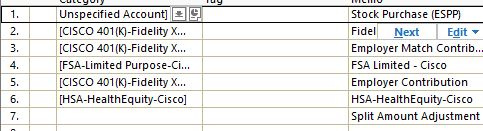
Not sure what happened, but after entering my Paycheck in the register this morning, an additional transaction was created, which duplicated the paycheck amount and created a subset of categories with amounts, but the transaction was not created as a paycheck. I have never seen this before. Any known issues?
I am using Quicken Classic on Windows, and the version is R64.19 (Build 27.1.64.19)
Comments
-
Hello @John McCurdy,
Thank you for sharing your experience. That is unusual behavior. Is the split transaction in your screenshot the extra transaction that appeared? Did it appear in the account your paycheck is usually deposited into, or another account? Are those categories associated with your paycheck in any way, such as being accounts funds from the paycheck are transferred to? I notice one of the categories is "Unspecified Account". Was any account recently deleted in your Quicken file? Since that extra transaction looks like it includes transfers, did it throw off the balances in other accounts?
I look forward to your reply!
Quicken Kristina
Make sure to sign up for the email digest to see a round up of your top posts.
0 -
Yes, that is the extra transaction that appeared.
Yes, it was in the account my paycheck is deposited in to.
All categories are associated with my paycheck, with the exception of the Unspecified account. The memo that is in that line item is correct and the amount was the same as my paycheck.
No account has been deleted associated with the Paycheck.
Yes, it through off the balances in the others account.
0 -
Thank you for your reply,
Since this is unexpected behavior in your Quicken file, I suggest that you try validating your data file. Please save a backup file prior to performing these steps.
Validate:
- File
- Validate and Repair File...
- Validate File
- Click OK
- Close the Data Log
- Close Quicken (leave it closed for at least 5 secs)
- Reopen Quicken and see if the issue persists.
The validate won't automatically remove the extra transaction that appeared, so you may need to delete that manually, then monitor to see if this unexpected behavior happens again.
Please let me know how it goes!
Quicken Kristina
Make sure to sign up for the email digest to see a round up of your top posts.
0 -
Hi, I have Validated the file. I had already removed the extra transaction a couple of days ago, so I will need to wait a couple of weeks for my next paycheck. I will let you know. Thanks.
0 -
Thank you for your reply,
Please let me know if the issue persists, so we can continue troubleshooting if needed.
Thank you!
Quicken Kristina
Make sure to sign up for the email digest to see a round up of your top posts.
0 -
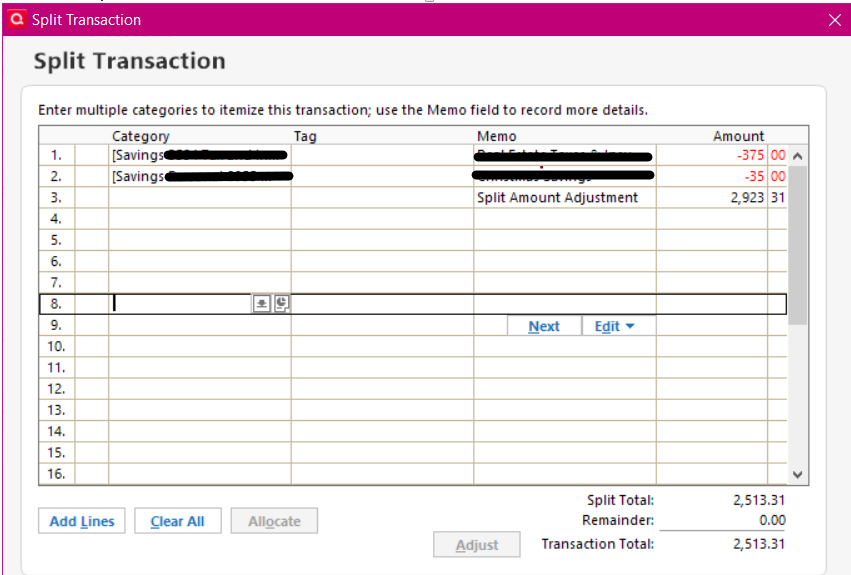
This happened to me as well. The scheduled paycheck entered as it should, but a second "Split Transaction" (screen shot below) appeared showing the portions of the paycheck which are put into separate savings accounts and all the other normal splits for healthcare premiums, taxes, etc. entered on a third line as an adjustment (interestingly, this split transaction is $5.44 less than the actual paycheck amount). My answers to the questions you asked John McCurdy are the same as his.
I was using R64.25 build 27.1.64.25. I performed a backup of my file and then validated with no errors found, Afterwards I updated to R64.29 build 27.1.64.29 and the extra transaction is still showing in my registers.
I am working on Windows 10.
0 -
Hello @45MPHK9,
Thank you for letting us know you're also seeing this issue. Updating Quicken to the latest version will not cause that transaction to disappear. You would still need to delete it manually.
Please let me know if the issue persists!
Quicken Kristina
Make sure to sign up for the email digest to see a round up of your top posts.
0 -
So deleting the duplicate transaction will resolve this problem the next time I enter a paycheck?
0 -
Thank you for your reply,
If it was caused by a one-time issue, yes. If the issue does happen again, please let me know.
Thank you!
Quicken Kristina
Make sure to sign up for the email digest to see a round up of your top posts.
0 -
This happened again on my paycheck from yesterday. An extra transaction was created.
0 -
Thank you for your reply,
Since the issue is persisting, the next troubleshooting step is to restore a backup from before the problem started, and test to see if the issue is resolved in that newly restored file.
Please let me know how it goes!
Quicken Kristina
Make sure to sign up for the email digest to see a round up of your top posts.
0 -
This is happening to me too. I delete the extra transaction for my last paycheck 2 weeks ago but it happened again today.
0 -
To the folks experiencing a corrupted paycheck, you may want to have a look at this discussion:
Quicken user since Q1999. Currently using QW2017.
Questions? Check out the Quicken Windows FAQ list0
Categories
- All Categories
- 60 Product Ideas
- 36 Announcements
- 222 Alerts, Online Banking & Known Product Issues
- 21 Product Alerts
- 704 Welcome to the Community!
- 672 Before you Buy
- 1.2K Product Ideas
- 53.9K Quicken Classic for Windows
- 16.4K Quicken Classic for Mac
- 1K Quicken Mobile
- 812 Quicken on the Web
- 115 Quicken LifeHub