Duplicate transactions from Fidelity (QMac)

This discussion was created from comments split from:
Why am I seeing duplicate entries from Fidelity?
.
Comments
-
I have also consistently been getting duplicate records from Fidelity, limited to the 401k account. My brokerage, IRA & Roth accounts have not had the same issue. It happen everytime the account refreshes. For example, I manually deleted the duplicate records this morning. I manually refreshed and they appeared again. I have also been prompted to update the Fidelity connection everytime I refresh.
0 -
I just started having the same problem on Quicken for Mac. Here's what seems to be happening. Quicken has created a duplicate set of securities for each of my existing Fidelity 401k securities. Each of these duplicate securities has created a transaction on 12/27/18. This transaction says "This is a special transaction that will automatically adjust its shares to maintain a share balance of X on 9/19/25 if any transactions are added, deleted or modified".
I previously deleted these transactions and duplicate securities, but when I update my accounts, then just reappear. How do I fix this permanently?
0 -
Hello @mvaz1029,
Thank you for sharing your experience. To clarify, are you reauthorizing the account every time and then getting duplicate transactions after reauthorizing? If that is what is happening, then the duplicates may be normal behavior, since any time an account is connected/reconnected, there is a risk of getting duplicate transactions (it's harder for Quicken to see that the transactions already downloaded).
The constant prompts to reauthorize indicate that something is making Quicken think that the problem account is not yet connected by the new connection method (Quicken Connect OAuth). I recommend that you navigate to Accounts>Hide and Show Accounts… and check to see if there are any duplicates of that account connected in your Quicken (This can sometimes happen when reauthorizing an account, if the account gets added as new instead of linked to the existing account in Quicken).
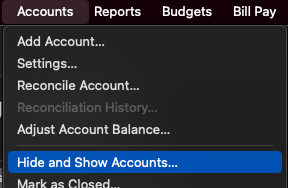
If you do find duplicate accounts, then I recommend that you backup your Quicken file and deactivate the duplicate account(s). Once that is done, test to see if the issues with being prompted to reauthorize and with duplicate transactions downloading are resolved.
Hello @Todd D,
Thank you for letting us know you're seeing this issue with duplicate securities. To resolve the issue, I recommend that you backup your Quicken file, then try merging those duplicate securities with the original securities already in your Quicken. For instructions on merging securities, please see this help article:
Please let me know how it goes!
Quicken Kristina
Make sure to sign up for the email digest to see a round up of your top posts.
0 -
Quicken has created a duplicate set of securities for each of my existing Fidelity 401k securities.
Actually, it's Fidelity, not Quicken, which changed the naming of the securities it downloads. Thanks, Fidelity! As @Quicken Kristina said, merging the old and new securities into one, then deleting any placeholder transaction which is doubling your holdings, should resolve the issue permanently.
Quicken Mac Subscription • Quicken user since 19930 -
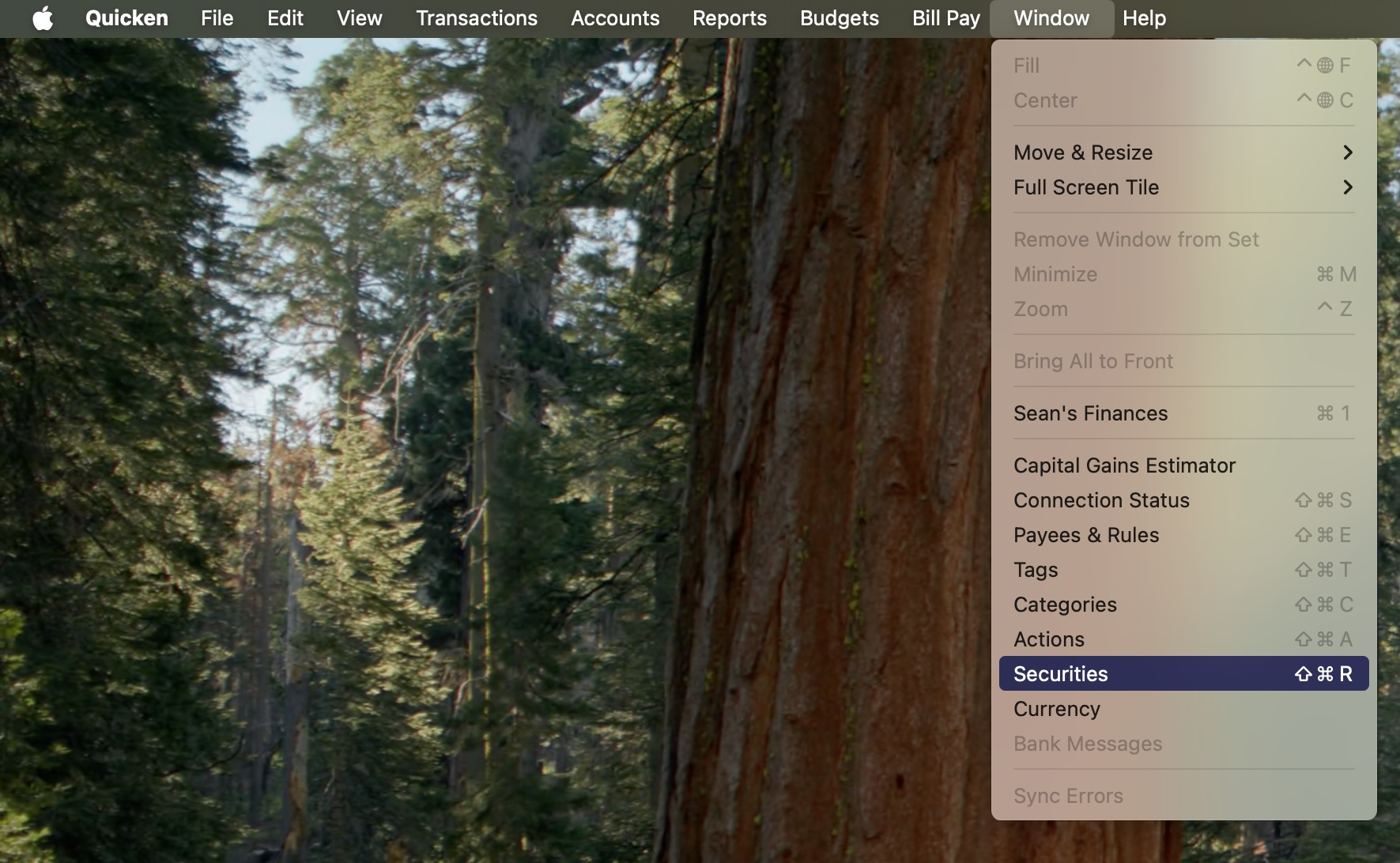
Thank you — this worked for my Quicken Mac duplicate Fidelity securities. Specifically, I clicked "Window" then "Securities" then on the list of securities, selected the duplicate Fidelity securities and clicked "Merge." Then refreshed all the accounts and the duplicate entries were gone.
 1
1 -
Merging securities fixed that problem. Thanks for letting me know.
Now a new problem has popped up with one of my Fidelity accounts. It has added a money market account in addition to the cash account so it doubles the cash in the account. I see this is also a known problem. I'll look into solutions if there are any or wait for the update to fix it.
0 -
Hello @Todd D,
Thank you for letting us know you're seeing an issue with the cash balance doubling. According to our Community Alert, you can correct the issue by doing the following:
If your cash balance is incorrect, please perform a reconciliation with the online balance and enter an adjustment to correct the cash balance.
Please let me know how it goes!
Quicken Kristina
Make sure to sign up for the email digest to see a round up of your top posts.
0 -
I added the adjustment and it seems to have fixed it. Fingers crossed they dont make some other weird change that throws things off. Thanks!
1 -
Thank you for the follow-up,
I'm glad to hear that the adjustment corrected the issue.
If you need further assistance, please feel free to reach out!
Quicken Kristina
Make sure to sign up for the email digest to see a round up of your top posts.
0


