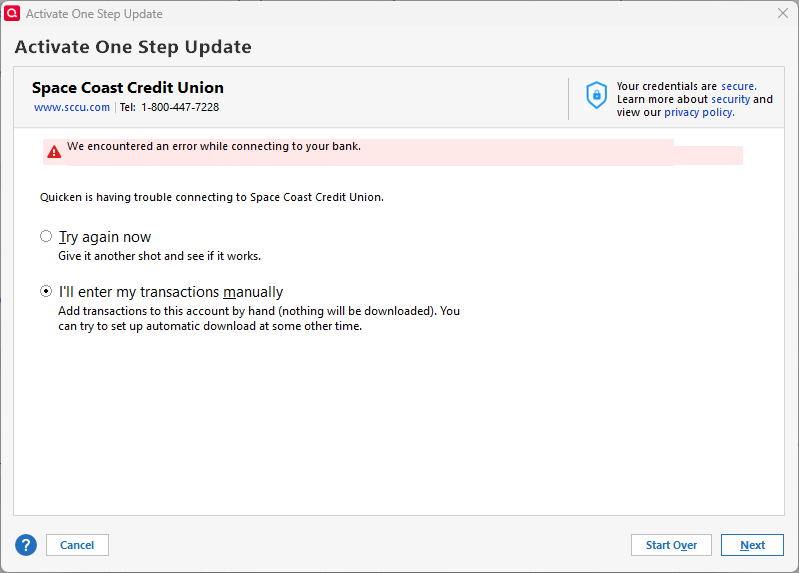
Space Coast Credit Union (SCCU) Not Updating (WIN)
I'm adding this as a repeat or continuation of same subject discussed and closed during Jun-Aug 2025. SCCU transactions still fail to load into Quicken during the One Step Update (OSU) process. However, deposits, etc do show on sccu.com.
If others see this problem, please respond here in Community. Also, like I did, please notify the Q Help Team via Help > Report A Problem and send log files and a sanitized data file. Maybe if Q trouble-shooters see a trend, a resolution will be released soon. For now, it's back to manual work-arounds.
Comments
-
If you haven't done so already, I'd say it's time to contact Quicken Support on the phone during posted hours of operation and report an Online Banking issue. Let them do a screen share session with you to review the situation on your computer, to determine the nature of the problem and to figure out how to fix it.
Send Help / Report a Problem files only when requested by Support. Unsolicited downloads will not receive the attention you think they should. And they will not receive a reply. Read the fine print in the Report a Problem panel.
0 -
Thank you for those insights, UKR. I thought (hoped) that REPORT A PROBLEM issues were considered and prioritized based on the trending of user feedback and issues.
I am humbled to say that I contributed to the problem. I changed my password at SCCU site and overlooked updating it in Quicken to enable downloads straight away. Once I figured that out and corrected things, everything seems to be working, albeit the connectivity with SCCU remains abysmally slow and requires the entry of repeated verification codes. Moral of the story? When all else failures, check for a simple solution. ;-}
0 -
Hi all. Does SCCU require verification from anyone else during OSU (One Step Update)? SCCU is the only one of multiple Financial Institutions I use that backtracked and added this extra step. All in all, it defeats the time-savings of doing a OSU. If SCCU downloads seamlessly, please let me know, too. I'm hesitant to put more hours into resolving issues between SCCU and Quicken.
0 -
Hello @SeaStar,
Thanks for sharing your experience and concerns — I know how frustrating it can be to deal with repeated MFA prompts.
While I can’t say for certain what Space Coast Credit Union specifically requires, I can confirm that some financial institutions do enforce multi-factor authentication (MFA) with every update or connection attempt. In some cases, this behavior can be adjusted from the bank’s website — for example, by changing security settings or adjusting how often MFA is required.
That said, this is ultimately something controlled by the bank, so I’d recommend reaching out to them directly for clarification and to see if there are any options available to reduce the frequency.
Hope that helps point you in the right direction!
Quicken Alyssa
Make sure to sign up for the email digest to see a round up of your top posts.
0 -
FWIW, I've been prompted for a code with every transaction download for at least the past two weeks. Before that, I would only get prompted once in awhile (couldn't tell you the interval because of numerous SCCU issues since the cutover to their new system). I just shake my head and move on with my life. Every time seems to be the way a number of sites are operating now.
Today, I got CC-506 errors. I usually wait a day or two to see if it clears on the back end because nothing's changed in my Quicken instance.
0 -
Hello @jtemplin,
Thank you for adding to this discussion with your experience.
Looking internally, it appears that your last update for Space Coast Credit Union today was successful and without errors. Are you still seeing the CC-506 on your end?
Looking forward to your response.
Quicken Alyssa
Make sure to sign up for the email digest to see a round up of your top posts.
0 -
Still having issues, but instead of bailing out and getting the CC-506 error, I went through the troubleshooting screens (no, I didn't close the accounts; no I didn't rename any of them; yes, I've seen the issue for more than a few days). I chose the reset option, provided my password, got prompted for a code which I got and supplied, but when it went off to search for my accounts, it took some time and finally I got the screen below.
0 -
Hello @jtemplin,
Thank you for coming back and sharing additional details.
I do now see the FDP-106/CC-506 error internally. Based on the information you provided, it sounds like you may have already checked out the Support Article for this issue. If not, please follow the steps in the article, and if they do not resolve the issue, please contact Quicken Support directly. Further investigation and escalation may be necessary.
Thank you!
Quicken Alyssa
Make sure to sign up for the email digest to see a round up of your top posts.
0 -
Again, SCCU and Quicken downloads. This is getting really problematic with a paid subscription. Come on get back to the way it was, do update DONE!!
0 -
Hello @Jako,
Thank you for adding to this discussion with your concerns. Sorry to hear that you are experiencing an issue with Space Coast Credit Union.
After checking your account internally, I do not see any errors for this financial institution. What exactly are you seeing on your end?
Providing screenshots of what you are seeing can also be helpful. If needed, please refer to this Community FAQ for instructions on how to attach a screenshot. Alternatively, you can also drag and drop screenshots to your response if you are not given the option to add attachments.
Looking forward to your response!
Quicken Alyssa
Make sure to sign up for the email digest to see a round up of your top posts.
0 -
SCCU updating is still a constant aggravation. The time taken for one Bank/CU to update accounts through their MFA is unacceptable. Not only does it not update in a timely manner, the SCCU process also locks up the quicken refresh program for other processing. MFA's for other institutions rarely take more than 5 secs. It is literally minutes for SCCU. If I have the time and a cup of coffee I can wait and then manipulate through a few accept screens and then get the update—-just glad I don't have to do that for other financial institutions.
1 -
I too can not get SCCU to work with one step update. It either never sends a verification code or it doesn't download transactions that ARE showing in the accounts as posted, This has been going on too long, I tried resetting all the accounts, deactivating and re-adding but nothing fixes it.
1 -
Hello @mardis2003 & @Jeff qkn,
Thank you both for adding to this discussion with your experiences.
It looks like both of you are getting the code (eventually), and both show no errors internally for this financial institution. So that is good!
As far as the speed at which the code is received, Quicken doesn't have control over that. It might be worth your while to contact SCCU and ask to speak with someone in online banking who can hopefully shed some light on this issue.
If you are missing transactions, please follow the recommendations in this Support Article. If they do not resolve the issue, contact Quicken Support directly, as this may require further investigation and possibly escalation.
Hope this helps!
Quicken Alyssa
Make sure to sign up for the email digest to see a round up of your top posts.
0 -
FWIW, I managed to reactivate only two (HSA-related) out of four accounts. The other two accounts are business-related and weren't even presented to me for mapping despite all attempts to activate those.
During OSU today, I get the dreaded CC-800 error on the two mapped HSA accounts, and I had to deactivate/reactivate them. Still no sign of my business accounts. Again, they are not presented for mapping, and I can't explicitly activate those.
A support email I opened with SCCU yesterday told me it's a Quicken issue. I'm done fighting with them to convince them otherwise. SCCU is unreliable and I'm convinced it doesn't have the internal capability to troubleshoot these issues. I fear any time I spend with Quicken support will be a waste of my time. The record shows this will just break again at some point.
I am done fussing with this. Once my HSA is emptied, I'm closing those accounts, and I will be moving my business accounts to BOA very soon.
1 -
Hello @jtemplin,
Thank you for following up and for contacting SCCU, though I am sorry to hear you didn't get any resolution by doing so.
If you contact Quicken Support, they may be able to escalate the issue for you from our end. You would need to call them to find out if that's the case or not.
I hope this helps.
Quicken Alyssa
Make sure to sign up for the email digest to see a round up of your top posts.
0 -
I have a Quicken Ticket opened for 3 weeks now. I can still not download transactions from SCCU.
1 -
Hello @jbabiak,
Thank you for adding to this discussion. I am sorry to hear you are having continued issues downloading transactions from SCCU.
I looked at your most recent tickets with support, and it looks like the escalations team sent you an email on 10/9/25.
If you want to reply to that and let me know once you have done so, I can follow up on it for you.
Thank you!
Quicken Alyssa
Make sure to sign up for the email digest to see a round up of your top posts.
0 -
I have already replied to the support team following their instructions in the email. I have not heard back from them. Issue still exists.
0 -
My apologies, for some reason, I am unable to see your reply to them.
I will follow up with that team tomorrow, as they are not in today, and get back to you when I have an update.
Thank you!
Quicken Alyssa
Make sure to sign up for the email digest to see a round up of your top posts.
0 -
I have sent you a direct message. Please navigate to the inbox in the top right-hand corner of the Community page and check your inbox.
Thank you!
Quicken Alyssa
Make sure to sign up for the email digest to see a round up of your top posts.
0 -
Eureka! There was no dreaded MFA request from SCCU during Q OSU (One Step Update) and two expected SCCU Checking transactions downloaded to Quicken today. I'll count that as two wins.
0 -
Thank you for updating us and letting us all know this issue has been resolved for you.
If you need more help, don't hesitate to reach out!
Thanks again!
Quicken Alyssa
Make sure to sign up for the email digest to see a round up of your top posts.
0 -
Hi, not sure which side of the connections Q or SCCU fixed the issue, but transactions are not working again.
0 -
That's a bummer, jbabiak. According to SCCU.com, I had one transaction on 11/7. I ran a few OSU updates over the weekend and that single download finally came to Quicken a few minutes ago, three days later. SCCU was the only OSU selected and the process disappointingly took several minutes. That is longer than it generally takes to OSU multiple other accounts. On the plus side, there was no prompt to do MFA like Users had faced for quite awhile.
0 -
Thank you for following up. I will continue with you via DM.
Happy to hear there was no MFA prompt, though it's unfortunate the update was slow. Let me know if you need further assistance.
Thank you.
Quicken Alyssa
Make sure to sign up for the email digest to see a round up of your top posts.
0
Categories
- All Categories
- 56 Product Ideas
- 36 Announcements
- 223 Alerts, Online Banking & Known Product Issues
- 22 Product Alerts
- 701 Welcome to the Community!
- 671 Before you Buy
- 1.2K Product Ideas
- 53.7K Quicken Classic for Windows
- 16.3K Quicken Classic for Mac
- 1K Quicken Mobile
- 813 Quicken on the Web
- 111 Quicken LifeHub