Register auto-enters bill reminders years into the future

sycamore91
sycamore91 Quicken Windows Subscription Member ✭✭

I've been using Quicken for 10 years or so on my Windows computer. After the most recent update to R64.30, I noticed that Quicken is auto-entering bill/transaction reminders several years into the future. Every time I open it, more future transactions are being auto-entered in the register—I'm now up to transactions in 2035.

I have set up Manage Bills and Income Reminders—> Bills and Deposits over the years for many transactions to "Show in List" Optional Settings—>60 days in advance. It's always behaved as intended, entering them into the register only 60 days beforehand.

In the register, I always have "Don't show reminders" set, as that's now how I like to manage my register. Confirmed that it's still set that way.

Now I have a cluttered register in nearly 10 accounts. Would love this bug to be fixed.

Answers

  • Jeff76
    Jeff76 Quicken Windows Subscription Member ✭✭✭✭

    Hmm, I have updated to R64.30 and have not noticed that, have you tried "validate and repair file" just to see on the off chance if that might help?

  • pkeegan
    pkeegan Quicken Windows Subscription Member ✭✭✭
  • Quicken Kristina
    Quicken Kristina Quicken Windows Subscription Moderator mod

    Hello @pkeegan,

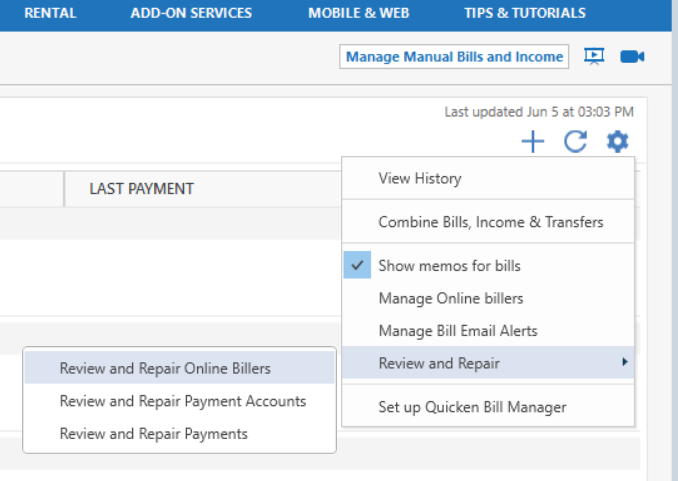
    Thank you for reaching out to the Community and telling us about this issue. To start troubleshooting, I suggest you try to Review and Repair Online billers. However, I do recommend that you save a backup of your data file first. After that, please navigate to the Bills & Income tab and click on the gear icon on the top-right. Then, click on Review and Repair > Review and Repair Online Billers in the dropdown menu.

    image.png

    Once that is done, please test to see if the issue is resolved.

    Please let me know how it goes!

    Quicken Kristina

    Make sure to sign up for the email digest to see a round up of your top posts.

  • pkeegan
    pkeegan Quicken Windows Subscription Member ✭✭✭

    I did the Review and Repair online billers today. I had previously deleted all the future reminders from the registers, so it may take a couple of months to see if the problem is fixed. Thanks.

  • pkeegan
    pkeegan Quicken Windows Subscription Member ✭✭✭

    Also, I had previously modified the problem reminders by changing the 'Auto enter' dates by 1 day.

  • sycamore91
    sycamore91 Quicken Windows Subscription Member ✭✭

    @Jeff76 , yes, I ran a file validation and no errors were found.

    Hi Quicken Kristina,

    I'm actually the original poster of this comment, though I don't mind @pkeegan weighing in on the same issue!

    I followed the steps you recommended. After doing so, I still see the auto-entered transactions. For some accounts they now go out to 2039. Should the procedure you outlined have removed them and reset the next due date in "Bills and Income Reminders" back to the 60 day mark that I originally set in the "Auto Enter __ Days in Advance" field? I don't see that either of those have happened.

    I think the alternative would be to do as pkeegan has done, which is to delete all of the erroneously auto-entered transactions and reset the "Due Next On" in the "Edit Bill Reminder" dialogue from 2039 back to 2025. That could take a while as I have a lot of reminders I've manually setup.

    Notably, the procedure you recommended is for Online Billers (which I've never used) but the recurring reminders are ones I've manually set up for many years. Call me old fashioned but I'd prefer this method which has been in Quicken for a long time.

    Thanks in advance.

  • Chris_QPW
    Chris_QPW Quicken Windows Subscription Member ✭✭✭✭

    Typically when something like this happens it is because of a corrupted reminder.

    It can be so bad that you can’t get the data file open because Quicken is trying put in transactions so far in the future it basically goes until it crashes.

    The fix for that is to set the system date to like a month prior and then delete and recreate the reminder.

    Signature:
    This is my website (ImportQIF is free to use):

    http://www.quicknperlwiz.com/

This discussion has been closed.