Fidelity Investments - Dividend transactions for Foreign Stocks are not being automatically recorded

Are others seeing the issue where dividend transactions for foreign stocks are being downloaded into Quicken (Windows) as deposits and not as dividends. Domestic stocks are being recorded correctly. Pls advise if anyone in the community has been able to get around this issue in an automated manner - not sure if I can rely on Quicken to come up with this fix since all my Fidelity accounts struggle to download on a regular basis and the typical Quicken support solution is to blame Fidelity and Fidelity blames Quicken.
Comments
-
Yes, I am seeing this issue also.
As far as getting around it In "an automated manner", no, I have not.
What I do with all dividends, however is create reminder transactions for them when they are declared. These reminders are are what get entered in Quicken. Then when the actual dividend downloads it matches with the reminder. In this case where the dividend is downloaded as a deposit I just delete the downloaded transaction and manually "clear" the reminder transaction. I don't have many foreign stocks so it doesn't happen that often
Quicken Windows user since 1993.
2 -
Could this be tied into the fact that foreign stock dividends typically also carry in either a dividend charge or a foreign tax withholding amount (or both)? Are those expense transactions showing up as you would expect?
Not offering a solution. Just trying to identify a cause.
1 -
In my case, no, there are no fees or other charges/taxes. When I look at the transaction online it looks exactly like domestic dividends. The only difference I can ever see is that it is posted later in the day than the domestic dividends. With the old DC Fidelity connection it was downloaded as a dividend just like all the rest of the dividends.
Quicken Windows user since 1993.
1 -
The service charges and tax fees are downloaded as withdrawals. In the past, I would automatically recharacterize these as Inv Exp and Foreign Taxes but am unable to do so since these transactions have descriptions and no payees.
1 -

Above is how the div transaction is downloaded ….
0 -
I have also been seeing this same behavior since the EWC+ cutover for Fidelity a couple weeks back. I'm also seeing the issue where I am getting Securities Comparison Mismatch errors between the Cash Balance (Quicken) and MMF (Fidelity). This is getting frustrating as I have not seen any recent updates on getting this fixed from Quicken.
1 -
I have also been facing the cash imbalance issue, but thought that was self induced since I have not adopted quicken's suggestion to consider money market tickers as cash.
I know that there are many quicken users who have fidelity accounts. Just super surprised that this issue with Foreign Dividends is not impacting a larger user base.
Am also surprised that the quicken team who is monitoring the comments in this community portal are staying silent and not providing any suggestions … I am sure they are crossing their fingers and staying silent with the hope the issue goes away by itself as the users will learn to live with this issue.
0 -
In my Category List, _DivInc is associated with "Schedule B - Dividend Income", but I've had Q for so long that I don't remember if I did that or if it came that way.
In either event, do these Foreign stock divs qualify for that tax treatment? How do you report them on your tax return?
Because, if they don't qualify, I'd think that you need to set up your own category, with an appropriate tax line and not rely of the downloaded Div action.
Q user since February, 1990. DOS Version 4
Now running Quicken Windows Subscription, Business & Personal
Retired "Certified Information Systems Auditor" & Bank Audit VP0 -
@NotACPA That is the default (automatic) category for _DivInc. In my experience 'foreign' dividends (really dividends from American Depository receipts, ADRs) do qualify for that same treatment; that is how they get reported on my 1040.
This issue seems to be that Fidelity under old Direct Connect connections handled these dividends just like other dividends, but now under recent EWC+ downloads they are coming in differently. Maybe that is on Fidelity, maybe that is on the aggregator (Intuit). In all honesty, I can't see that being on the Quicken program. I've always seen the program in the position of using what it has been given.
0 -
@q_lurker But the OP didn't say that this is an ADR (which I'm quite familiar with) but a "foreign stock". Thus my question.
Imperial Oil, shown in the OP's graphic, is a CDN company, so it might be an actual stock holding. But that the other holdings in the account are US, that does suggest an ADR.
Q user since February, 1990. DOS Version 4
Now running Quicken Windows Subscription, Business & Personal
Retired "Certified Information Systems Auditor" & Bank Audit VP0 -
I agree with you that it seems odd that we are getting limited responses from Quicken Community mods on this issue. They have not updated the official thread (below) since 9/22.
1 -
My apologies for not being extremely clear with my last comment. The "foreign stock" that I mentioned earlier are not ADR's and taxes for these are withheld at the time when the dividend is paid out. They have to be recorded in quicken when I do my taxes and summarized in my tax return based on the country.
Another clarification - the example image I attached, previously in this thread, shows both domestic and international transactions when downloaded by quicken after clicking the "One Step Update" button. All the transactions in the image, except the last one, are domestic transactions which are appropriately categorized by quicken. The last transaction is the international equity, the one that is the problem. (BTW, I just picked an account which had a single transaction. Earlier this year I loaded up on international stock and am facing this issue in droves across the board).
Finally, MUCH THANKS AND APPRECIATION TO ALL THE FOLKS on this thread who are responding to my plea for help on this issue.
Unfortunately, Intuit is still silent on this issue which seems to demonstrate a culture of of continuing negligence and callousness.
1 -
@pcg_quick but if this is truly a CDN stock, isn't it denominated in CAD rather than USD like your Coca-Cola and Brown-Forman stocks?
Because if it is a CAD stock, then it should be in a CAD denominated account … in Q, you can't mix currencies within an account.
I don't know. for certain, that such is related to the issues you're reporting, but it can't hurt to make those corrections.
Q user since February, 1990. DOS Version 4
Now running Quicken Windows Subscription, Business & Personal
Retired "Certified Information Systems Auditor" & Bank Audit VP0 -
I used to own Imperial Oil, ticker IMO, in 2020. It was traded on Nasdaq (as I recall) in USD and treated tax-wise just like any other holding, except that as @pcg_quick noted an extra transaction for the foreign taxes withheld. Yes, it is a foreign stock, Canadian, traded on a US exchange.
It seems clear to me from all of @pcg_quick comments that Fidelity is mis-handling these transactions that they used to handle correctly. Perhaps the EWC+ aggregator is (Intuit) at fault. I’d be less likely to blame the Quicken Classic desktop package because I see that package using the data provided in almost all cases. The Quicken team can and should be working with Fidelity (and Intuit) to get this straightened out.
2 -
Fidelity does the currency conversion in their back-end and presents it back to me in USD. Not to be rude, but the issue I am experiencing is not in the quantity or price/earnings. All I am looking for Intuit to do is do the same as they do for domestic stocks for these international stocks and classify them as dividends and not leave them hanging as a default deposit.
On a separate note, I have had some success with Fidelity and got the issue escalated to their interface team, this morning they called and shared the API schema and it is clearly the same as domestic equities (they do have a identifier for international and country of the exchange). They share the same API with e-money and other third party aggregators, and they have no complaints from them. Hence it is all pointing towards a translation that Quicken has in their code and is dropping the "Div" transaction type and substituting it with a "Deposit" transaction and copying the memo field from Fidelity into the description field in Quicken. They also indicated that Fidelity is more than happy to discuss this with Quicken if they are interested in fixing this issue and to go through their regular relationship channel for defect management.
But since there has not been a whisper from any of the Intuit mods on this thread, it looks like Quicken is shirking their responsibility to resolve this defect. I see them actively responding to simpler issues that are user errors/education, but turning a blind eye to this.
-1 -
Hello All,
Sorry for the delayed response. Please be aware that the Community forum is primarily user-to-user based with only a handful of us mods. If you prefer immediate assistance, please contact Quicken Support directly.
I forwarded this issue to the proper channels for further investigation and resolution. If you haven't already done so, please navigate to Help>Report a Problem and send a problem report with log files attached. Please also include screenshots showing how the problem transactions appear on Fidelity's website and how they are downloading into your Quicken. Please note that problem reports are limited to 10 attachments. If you need to send more than 10 attachments, please use a 2nd problem report for the additional attachments.
Thank you!
(CBT-862)
Quicken Kristina
Make sure to sign up for the email digest to see a round up of your top posts.
0 -
In my EWC+ connected file the recent OSU still has problems with incorrect "Action" and missing Categories.
All of my International Stocks are being downloaded as Deposit with no Category assigned. My US Stocks are correctly being downloaded/posted as DIV and assigned to _DivInc category.
This is a real problem and requires a manual intervention each day or my Dividends total for tracking and tax reporting are incorrect.
How do we get these real examples to Quicken development. These are clearly a serious issue that needs attention. I have posted a similar message on the (https://community.quicken.com/discussion/comment/20514719#Comment_20514719) thread and included a couple of the Quicken moderators.
Sample below:

@Quicken Kristina Pointed me to this discussion thread with the suggestion I use the "Report a Problem" feature in Quicken, but in my case, I have accepted all the incorrect transactions and then corrected them to reflect Div and category _DivInc, so other than the screen shot above, not sure my log file and other files sent to Quicken (my data file is too large to send) would provide what they need. This should be a simple test for Quicken to recreate and if they look at how this was treated in the DC connection (which worked) they should be able to mimic. I am sure I will have some more International Dividends soon, just not sure at what stage do I report the problem, after download but before accepting, or after accepting the incorrect Deposits but before doing a manual correction?
"No Matter Where You Go, There You Are"Windows 11 Pro, Quicken SubscriptionIntel Core i7-12700, 32GB Ram1 -
I think the logs after you download, but before you accept would be fine with a screenshot at the Compare to Register window (like you have in your post). The logs should tell them how each of those lines in the Compare to Register are downloading so they can do more research. Even after accepting and editing the transaction, the logs will show what was downloaded for troubleshooting.
0 -
This is not a one-off. I am seeing the same behavior with my international stocks after Fidelity's switchover from DC to EWC+.
1 -
Ditto here.
0 -
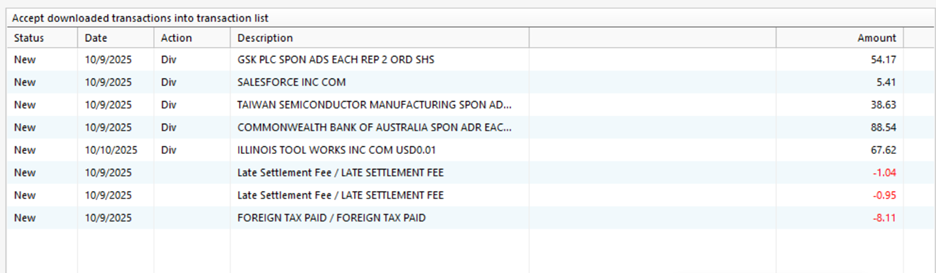
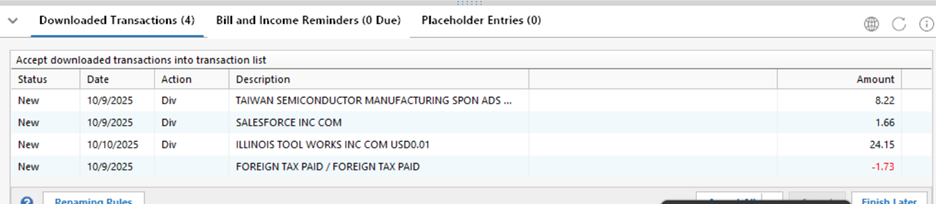
At approx 11:30pm pst, I was able to reconnect my Data file that has Fidelity DC connections. Performed a OSU and these transactions all appeared correctly with DIV Action. Screen shots below of two of my ROTH accounts. Several of these are the same as the incorrect EWC+ transactions that I posted earlier. A couple of additional items at this was done 6 hours later.
 "No Matter Where You Go, There You Are"Windows 11 Pro, Quicken SubscriptionIntel Core i7-12700, 32GB Ram0
 -
Question, shouldn't this thread be under the "
Home›Alerts, Online Banking & Known Product Issues"I only found this thread because (Quicken Kristina) pointed it out to me in another thread .
"No Matter Where You Go, There You Are"Windows 11 Pro, Quicken SubscriptionIntel Core i7-12700, 32GB Ram0 -
As you can see in the screen shot, dividends from SLB and NXP do not download as dividends in Quicken. Meanwhile, other dividends download as expected, also seen in the screenshot. The only difference I can find is that SLB and NXP are not incorporated in the US. This issue is repeatable across other foreign stock holdings and started with the new connection method. I have also sent a problem report with a screenshot in Quicken.
 1
1 -
Hello @jcloudm,
Thank you for letting us know you're also seeing this issue! I merged your post with the ongoing discussion of this issue.
It has already been reported to the proper channels for further investigation and resolution. To contribute to the investigation, please navigate to Help>Report a Problem and send a problem report with log files attached. Please also include screenshots showing how the problem transactions appear on Fidelity's website and how they are downloading into your Quicken. Please note that problem reports are limited to 10 attachments. If you need to send more than 10 attachments, please use a 2nd problem report for the additional attachments.
Thank you!
(CBT-862)
Quicken Kristina
Make sure to sign up for the email digest to see a round up of your top posts.
0 -
I see in a couple of other threads that you closed, you pointed us to a new Discussion:
https://community.quicken.com/discussion/7967194/updated-10-17-25-fidelity-migration
HOWEVER, none of the item mentioned in the new discussion reference this issue of incorrect reporting of Dividends for International Stocks. They should come in as Code DIV, not Deposits and they should have the category of _DivInt instead of a blank category. A similar issue exists with Foreign Fees, they show as a withdrawal but the category is blank. This should post to category of "Foreign Fees".
"No Matter Where You Go, There You Are"Windows 11 Pro, Quicken SubscriptionIntel Core i7-12700, 32GB Ram1 -
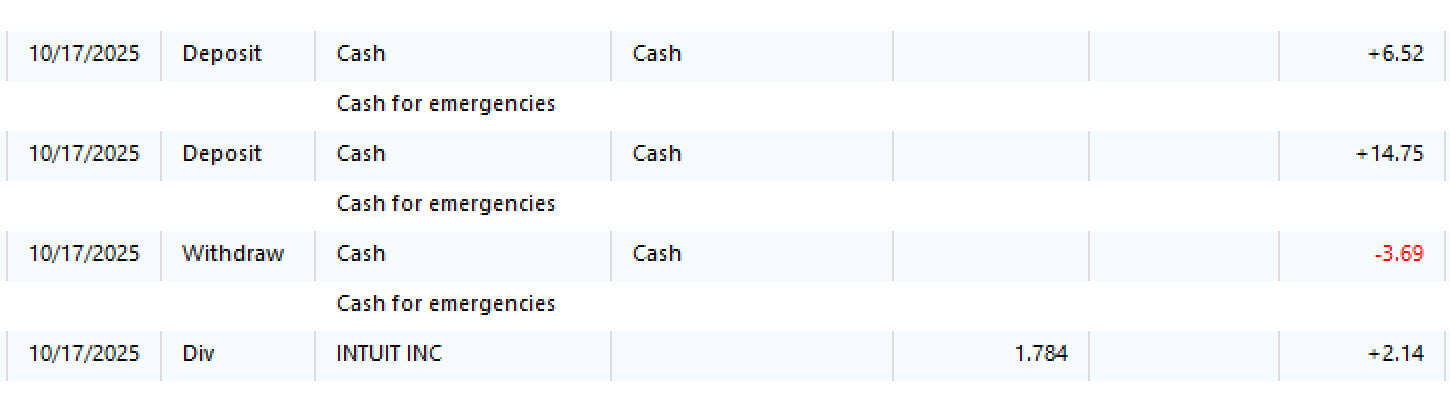
I am experiencing the same problem in Quicken Classic Premier (Windows). I will file a report via Quicken > Help > Technical Support.
Below are screen shots from Fidelity and from Quicken.
Quicken user since 1996.
0 -
Yes, the new connection scheme between Fidelity and Quicken has broken the correct downloading of Foreign Stock Dividends. They now come as Deposits instead of Dividends. I have also seen this problem appear on certain iShare ETF dividends. I chatted with both Fidelity and Quicken yesterday and they both acknowledged the issue and they both categorically said the other was at fault. This yet another example of Quicken using its customers as beta testers. It's completely unacceptable. Add this to the problems resulting from the same change with the cash handling and the task of downloading investment transactions and getting them recorded properly has gone from a simple one minute task to a laborious 15 minute task. At the end of the day it is putting their customers tax planning at risk by incorrectly identifying dividends as deposits. Neither company offered an ETA.
1 -
I had one International stock pay dividends and it downloaded and processed into Quicken correctly as (_Div). The Foreign Tax and ADR Fees downloaded as withdrawal from cash, and did not assign the categories I have assigned to them?
Sooo, maybe some progress has been made? One international stock transaction is not enough to close this issue. Hopefully I will see more International Stock Dividends to confirm. Still need a solution that assigns the correct category to the Foreign Tax and Fee transactions.
"No Matter Where You Go, There You Are"Windows 11 Pro, Quicken SubscriptionIntel Core i7-12700, 32GB Ram0 -
Thank you for the update,
I'm glad to hear it's downloading closer to correctly.
Please let me know how other international stock dividends download (when possible).
Quicken Kristina
Make sure to sign up for the email digest to see a round up of your top posts.
0 -
@Quicken Kristina I will monitor the International Stock Dividend transactions and provide more feedback. It would be nice to know if Fidelity or Quicken made some changes in the mapping of these transactions, so I could feel confident this part of problem were solved.
Concerning the Foreign Tax Paid and Fee Charged transactions. I looked back at pre EWC+ activity (i.e. Direct Connect (DC)). These two charges posted as "FOREIGN TAX PAID" in the payee and memo fields, and "LATE SETTLEMENT FEE" in its payee and memo fields. (I will refer to these as "Pre-EWC+"
Since EWC+, these two withdrawal transactions come in as "FOREIGN TAX PAID XXXXXXXX" and "FEE CHARGED XXXXXXXXX" , where XXXXXXXX is partial text name of stock. (I will refer to these as "Post-EWC+"
I am not sure if the (DC) connection was bringing these transactions in with the "Pre-EWC+" labels or some renaming rules were being evoked. I do see one Renaming Rule in my file that states:
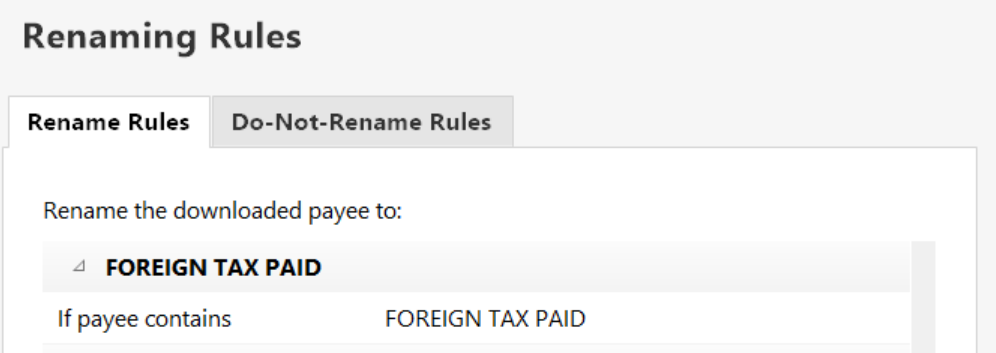
I checked Preferences for Download Transactions and I have selected to use my Renaming Rules. However this rule is not being evoked on "Post-EWC+" transactions, as they appear as"

I do not have a Renaming rule for "LATE SETTELMENT FEE" they are now posting as "FEE CHARGED XXXXXXX". Example before 7/31/25:

Hope this helps in your analysis. Just need to know exactly what the Payee on these foreign tax and fee transactions will be going forward and hopefully our Renaming Rules will work correctly. Then a couple of Memorized Payee entries can be set up to apply the correct category.
"No Matter Where You Go, There You Are"Windows 11 Pro, Quicken SubscriptionIntel Core i7-12700, 32GB Ram0



